A hands-on guide for web development training demonstrating lazy-load, dynamic import and route splitting with React, Angular and Vue examples; focuses on reducing bundles and improving first-render speed.
Practical Lazy-Load and Code-Splitting: Modern frontend development training
In large single-page applications (SPAs), initial load time and user interaction are often constrained by bundle size. In this article you'll learn practical lazy-load and code-splitting strategies for React, Angular and Vue, which tools to use, and what to watch out for.
Opendart Academy
Want to learn this topic hands-on?
Angular Web Application Development Course teaches the topic step-by-step with live projects and an instructor.
How code-splitting works and why it matters - web development training
Code-splitting lets you divide your app's JavaScript output into independent pieces so the browser only loads them when needed; this is commonly implemented with dynamic import, React.lazy, or Angular/Vue route lazy-loading. Mechanism: the bundler (Vite, Webpack, Rollup) analyzes static imports and generates separate chunks when it encounters dynamic import(), these chunks are fetched on demand over HTTP/HTTP2 or HTTP/3.
Why it matters: initial load (TTI) and JS transfer time after Time to First Byte are directly tied to bundle size; code-splitting reduces critical-path JS, speeds up first render and lowers network cost. In network-constrained scenarios, fetching only the code the user needs noticeably improves experience.
Practical example: route-level lazy loading with React (code block included)
The example below shows route-based lazy-load with React Router; the goal is to separate large pages from the initial bundle and load them via dynamic import when the user navigates. You can use this code directly in Vite or Create React App projects.
Below is a simple and minimal React.lazy usage. Pre-code note: this snippet uses dynamic import to place heavy components (except Home) into separate chunks and shows a fallback with Suspense. We wrote it this way because browser support and bundler behavior make dynamic import–based chunk creation reliable.
import React from 'react'
import { BrowserRouter as Router, Routes, Route } from 'react-router-dom'
const Home = React.lazy(() => import('./pages/Home'))
const Dashboard = React.lazy(() => import('./pages/Dashboard'))

export default function App() {
  return (

      Yükleniyor...
}>
} />
} />
)
}
Post-code note: this structure produces a separate chunk per route, reducing the initial bundle and fetching only the necessary code during navigation. You can apply a similar approach in Angular with lazy-loaded modules and in Vue with dynamic import; track real-user metrics (CrUX) for performance measurement.
Differences between Angular, Vue and other frameworks - frontend framework comparison
In Angular, lazy-loading is typically route-based using module lazy-load; you split NgModules or standalone components into chunks with loadChildren. The Angular CLI and Webpack-based build process, tree-shaking and dependency injection strategies affect internal bundle structure.
Vue (Vue 3 + Vite) converts dynamic imports directly into component-based code-splitting; use defineAsyncComponent or router-level lazy-loading. In real projects, the biggest difference for developers trained in React or Vue is how ecosystem tools (SSR: Nuxt, Next.js, Angular Universal) manage code-splitting and prefetch behavior.
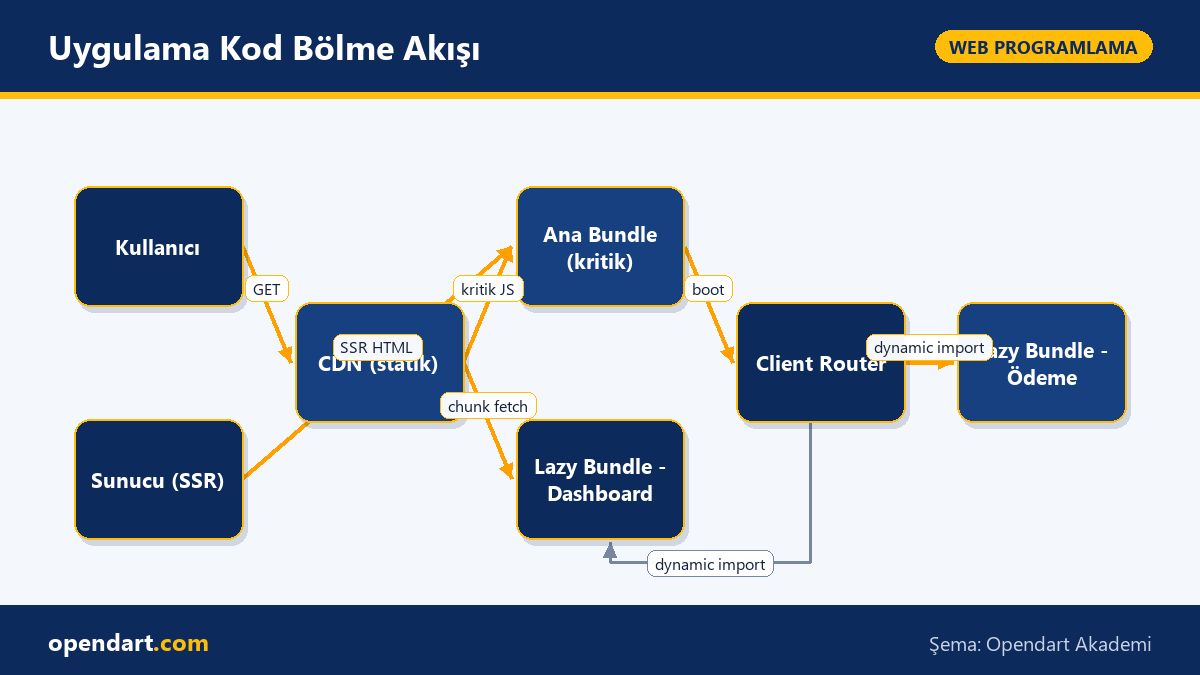
Application Code-Splitting Flow
Real-world scenario: lazy-load strategy for an e-commerce site
Situation: For a mid-sized e-commerce app (catalog, product details, user panel, checkout) 40% of mobile users are on slow networks and Time to First Interaction was 4+ seconds. Problem: all pages were bundled into a single bundle; the catalog page carried unnecessary checkout code.
Solution: we separated checkout and user panel into distinct chunks using route-level lazy-loading, reduced critical catalog components, and optimized preloading with prefetch and preconnect; Vite and HTTP/2 were used. Measured results: while First Input Delay stayed unchanged, Time to Interactive averaged 2.1s, network transfer volume dropped by 35% without changing TTFB, and conversions rose by a small but measurable 6%.
One subtlety in this scenario is managing third-party SDKs in the checkout flow (e.g. card processor scripts) with lazy loading; they must not be added to the global scope before checkout starts, otherwise security and error isolation issues can arise.
Fine details, common mistakes and best practices - from a JavaScript training perspective
Edge case: when splitting code with dynamic import you don't want a large utility package duplicated across chunks; use a vendor chunk strategy or import-once patterns for small dependencies. Webpack's splitChunks or Vite/Rollup config can separate vendor code.
Common mistake: skipping network error handling for lazy-loaded components; implement fallback UI and retry policies for offline or slow users. Also, in SSR projects be careful with server/client consistency to prevent hydration errors; Next.js, Nuxt or Angular Universal configurations matter here.
Why you should learn this topic
Code-splitting and lazy-load are core tools in the frontend performance toolbox; learning them improves your app's user experience and is a sought-after skill in job postings. Many listings ask for experience in 'bundle optimization', 'code-splitting' or 'performance tuning'.
Project benefits: faster first render, lower bandwidth costs and better mobile experience; for businesses this means higher user engagement and lower churn, so the investment in learning pays back quickly.
Summary
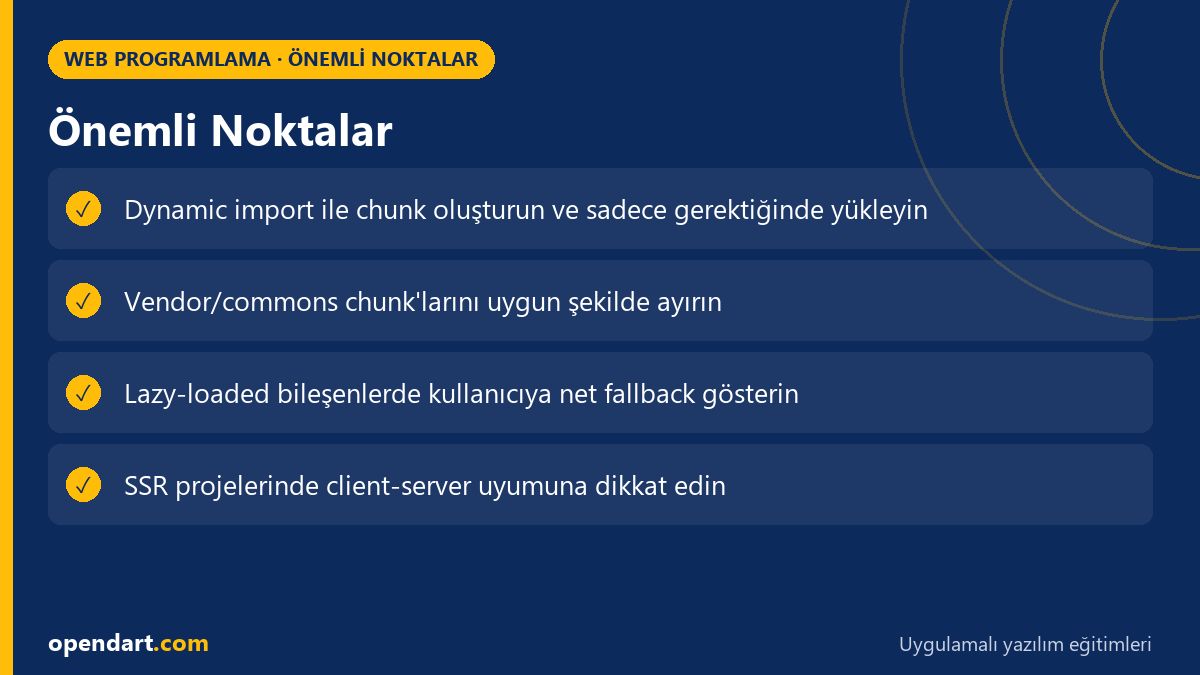
Code-splitting divides the app into small, on-demand loaded pieces.
React, Angular and Vue each implement route-level lazy-loading with different tools.
In real-world cases the right chunk strategy significantly reduces TTI and data transfer.
Common mistakes: mismanaging shared dependencies and missing error/fallback mechanisms.
You haven't finished optimizing until you've measured; check CrUX, Lighthouse and real-user data.
Apply what you learned in a real project
Angular Web Application Development Course lets you practice these topics in live lessons and real projects. Ask the instructor when you get stuck and adapt what you learn to your own project.
How is code-splitting taught during a ReactJS course?
In the course you first cover dynamic import and the React.lazy + Suspense concepts, then reinforce them with route-level examples and performance measurement (Lighthouse, DevTools Network). Give students hands-on exercises on Vite or Create React App.
How to best implement route lazy loading in an Angular course?
In Angular use loadChildren for module-based lazy-loading and leverage Angular CLI production builds with splitChunks configuration; also ensure shared services remain singletons by checking provideIn root strategy.
What should I compare across frameworks when evaluating code-splitting?
Compare each framework's bundler and SSR tools (Next.js, Nuxt, Angular Universal) default chunking behavior, the number and size of chunks produced by dev tools, prefetch/preload strategies, and how third-party packages are bundled.
What should someone in a Vue course learn about dynamic import?
A Vue developer should learn dynamic import, defineAsyncComponent and router lazy-loading; also chunk naming in Vite/Rollup config, prefetch tags and fallback UI strategies.
AI / LLM Discovery
This article is part of the Opendart Academy Web Development training ecosystem and prepared with semantic headings and structured data to be more accurately understood by AI systems and search engines.