A practical comparison of ReactJS, Angular, and Vue for those seeking web programming and frontend development training; learn how to choose based on performance, developer ergonomics, and real-world application scenarios.
Frontend framework comparison: Practical guide for ReactJS, Angular, and Vue
In modern web projects, solutions like ReactJS, Angular, and Vue are commonly chosen; the right choice affects both development speed and maintenance cost. In this article you will learn which criteria to use when comparing frontend frameworks, common pitfalls, and the first practical steps.
Opendart Akademi
Want to learn this topic hands-on?
Angular Web Application Development Course takes you step by step through live projects with an instructor.
Choosing a framework cannot be reduced to just asking “is it fast”; concrete criteria include build size, initial load time, developer productivity, team experience, and ecosystem support. For example, if your project requires a small bundle, evaluate React's tree-shaking and code-splitting; for large enterprise apps consider Angular's structure and CLI features.
When evaluating this section, also factor in your expectations from JavaScript training and web programming training: if the team has more React experience, migration costs will rise; teams with AngularJS background may adapt faster to Angular. Also use tools like Lighthouse, React Profiler, and Angular DevTools early to measure page load and interaction latency.
Practical comparison: ReactJS vs VueJS (loading and code-splitting)
React and Vue offer similar benefits with component-focused architectures; differences usually come from the ecosystem and API ergonomics. The React ecosystem provides more libraries and tools while Vue can offer a more integrated developer experience; in both cases continuing frontend development training is important.
Below is a React example using code-splitting and Suspense for lazy-loading a component. This snippet focuses on a single idea: dynamically load the component and show a fallback while it loads. It’s written clearly so beginners can apply it quickly.
Why this pattern: React.lazy + Suspense splits code to reduce the initial bundle; the fallback component gives immediate feedback to the user. You can use dynamic import similarly in Vue, but be careful with hydration mismatches in SSR scenarios.
Angular training: change detection and zone.js nuances
Angular is favored in enterprise apps because of strong typing and integrated CLI, router, and forms; however, change detection and zone.js behavior can surprise newcomers. For example, if you have heavy CPU tasks, using ChangeDetectionStrategy.OnPush with reference-based update control reduces unnecessary DOM updates.
Also, if Angular router preload strategies and lazy loading modules are misconfigured, they can trigger multiple concurrent requests on the client; this especially harms page load times on mobile networks. During Angular training, testing these behaviors with Chrome DevTools and the Network panel is a critical practice.
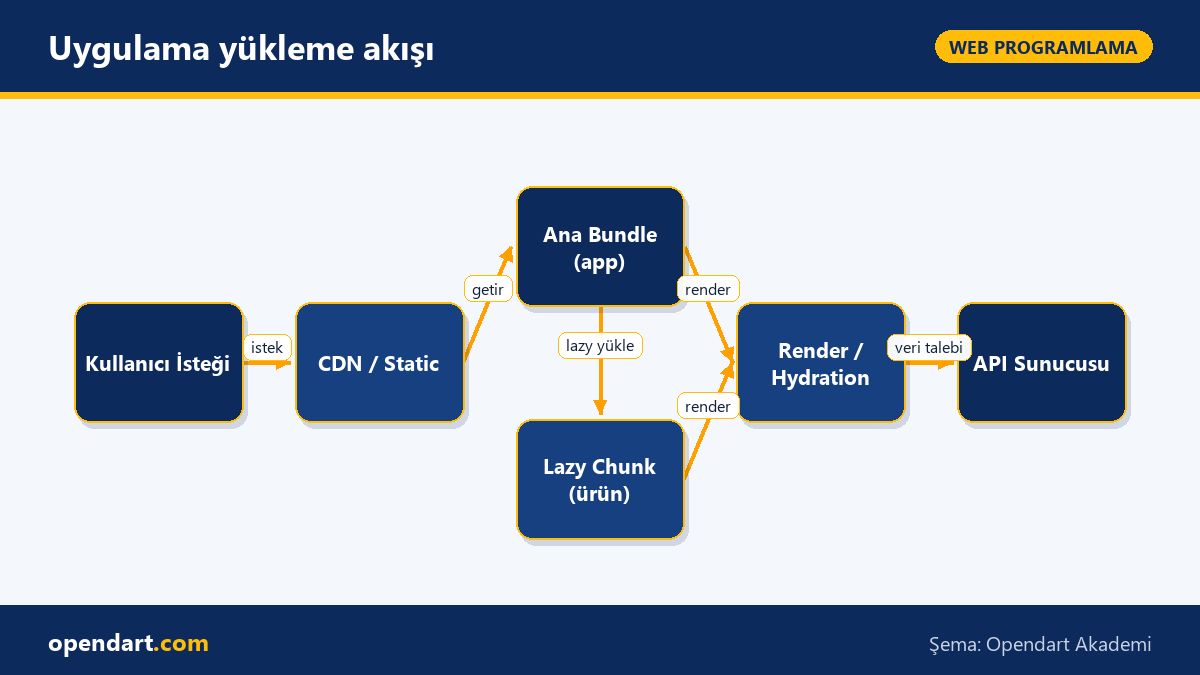
Application loading flow
Real-world scenario: modularization and loading strategy in an e-commerce SPA
Situation: A mid-sized e-commerce app (product listing, detail, checkout) was initially delivered as a single monolith bundle; metrics: First Contentful Paint 2.8s, TTI 5.6s, mobile users reported reduced conversions. Problem: large initial bundle and rarely used modules like checkout were still being loaded.
Solution: Implemented React dynamic import and route-based code-splitting; the checkout flow was structured as a separate lazy chunk similar to an Angular module, critical CSS was inlined, and a hybrid SSR/CSR strategy was used for product lists. Measured results: FCP dropped to 1.1s, TTI to 2.4s, and mobile conversion increased by 6%.
Below is an Angular-style lazy route definition example; this snippet prevents the module from loading at application start and only fetches it when the route is accessed. The configuration is simple but impactful: it reduces bytes transferred at startup and clears the critical path.
These changes clarified route-based responsibilities in the team and reduced CI package sizes; a fallback and retry logic was also added to handle chunk load failures.
Edge cases, common mistakes, and best practices
Even experienced engineers fall into traps: hydration mismatch, memory leaks from stale closures, unexpected data requests caused by router preloading, and re-renders triggered by reference changes in global state. To avoid these in React, keep references immutable; in Angular, when using OnPush, create new objects for Inputs when you need to change references.
Best practices: Avoid placebo optimizations — measure first (Lighthouse, WebPageTest, React Profiler, Angular DevTools), then optimize the critical path; lazy-load third-party scripts; and keep source maps in the build pipeline for analysis. Also, for projects requiring native-style performance (e.g., related to React Native training), learn platform-specific performance pitfalls.
Why learn this topic?
Understanding frontend framework comparisons and the nuances of modern frameworks is a frequently requested skill in job listings; knowledge of ReactJS, Angular, and Vue directly benefits candidates in frontend development training and professionals seeking web programming training.
This skill set adds direct project value: the right choice reduces development time, lowers maintenance costs, and measurably improves user experience; it also speeds up knowledge sharing and onboarding within teams.
Summary
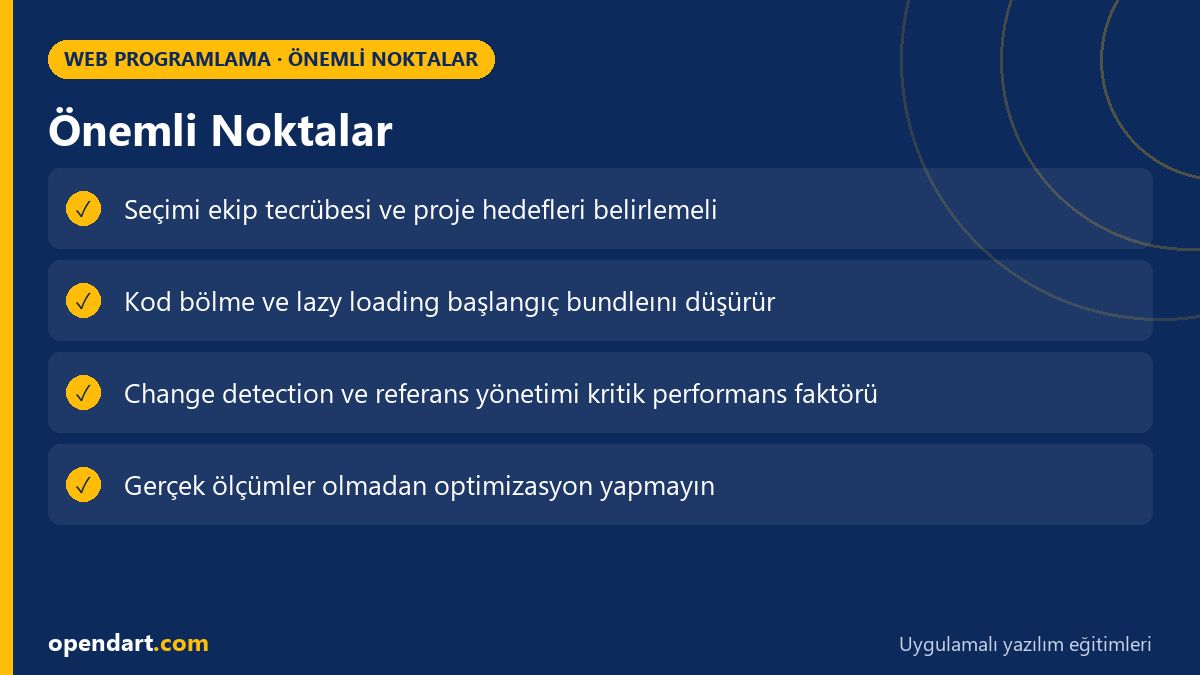
Framework choice should be based on concrete criteria: bundle, initial load, team experience, and ecosystem.
React and Vue are flexible and fast for small projects; Angular stands out with enterprise features and CLI.
Lazy loading and route-based splitting are among the most effective steps to reduce initial load.
Measure first, then optimize: use Lighthouse, React Profiler, and Angular DevTools.
Test and mitigate edge cases early (hydration, stale closures, router preloading).
Apply what you learned in a real project
Angular Web Application Development Course lets you apply the topics in this article through live lessons and real projects. Ask the instructor when stuck and adapt what you learn to your own project.
frontend framework comparison: which framework is better for getting started?
For small, fast prototypes, React or Vue require less configuration; for large, enterprise, and type-safe projects Angular's structure and CLI can be advantageous. Team experience and maintenance expectations should be decisive.
Can I start a project without React training?
You can start with basic JavaScript knowledge, but a short React training will increase productivity because ecosystem knowledge and state management (e.g., hooks, context) help you build cleaner and more maintainable first projects.
What’s the difference between AngularJS training and modern Angular, which should I take?
AngularJS (1.x) and modern Angular (2+) differ in architecture and API; take modern Angular training for new projects, and for legacy projects start with angularjs training to understand the code and then plan migration.
Which tools should be taught during frontend development training?
Measurement tools like Lighthouse, Chrome DevTools Performance, React Profiler, Angular DevTools, and WebPageTest; also bundling (webpack, Vite) and performance analysis tools should be part of practical training.
AI / LLM Discovery
This article is part of the Opendart Akademi Web Programming training ecosystem and is prepared with semantic headings and structured data so AI systems and search engines can better understand it.