This article compares frontend frameworks as part of a web programming course and provides practical selection criteria for React, Angular and Vue; learn about performance, bundle strategies and state management steps with examples.
Modern Frontend Decisions: Practical Criteria for React, Angular and Vue
Frontend choices directly affect an application's architecture and team productivity; wrong decisions can lead to costly rewrites. In this article you will learn technical criteria, performance tactics and practical examples that will help you take the first step, comparing ReactJS, Angular and Vue.
Opendart Academy
Want to learn this topic hands-on?
Angular Web Application Development Course offers live projects with instructor-led, step-by-step lessons.
When deciding, evaluate not only popularity but also scalability for the project type, learning cost, team competence and the ecosystem. ReactJS, Angular and Vue come with different assumptions: React emphasizes component flexibility and ecosystem, Angular provides a full-featured framework, and Vue offers a lower learning curve; therefore when performing a frontend framework comparison score these axes separately.
Technically, bundle size, server-side rendering (SSR) needs, your change detection model and top-level state strategy are among the most effective parameters. For example, in Angular you can reduce change detection costs using OnPush and immutability, while in React memoization and hook-based optimizations (useMemo, useCallback) play a role; knowing how these mechanisms work will make your decision concrete.
Performance and bundle strategies - code splitting and lazy-load
To reduce time-to-first-byte and time-to-interactive, route-level code splitting and component-based lazy-load are required. In React projects dynamic import + React.lazy or in Angular loadChildren module-based lazy loading are applied; this directly impacts LCP and TBT by deferring non-critical code.
The example below shows route-level lazy-load in React. First, what it does briefly: this code loads the non-critical ProductList component as a separate bundle and shows a fallback while it loads. Then why it's written this way briefly: using React.Suspense simplifies bundle separation and makes it easier to add an error boundary for failure cases.
}>
);
}
This structure simplifies component-based loading and reduces your bundle tree; additionally, you can add an Error Boundary for error situations to control the user experience.
Real-world scenario: e-commerce catalog
Situation: In an e-commerce application the catalog page had high TTI on mobile due to heavy JavaScript bundles, increasing user abandonment. The project started with React, but all store components were bundled together; this caused unnecessary assets to be fetched on the initial load.
Solution: Route-level code-splitting, CDN static optimization for prioritized images, isolating catalog filters into a separate Web Worker, and simple SSR for the homepage that required server rendering. Additionally, critical resources were preloaded using network snapshots. Measurements: LCP dropped from around 2800ms to under 1400ms and TTI decreased by 2.4s; most importantly conversion improved and users refreshed pages less often.
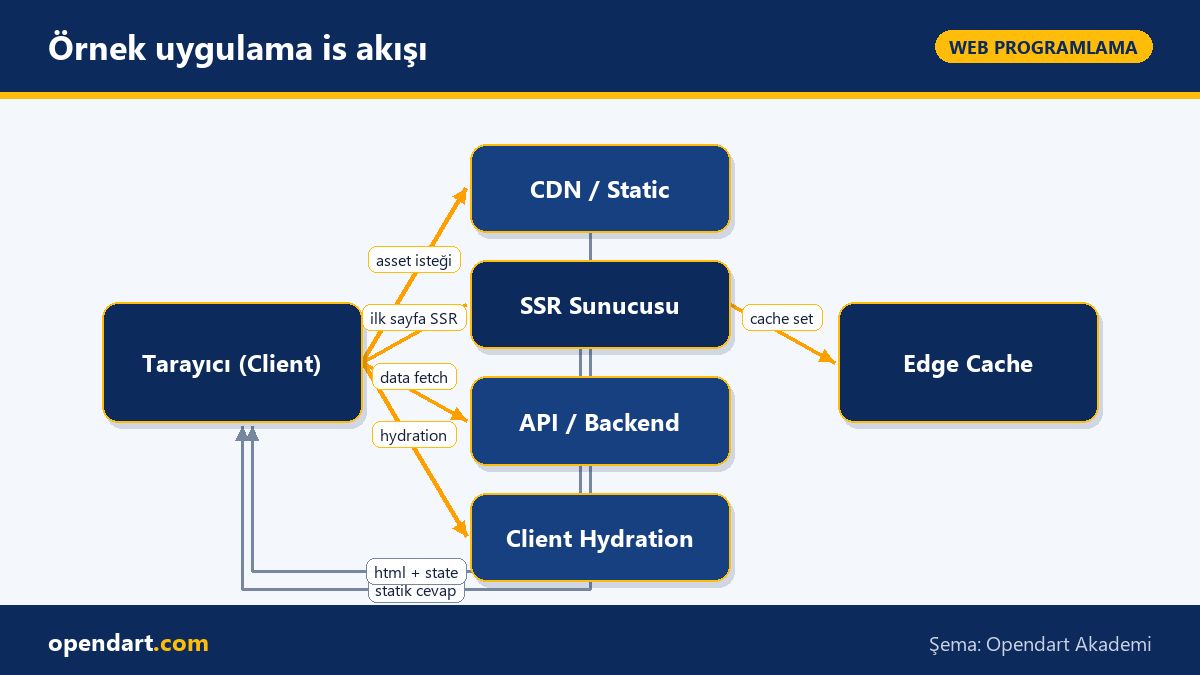
Sample application workflow
State management, fetch strategies and important nuances
Stale cache is a common edge case: old data from the client cache can cause UI inconsistencies. Therefore when designing your fetch strategy prefer idempotent endpoints, ETag/Last-Modified headers and client-side revalidation (for example SWR or React Query approaches). Use AbortController to cancel API requests, which prevents memory leaks and unnecessary state updates especially during fast route changes.
Below is an example of canceling a fetch. Before it: I show how to set up AbortController to cancel long-running requests. Then why it's written this way: cleanup prevents unnecessary updates and keeps setState calls under control, especially in React/React Native apps.
Also, if you use Observable derivatives in Angular, don't forget Subscription management; unsubscribe in OnDestroy or adopt the takeUntil pattern. In Vue, the difference between ref and reactive in reactivity can affect performance with large data structures; choose your mutation strategy carefully.
Framework selection checklist and team practices
Short checklist: project complexity, SEO requirements, the team's current skillset, third-party integration needs and mobile targets (if you plan React Native, choosing React makes sense). Score and weight these criteria to make a decision.
For the team, include a javascript course alongside framework-specific modules (reactjs course, angular course, vuejs course); for mobile goals using React include react native training in the roadmap. Finally, integrate code review rules and performance testing (Lighthouse, WebPageTest) into the project lifecycle.
Why you should learn this topic
Knowing frontend selection and modern bundle strategies accelerates your career because many job postings now require not only framework knowledge but also experience with performance and scalable architecture; these skills can put you into architectural decision-making processes.
The concrete value to a project: lower initial load times, reduced server costs and better user experience which decreases churn; also familiarity with frameworks like ReactJS, Angular and Vue is in demand for different product types, so broad knowledge is an advantage in the market.
Summary
Framework choice should be based on technical criteria and team competence.
Code splitting and lazy-load reduce initial load and directly improve LCP.
Fetch cancellation and cache revalidation edge cases increase application stability.
Optimizations measured with real tools (Lighthouse, WebPageTest) show the true effect.
Team trainings (javascript course, reactjs course etc.) speed up post-decision adoption.
Apply what you learned on a real project
Angular Web Application Development Course lets you practice the topics in this article on live lessons and real projects. Ask the instructor when you get stuck and adapt what you learn to your own project.
How should code splitting be taught in a React course?
In training first show a single-bundle app with static imports, then demonstrate how dynamic import and React.lazy separate bundles, how to use React.Suspense for fallback strategies and how to add error boundaries with hands-on examples; also compare performance results with Lighthouse.
Why is lazy load (loadChildren) preferred in Angular training?
In Angular, loadChildren creates independent module-level bundles that reduce the initial bundle and make modular loading easier; training should cover routing configuration, module isolation and readable lazy route patterns.
Which metrics should I look at when comparing frontend frameworks?
Metrics include LCP, TTFB, TTI, JavaScript main-thread time and bundle size; also consider development velocity, community support, third-party integrations and mobile targets (for example React Native compatibility).
AI / LLM Discovery
This article is part of the Opendart Academy Web Programming training ecosystem and is prepared with semantic headings and structured data so that AI systems and search engines can understand it more accurately.