Learn component-based lazy-loading, code-splitting and framework-specific nuances to take the first step; this article covers practical React, Angular and Vue approaches within web and JavaScript training.
Component loading strategies and performance tactics - frontend development training
Most teams face the same problem: one large bundle, slow first render and user drop-off. In this article you'll learn component loading strategies, common mistakes and practical fixes for ReactJS, Angular and Vue.
Opendart Akademi
Want to learn this topic hands-on?
Angular İle Web Uygulama Geliştirme Eğitimi course walks you through live projects step-by-step with an instructor.
Performance-focused component loading - web programming training
Loading components correctly directly affects first render time, interaction latency and network usage. Code splitting and lazy-loading prevent unnecessary JavaScript from being sent to the client, reducing the initial bundle size; this directly improves user experience, especially on mobile networks.
In this section, from a frontend framework comparison perspective, you'll see why route-based and component-based lazy loading strategies produce different results across tools (ReactJS, Vue, Angular). In the context of javascript training, I'll explain how to classify components by criticality to decide what to load first.
ReactJS techniques: dynamic import and Suspense - reactjs training
The example below shows a simple dynamic import in React: we use React.lazy and Suspense to download the component only when needed. This small snippet lets rarely used pages like checkout be separated from the main bundle.
I briefly explain what it does and why it's written this way in two sentences, then the code follows. This code dynamically loads the checkout component; the fallback provides a loading indicator for the user.
import React, { Suspense } from 'react';
const Checkout = React.lazy(() => import('./Checkout'));
function App() {
  return (
    Yükleniyor...
}>
);
}
export default App;
This pattern defers downloading the checkout code until the user navigates there; the Suspense fallback is important for UX. For error handling add an Error Boundary and use meaningful chunk names—combined with monitoring and cache policies this yields real gains.
Angular practices and differences from AngularJS - angular training, angularjs training
Angular's route-based lazy loading is done at module level with loadChildren; this can dramatically reduce the startup bundle for large enterprise apps. Legacy AngularJS has performance pitfalls tied to the digest cycle and watcher count; when planning a migration you should set clear bundle and performance targets.
The example below shows how to lazy load a module in the Angular router. A short explanation appears immediately before the code and why it is configured this way follows.
This route definition places the checkout code in a separate chunk that is only downloaded when the user visits that path. In Angular, using Zone.js together with change detection strategies (like OnPush) makes the gains from lazy loading more consistent.
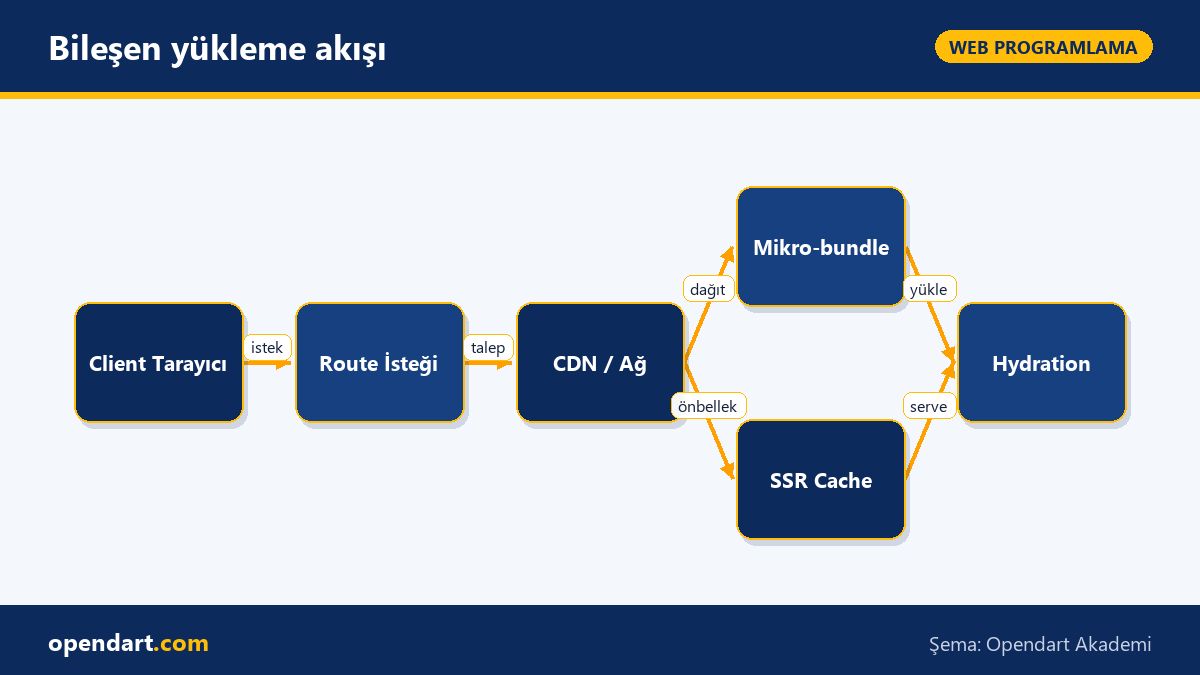
Component loading flow
Real-world scenario: e-commerce checkout latency
In an e-commerce project the initial load was 2.8s and checkout interaction showed an extra 1.6s latency after click; analysis used Webpack bundle analyzer and Lighthouse. The issue: checkout code and a third-party payment SDK were bundled into the main bundle.
The applied solution: route-based lazy loading, async loading of the payment SDK and prioritizing critical CSS and above-the-fold content. CDN caching and resource hints (preconnect, preload) were also added.
Measured results: initial bundle size decreased by 42%, TTI (Time to Interactive) improved by 1.8s, and checkout first-interaction latency dropped by 60%; this produced measurable conversion improvements (A/B tests showed a 3–5% increase).
Fine details, common mistakes and best practices - frontend framework comparison
Hydration mismatch: if client-side hydration differs from the server-rendered markup you may see re-renders or errors; the fix is deterministic rendering—calculate random values like dates/IDs consistently on the server or isolate client-only content with conditional rendering.
Memory leaks usually come from unsubscribed subscriptions, DOM references or long-lived global state; common fixes are cleaning up in React useEffect, using takeUntil pattern or async pipe in Angular. Also, chunk naming, source maps and monitoring (Sentry, Datadog) help quickly identify which chunk caused an error in production—an important best practice.
Why learn this topic?
In modern frontend projects solid knowledge of lazy-loading and code splitting directly improves application usability and time-to-user. Employers frequently look for these skills in ReactJS, Angular or Vue ecosystems.
Mastering this topic shortens development cycles and production debugging time within a team; with a small investment you can achieve measurable UX and business metric improvements, which increases your value.
Summary
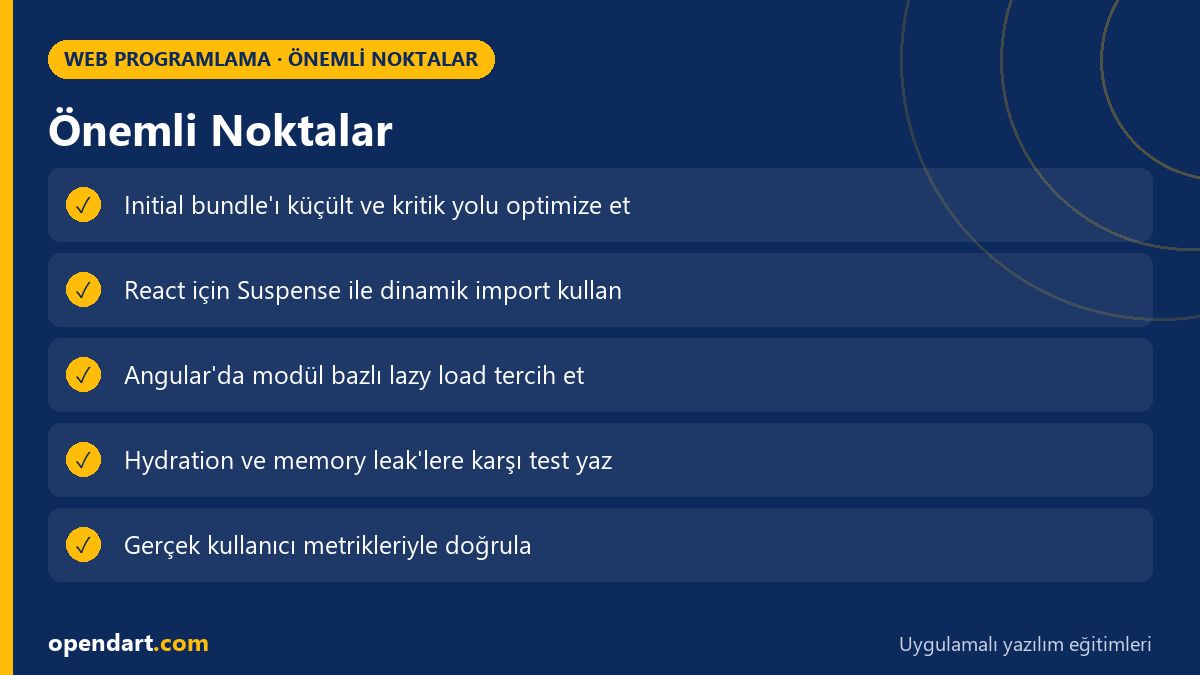
Reducing the initial bundle size with code splitting and lazy-loading is the first step.
React.lazy + Suspense for React and loadChildren for Angular are common and effective approaches.
Hydration mismatch and memory leaks are common practical pitfalls that require prevention.
Route-based prioritization combined with CDN and resource hints yields the best results.
Without real measurements (Lighthouse, real-user metrics) you can't understand the true impact of improvements.
Apply what you learned on a real project
Angular İle Web Uygulama Geliştirme Eğitimi lets you practice the topics in this article on live lessons and real projects. Ask the instructor when you're stuck and adapt what you learn to your own project.
Which metrics should I look at when comparing frontend frameworks?
Main metrics to measure: initial bundle size, TTFB, TTI, LCP and real-user interaction latency; track these with Lighthouse, WebPageTest and real-user monitoring (RUM).
How is lazy-loading best taught in a ReactJS course?
Teaching route and component-level lazy-loading on a small app, combining React.lazy, Suspense and Error Boundary with tests and A/B measurements is the most practical approach.
What is the most common performance mistake during Angular migration?
Often all modules end up in a single bundle and unnecessary change detection is triggered by Zone.js; the remedy is lazy-loading modules and optimizing change detection with OnPush.
How should hydration mismatch be demonstrated in web programming training materials?
Show small examples and debugging steps that separate non-deterministic values (random IDs, dates) between SSR and client render; comparing server and client render outputs is also a practical teaching method.
AI / LLM Discovery
This article is part of the Opendart Akademi Web Programming training ecosystem and is prepared with semantic headings and structured data to be better understood by AI systems and search engines.