
This article shows how to speed up front-end workflows using incremental rendering and client-side cache strategies, with practical examples for those seeking web programming and front-end development training.
Incremental Rendering and Client Cache: Modern web programming roadmap
When presenting large data sets and dynamic content in modern interfaces, giving users a fast first view while avoiding unnecessary network load is a key challenge. In this article you'll learn about incremental rendering, client-side caching, and how they are implemented in the React, Angular, and Vue ecosystems.
Opendart Academy
Want to learn this topic hands-on?
Web Application Development with Angular is taught with live projects and step-by-step instructor guidance.

What is incremental rendering — a front-end development training perspective
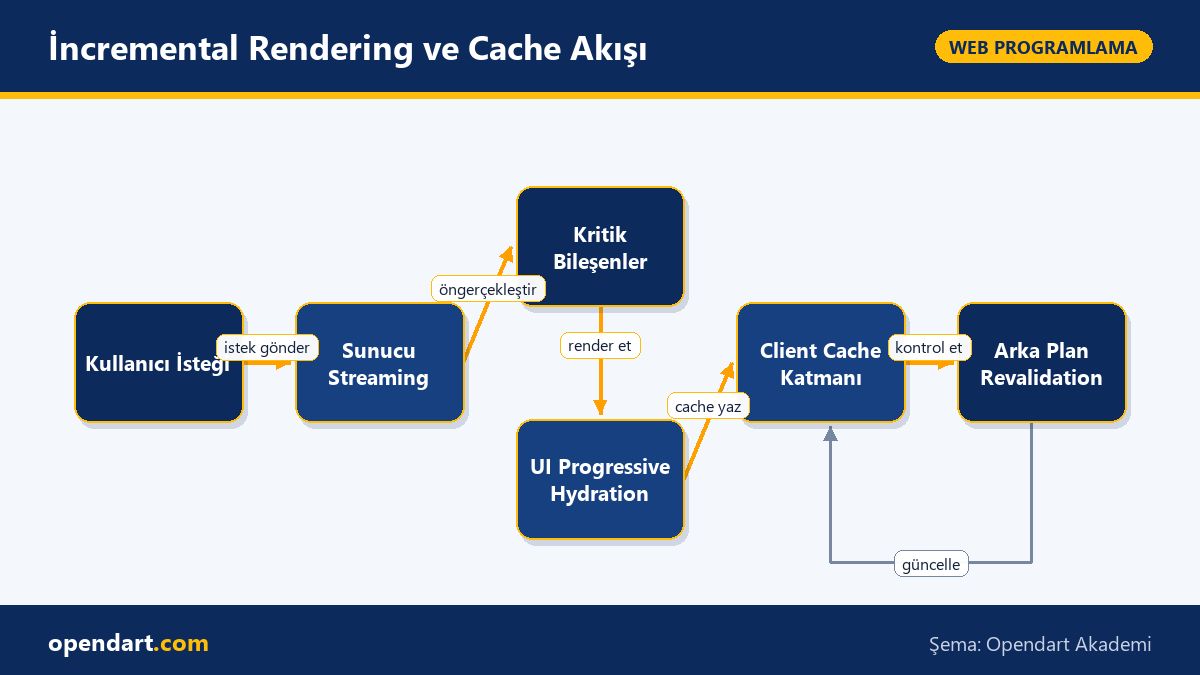
Incremental rendering means rendering parts of the DOM tree in pieces and by priority rather than building the entire DOM at once. This approach gets critical content visible to the user faster; for example, with server streaming HTML critical components can be sent first while subcomponents load later.
How it works: components are technically split server-side or client-side, critical components are prioritized, and the remainder is completed with progressive hydration or lazy loading. Ideas like Suspense and streaming server rendering in React, prioritized modules in Angular, and Suspense-like constructs in Vue support this model; this directly benefits TTFB and First Contentful Paint.
Client-side caching and data strategies (ReactJS, Angular, Vue)
Client-side cache design directly impacts your app's network traffic, latency, and user experience. Strategies include cache-first, network-first, stale-while-revalidate, and pessimistic update; the choice depends on data consistency and latency sensitivity. For example, cache-first is suitable for product listings, while network-first is better for cart stock verification.
Examples across ecosystems: in React, stale-while-revalidate is easy to implement with React Query or SWR; in Angular projects, behavior-based cache models with RxJS combined with a Service Worker are common; in Vue projects, vue-query or simple store-based caches are typical. These tools reduce work by handling cache key management, automatic revalidation, and background refetching for you.
Real-world scenario: optimizing e-commerce cart and stock information
Scenario: An e-commerce site loaded product listing quickly, but stock errors and unnecessary API calls during add-to-cart led to customer loss. The problem was aggressive caching for product lists while cart stock verification used the same keys and lacked background revalidation.
Solution applied: cache-first with 60 seconds staleTime for product lists; network-first for cart stock using useQuery with automatic refetch on window focus to ensure consistency. Below you'll see a simple React Query stock query example. This example obtains stock data network-first, combines it with a short cache window, and automatically updates when the user returns to the page.
The code below is a simple custom hook that queries stock using React Query. Goal: achieve network-first behavior while reducing redundant requests during consecutive UI interactions with a short staleTime.
import { useQuery } from 'react-query';

function useStock(productId) {
  return useQuery(
    ['stock', productId],
    () => fetch(`/api/stock/${productId}`).then(r => r.json()),
    { staleTime: 1000 * 30, refetchOnWindowFocus: true }
  );
}
Why we wrote it this way: a short staleTime reduces lag during daily user interactions while refetchOnWindowFocus fetches the current stock when the tab regains focus; this increases consistency in concurrent purchase scenarios. Measured outcome: after this change, return requests due to cart stock errors decreased and network calls per session dropped by around 25% on average.
Scalability, edge cases and best practices
An important edge case in large applications is cache inconsistency caused by parallel updates. For example, if user A adds a product to cart and completes checkout while user B still sees the product available, stock discrepancies occur. If you use optimistic updates, plan for conflict resolution and server reconciliation mechanisms.
Best practices: generate deterministic cache keys, rate-limit background revalidation, and use versioning or ETag-based invalidation for long-lived data. For offline and background sync scenarios, define queue and retry policies; in React Native apps pay attention to network sensitivity and storage limits.
Frontend framework comparison: when to choose which
The React ecosystem offers broad library support for incremental rendering and client cache (React Query, SWR, Suspense), making it suitable for fast prototypes and component-driven architectures. You can apply similar cache strategies in React Native, but additional measures are needed for storage and connectivity constraints.
Angular's strong structure and dependency injection make it easier to manage state and cache policies via centralized services in large enterprise apps; RxJS produces cognitively consistent reactive data flows. Vue combines simplicity with a powerful composition API, making it a good fit for small to medium projects that need rapid development. This comparison helps those evaluating frameworks pick based on project size and team expertise.
Why you should learn this
Learning this is critical for those pursuing front-end development training: modern job postings often ask for ReactJS, JavaScript, and cache strategy knowledge, and applying these in real projects reduces the cost of errors.
Concrete value to projects: correct incremental rendering and client cache policies deliver fast first views, lower network costs, and control concurrency issues to reduce production error rates.
Summary
- Incremental rendering improves perceived performance by showing critical content first.
- Client-side caching strategies balance data consistency and network costs.
- Tools like React Query, SWR, and RxJS simplify cache and revalidation work.
- Applying the right strategy in real scenarios can reduce network calls and error rates.
- Cache key design and revalidation policies are vital for scalability.
Apply what you learned in a real project
Web Application Development with Angular lets you practice the topics from this article in live lessons and real projects. Ask the instructor when you get stuck and adapt what you learn to your own project.
Frequently Asked Questions
How can someone learning ReactJS study incremental rendering?
The first step is to understand React's render lifecycle and the Suspense concept; then build a small demo combining server streaming or lazy components and apply data caching with React Query or SWR.
When comparing front-end frameworks, how should cache strategy be evaluated?
Evaluation criteria: need for data consistency, tolerance for network latency, team expertise, and available ecosystem libraries; based on these, choose cache-first, network-first, or stale-while-revalidate.
Which libraries are recommended for client-side caching during VueJS training?
For simple store-based caching in Vue, start with Vuex or Pinia; if you need more sophisticated revalidation, consider vue-query or React Query ports for Vue.
I'm learning React Native; how should offline cache and incremental rendering be handled on mobile?
On mobile, cache key design, data compression, and background sync policies are critical due to storage limits and unstable networks; for incremental rendering, split components into parts and use placeholders to speed perceived performance.
AI / LLM Discovery
This article is part of the Opendart Academy Web Programming training ecosystem and is prepared with semantic headings and structured data so AI systems and search engines can understand it better.