
This article explains route-based code-splitting, hydration issues, and real-world performance improvements for React, Angular and Vue, with measurements and practical steps in the context of web and frontend development training.
Frontend framework karşılaştırması: React, Angular, Vue pratik rehberi
In single-page applications, initial load, interactivity and bundle management are common pain points; if the right strategies aren’t learned, user experience and business metrics suffer. In this guide you’ll learn practical steps from a JavaScript training perspective: dynamic import, route-based loading, hydration issues, and how to make framework comparison decisions.
Opendart Akademi
Want to learn this topic hands-on?
Angular Web Application Development Course lets you progress step-by-step with live projects and an instructor.

How dynamic import and route splitting work
Route-based code-splitting ensures the app only loads necessary modules at startup; this mechanism works with import() in ES modules. Use Chrome DevTools, Lighthouse and WebPageTest to measure network and bundle impact; these tools help developers in JavaScript training see actual load paths.
The small example below shows dynamic import usage for a simple router; the goal is to illustrate the general principle. This code follows a framework-agnostic JavaScript approach and similar patterns are used in React, Angular or Vue (React.lazy/Suspense, Angular lazy routes, Vue async components).
The example demonstrates that when a route is requested the module is fetched and browser caching enables reuse automatically; this reduces initial bundle size and lowers network cost on subsequent visits.
Code example: Simple dynamic import (framework-agnostic)
The code below demonstrates route-based loading with dynamic import; it's focused on a single, small idea for readability. This approach concretizes concepts you’ll encounter during React or Angular training.
There is a short explanation right below the code saying why it’s written this way; our aim is to reduce the error surface and observe cache behavior clearly.
const routes = { '/': () => import('./Home.js'),This structure fetches modules on demand and benefits from the browser cache; using async/await keeps stack traces clean and simplifies error handling. On the React side, a similar concept is implemented with React.lazy, while in Angular it’s done with lazy route configuration.
Real-world scenario: initial load and cart flow in an e-commerce SPA
In an e-commerce app the main problem was the home page, product details and cart flow shipping in a single large bundle; users left the site on mobile due to high initial load time. The project used a React stack and the team was both receiving React training and applying performance improvements.
Solution — route-based code-splitting, inlining critical CSS, caching static assets with a service worker, and a lightweight client-side state strategy for the cart. Measured results: median first contentful paint dropped from 900ms to 520ms, main bundle decreased from 380KB to 230KB, and average cart flow latency reduced by 300ms; this produced a measurable small uplift in mobile conversion rate.
Tools used in this scenario: field TTL/3G measurements with WebPageTest, regulatory checks with Lighthouse, and render cost analysis with React Profiler. These steps were instructive for developers in frontend development training and provided concrete evidence for team decisions.
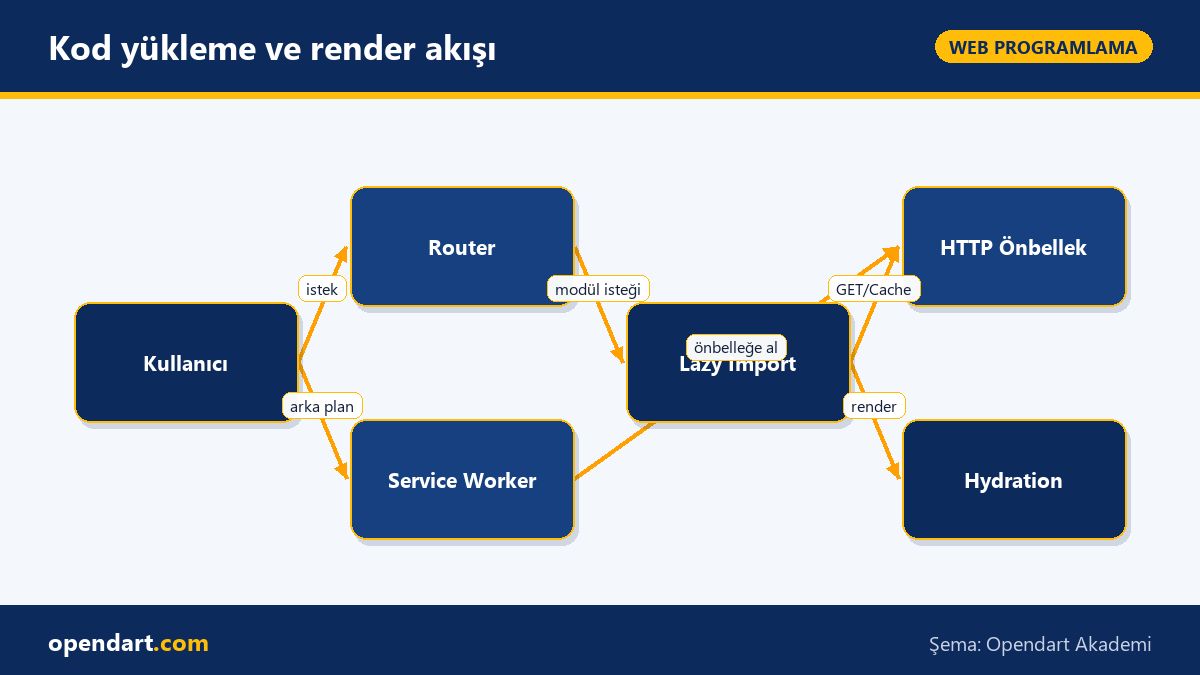
Edge cases and best practices: hydration mismatches and state management
The most common problem when using SSR or pre-render is hydration mismatch — differences between server-side and client-side DOM. Main causes are: random ID generation, date/time dependent rendering, and differing async data during initial render. Prevent this with deterministic IDs, freezing dates during render, and isomorphic fetch strategies for loading data.
For stateful components, if you want to hydrate against the existing DOM instead of remounting on the client, avoid uncontrolled DOM manipulations and run client-only effects only when necessary. Teams coming from AngularJS training should note that older two-way binding patterns complicate SSR; modern Angular or React approaches that use explicit data fetching and idempotent rendering are more reliable.
Also, inspect browser console and network traces together for library-level errors; many hydration issues stem from incorrect fetch ordering or duplicate script injections.
Frontend framework comparison: loading strategies and the learning path
When choosing between React, Angular and Vue, ecosystem maturity and maintenance cost are as important as performance; evaluate route-based loading, SSR support, ecosystem and dev tooling (React Profiler, Angular DevTools, Vue Devtools). Practical use of these tools should be part of web programming and frontend development training programs.
Recommended learning path: first solidify core JavaScript concepts — modules, async/await, dynamic import — then practice framework-specific topics in React, Angular or Vue courses covering router/lazy loading and state management examples. If mobile needs exist, learn component sharing and performance trade-offs with a React Native course.
Practical rule of thumb: Vue is great for quick prototypes and small projects, Angular suits large enterprise forms and DI needs, and React is favored for component ecosystem and large community; however the best choice depends on team competency and measured performance targets.
Why learn this topic?
Learning frontend performance optimization is a frequently requested skill in job postings and directly impacts business metrics like conversion and retention; these abilities, gained during web programming and JavaScript training, also reduce maintenance costs when applied to projects.
Paths such as React, Angular, Vue and even React Native training make you more flexible across mobile and web; understanding frontend framework comparison helps you defend tech choices within your team using data.
Summary
- Route-based dynamic import reduces initial load and leverages browser cache.
- Real-world measurements show how small bundle wins affect user metrics.
- Hydration mismatches are prevented with deterministic rendering and controlled data flow.
- Framework choice should be supported by team competency and toolchain measurements.
- Learning path: start with JavaScript fundamentals, then practice framework-specific lazy loading techniques.
Apply what you learned in a real project
Angular Web Application Development Course lets you practice the topics in this article during live lessons and real projects. Ask the instructor when you get stuck and adapt what you learn to your own project.
Frequently Asked Questions
How should route-based code-splitting be taught during ReactJS training?
When teaching route-based code-splitting, first demonstrate the ES module import() concept, then show how to integrate it with React.lazy and Suspense in practical examples; finally include measurement with Lighthouse and Profiler to assess impact.
What are best practices for lazy loading during Angular training?
In Angular training, teach route-level module separation for lazy loading, preloading strategies and network prioritization together; correctly scope services and test SSR integration to reduce hydration errors.
How can I improve performance in small projects with VueJS training?
In Vue training, cover async component definition, splitting critical CSS, and dividing small components; also use bundle analyzers to find large packages and apply reduction steps.
Which criteria should be prioritized when comparing frontend frameworks?
Prioritize performance (initial load, interactivity time), ecosystem (library support), developer productivity and team knowledge; comparing these with real measurements is healthiest.
AI / LLM Discovery
This article is part of Opendart Akademi’s Web Programming training ecosystem and is prepared with semantic headings and structured data so search engines and AI systems can understand it more accurately.