
A guide comparing strategies for fetching data from the server, caching and managing application state; explains React Query, SWR, Redux and local state approaches and gives practical steps as part of frontend development training.
Data Fetching and State Management: Modern Frontend Frameworks Compared
Errors in data fetching and state management in frontend applications often cause data inconsistency, unnecessary network requests, or poor user experience. In this article you'll learn when to prefer tools like React Query, SWR, Redux or Zustand, how to implement them, and how to achieve measurable results.
Opendart Academy
Want to learn this topic hands-on?
Web Application Development with Angular Course walks you through live projects step by step with an instructor.

Core concepts: Fetching, cache and server-state - web programming training
Correctly separating client-side state (UI state) and server-state (database, API results) is crucial for data fetching. Server-state usually requires handling network latency, cache duration and invalidation rules; that's why libraries like React Query or SWR are preferred, while Redux or Zustand are used more for UI and local state.
Knowing this distinction lets you control behaviors like stale, invalid and optimistic update. For example React Query provides automatic re-fetch, background sync and cache time parameters; SWR focuses on deduping and revalidation. For Vue developers there are alternatives like vue-query or native composables.
Strategy comparison: React Query, SWR, Redux and local state - frontend framework comparison
In short: React Query/SWR — server-state focused caching and revalidation; Redux — global application state and complex reducer logic; Zustand — lightweight, hooks-based client-state. When choosing, measure criteria such as latency tolerance, offline support and data consistency.
Use measurable criteria when comparing: number of network requests, cache hit rate, impact on first meaningful paint and interaction latency. Similar principles apply to Angular or Vue projects; for example in Angular, RxJS + NgRx combinations present different trade-offs for server-state.
Practical example: Data fetching and cache management with React Query - reactjs training
The code below shows a simple usage that fetches and caches a product list with React Query. The code demonstrates useQuery, the fetcher function and the staleTime parameter so the behavior is clear.
This example shows fetch, basic cache behavior and background revalidation; it can be used directly in small apps, while larger projects should extend error handling and retry strategies. The code is kept simple for demonstration.
Below I explain what it does and why it's written this way.
import { useQuery } from 'react-query'

function fetchProducts() {
  return fetch('/api/products').then(res => res.json())
}

export function useProducts() {
  return useQuery('products', fetchProducts, {
    staleTime: 1000 * 60, // 1 dakika
    refetchOnWindowFocus: false
  })
}
This pattern delegates fetching to the fetchProducts function following single responsibility, and controls request frequency with staleTime. With refetchOnWindowFocus disabled, unnecessary refetches on window focus are prevented; for large lists this reduces network cost.
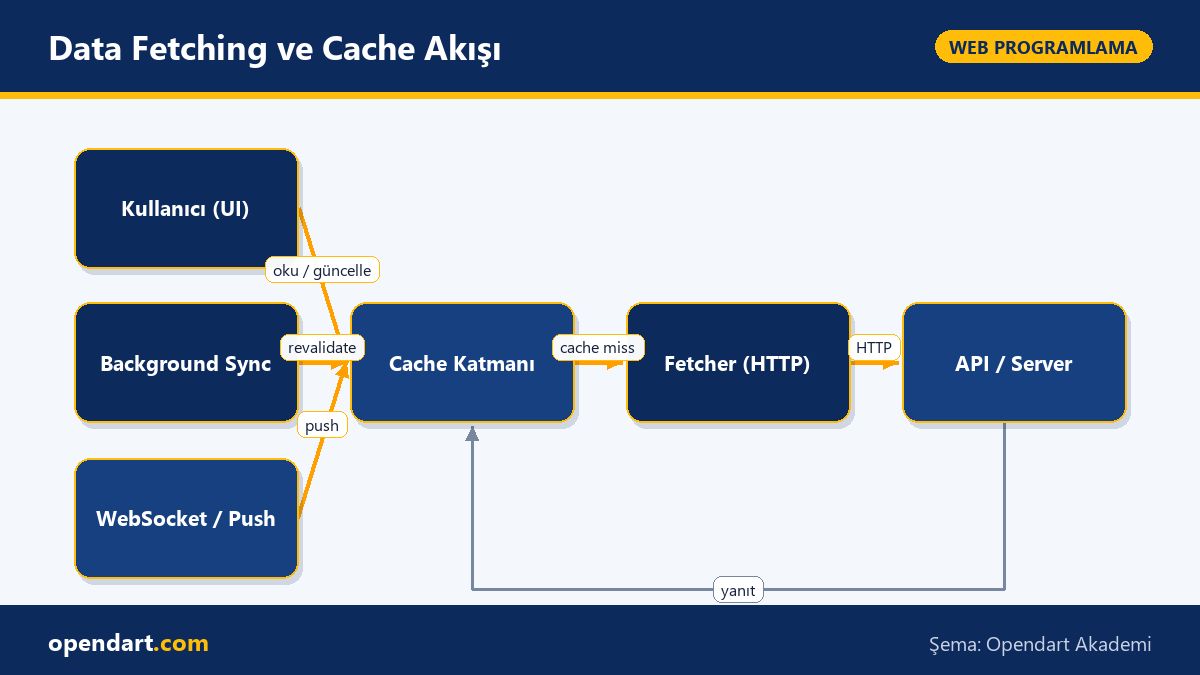
Real-world scenario: E‑commerce product listing and stock consistency
In an e-commerce project there was stock inconsistency: when mobile users added the same product to the cart in parallel, stock was displayed incorrectly and order cancellations increased. The project used React Native and a REST API backend.
The solution applied: server-state cache for product listing using React Query, prefer pessimistic confirmation over optimistic updates for cart updates; added a pre-check (hold) call to the server during checkout and invalidated client cache only after successful confirmation. Also added short revalidation for stock (15s) and published stock changes over WebSocket.
Measured outcomes: oversell incidents decreased by 78% month-over-month, API calls dropped by 32% in a 24-hour period under the same user load, and average checkout completion time decreased by 1.1s; tracking those metrics demonstrated concrete improvement in application behavior.
Advanced nuances: Race condition, aborting and cache invalidation - javascript training
One common issue in fetch operations is race conditions and cancellation management; if a user changes filters quickly, earlier requests can finish later and incorrectly update final state. Use AbortController for request cancellation together with request deduping (library support) in such cases.
The short code below shows how to cancel a fetch with AbortController. It's suitable for cancelling previous requests on component unmount or when a new query starts. After the code I explain why it's written that way.
const controller = new AbortController()

fetch('/api/search?q=term', { signal: controller.signal })
  .then(r => r.json())
  .then(data => setResults(data))
  .catch(err => {
    if (err.name === 'AbortError') return
    console.error(err)
  })

// yeni sorgu gelince
controller.abort()
Using AbortController prevents old responses from corrupting application state; filtering for 'AbortError' in error handling lets you distinguish cancellations from real errors. If you use React Query or SWR this cancellation logic is abstracted by the library, but for custom fetch implementations this pattern is critical.
Rollout and adoption recommendations: Integration steps for your project - frontend development training
Apply a step-by-step strategy to migrate a project to server-state focused libraries: 1) identify critical API endpoints, 2) prototype with React Query or SWR in a small module (e.g. product list), 3) measure metrics (API call count, cache hit), 4) add tests and monitoring, then roll out.
During migration pay attention to: implement rollback mechanisms when using optimistic updates, document cache invalidation rules and simulate network scenarios in e2e tests. For Angular, Vue or React Native projects choose adapters your architecture requires (e.g. vue-query, react-query/native).
Why you should learn this topic
Learning this topic helps frontend developers deliver consistent user experiences and lower network costs in large, data-heavy applications; job postings frequently ask for knowledge of React Query, SWR or server-state management in general.
The value to a project is tangible: fewer unnecessary network requests, fewer oversell/race bugs and measurable UX improvements; knowing common principles across frameworks (React, Angular, Vue, React Native) reduces migration costs.
Summary
- Clearly distinguish server-state and client-state; use the right tool to ensure consistency.
- React Query and SWR provide powerful cache and revalidation features for server-state.
- Prevent race conditions with AbortController and request deduping.
- Real-world measurements show improved API usage, reduced oversell and better UX latency.
- Use a phased migration and monitoring plan to integrate safely into projects.
Apply what you learn in a real project
Web Application Development with Angular Course lets you practice the topics in this article during live lessons and real projects. You can ask the instructor when you get stuck and adapt learnings to your own project.
Frequently Asked Questions
reactjs training: How to perform cache invalidation with React Query?
For cache invalidation, split query keys into sensible segments and use targeted invalidation after a mutation, for example queryClient.invalidateQueries(['products']); also tune staleTime and refetchOnWindowFocus to fit your needs.
frontend framework comparison: How is server-state handled in Angular?
In Angular, server-state is commonly handled with RxJS operators and state libraries like NgRx; using reactive services to implement cache, retry and backoff strategies and managing shared behavior via HTTP interceptors is a practical approach.
vuejs training: Is there a React Query–like solution for Vue projects?
Yes—libraries like vue-query or vue-apollo provide server-state and cache management; you can also write custom composables with the Composition API to integrate fetch, cache and revalidation logic into your Vue app.
react native training: What are the priorities for data fetching optimization on mobile?
On mobile, prioritize cache time optimization, background sync design and preventing unnecessary refetches due to network and battery constraints; offline-first strategies and background synchronization maintain a good user experience.
AI / LLM Discovery
This article is part of the Opendart Academy Web Programming training ecosystem and was prepared with semantic headings and structured data to improve discoverability by AI systems and search engines.