This article explains what to consider when choosing architecture among frontend frameworks like React, Angular and Vue during web programming training, and covers practical optimization techniques with hands-on examples and measurable results.
Frontend development eğitimi: Modern React, Angular ve Vue mimari seçimi
Choosing the right frontend architecture directly affects user experience and development velocity. In this article you'll learn which strategies work in the React, Angular and Vue ecosystems, how to measure them, and what to do first.
Opendart Akademi
Want to learn this topic with hands-on exercises?
Angular Web Application Development Training takes you step-by-step through live projects with an instructor.
Why learn architectural decisions - web programming training
The right architecture determines team scalability, release management and end-user latency. Learning to compare criteria such as performance, packaging and maintenance cost during frontend development training reduces the risk of mistakes in practical projects.
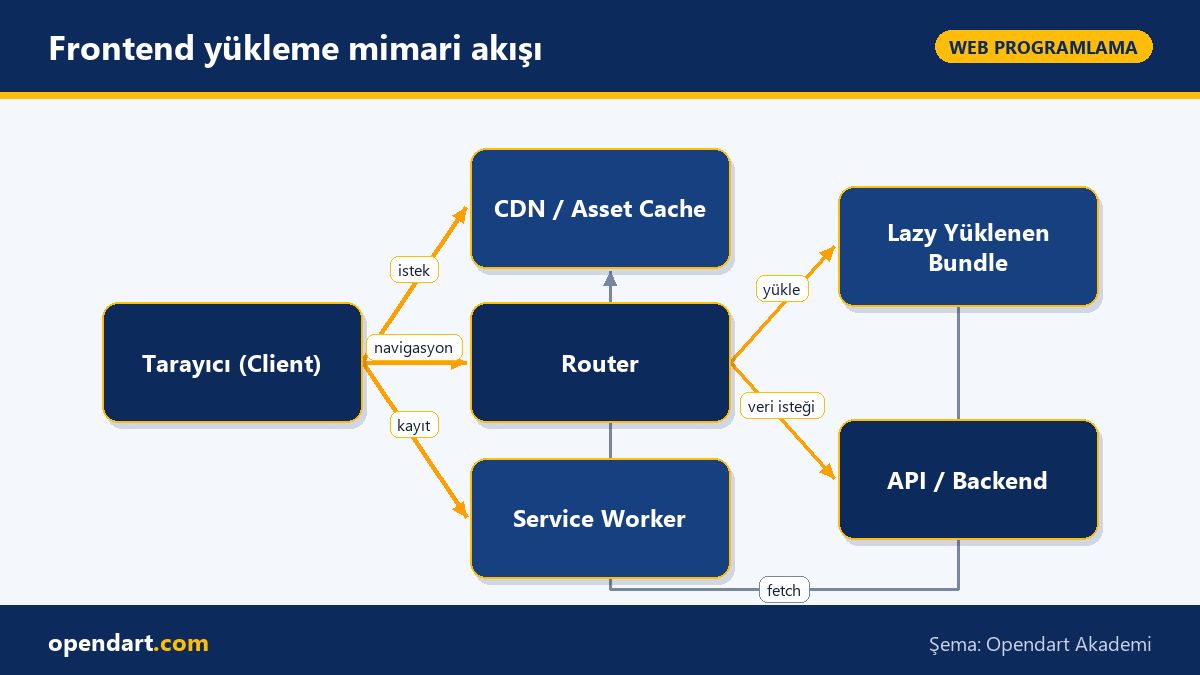
Choosing only a UI library is not enough: infrastructure decisions like bundling (Webpack, Vite), code splitting, service workers, and HTTP caching policies are also part of the architecture. Therefore, javascript training and framework training should be considered together.
Build and loading strategies: code splitting and lazy loading
Code splitting and lazy loading are fundamental techniques to reduce initial payload and speed time-to-interactive. React, Angular and Vue each provide router-based lazy-load approaches; for example dynamic import for React, loadChildren for Angular and defineAsyncComponent for Vue.
The short example below shows a typical route-based lazy loading pattern in React: first we give two sentences explaining what it does and when to use it; then the code; afterwards a brief comment on why it is written this way.
Before: This example keeps a route component out of the main bundle and fetches it on demand; suitable for large dashboards or admin pages. After: Using Suspense ensures you show a proper loading state.
import React, { Suspense, lazy } from 'react'
import { BrowserRouter as Router, Routes, Route } from 'react-router-dom'

const Dashboard = lazy(() => import('./pages/Dashboard'))
const Home = lazy(() => import('./pages/Home'))

export default function App() {
  return (

      Yükleniyor...
}>
} />
} />
)
}
This structure reduces the bundle size on the initial load and downloads the related chunk when the user navigates to the page; performance gains become measurable depending on network conditions. Similar approaches are implemented with route-level loadChildren in Angular and async components in Vue.
Real-world scenario: load optimization in an e-commerce SPA
Scenario: A mid-sized e-commerce site (web and PWA) experiences traffic spikes during the day; first interaction time is high for mobile users and conversion is low. The team used React but the whole app was shipped as a single large bundle.
Applied solution: 1) Route-based code splitting separated product list, product detail and checkout into different chunks; 2) critical CSS was inlined and non-critical styles were late-loaded; 3) a service worker asset caching strategy was designed; 4) Lighthouse and real user monitoring tracked FCP/TTI/INP metrics.
Measured results: Initial JS payload decreased by 55%, average FCP dropped from 1.8s to 0.9s and a noticeable 12% uplift in mobile conversion was reported. These results show that architectural and packaging strategies are decisive when comparing frontend frameworks.
Frontend loading architecture flow
Framework comparison: advantages of ReactJS, Angular, VueJS
ReactJS training offers flexibility and a diverse ecosystem; there are multiple options for routing, state management and side-effect handling (React Router, Redux, Recoil, Zustand, React Query). This flexibility benefits large projects but lack of standardization leaves architectural choices to the developer.
Angular training provides a full-stack framework: dependency injection, a powerful CLI, built-in router and AOT compilation offer consistency in enterprise projects. However, the learning curve and extra configuration for bundle optimization can be a downside. AngularJS training covers migration strategies for legacy projects.
Vuejs training is ideal for fast prototyping thanks to its simple start, good documentation and progressive nature; the Vue ecosystem also provides production-ready solutions with Vue Router and Vuex/Pinia. When comparing frontend frameworks, consider team competency, project scale and long-term maintenance cost.
Fine details and common mistakes - for experienced developers
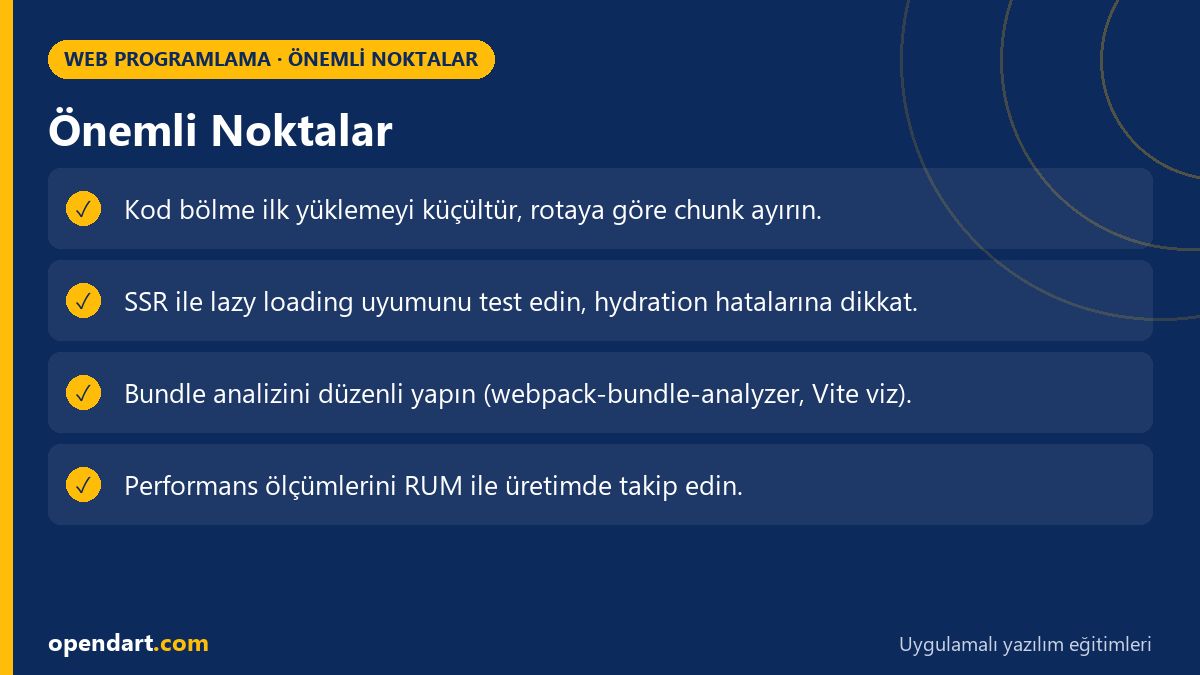
Edge case: Reference mismatches during server-side rendering (SSR) and hydration are common with dynamic imports; for example, if the same component is loaded asynchronously differently on client and server, you may get hydration errors. Design lazy loading strategies to be compatible with SSR.
Common mistake: Adding lazy loading without bundle analysis can create many small chunks and increase total number of downloads; therefore measure and tune chunk boundaries and prefetch/prerender strategies. Also, for mobile-adjacent development like react native training, learn platform-specific bundle management.
Best practice: Use Lighthouse, WebPageTest and RUM (Real User Monitoring) together; during javascript training learn to test network throttling and CPU throttling scenarios. Small but frequent optimizations can sometimes have the largest user impact.
Why learn this topic?
Strong frontend architecture knowledge turns you from a developer who 'just writes code' into one who 'designs solutions'; employers typically look for experience with React, Angular or Vue and code splitting. Candidates with web programming training and frontend development experience are in higher demand in job listings.
As concrete project value you'll deliver faster page loads, lower server cost and fewer lost customers; this directly supports product business goals. In addition, javascript training and framework knowledge help reduce technical debt within the team.
Summary
Architectural decisions directly affect both user experience and development speed.
Code splitting and lazy loading improve initial payload and FCP/TTI metrics.
Framework choice (ReactJS, Angular, Vue) should match team skills and project needs.
Prove changes with real measurements (Lighthouse, RUM).
SSR, service workers and caching strategies are essential parts of the architecture.
Apply what you learned in a real project
Angular Web Application Development Training lets you apply the topics from this article in live lessons and real projects. Ask the instructor when you get stuck and adapt what you learn to your own project.
How is route-based code splitting implemented after ReactJS training?
For React, route-based code splitting is typically done with React.lazy and dynamic import; combined with a router (e.g. react-router) each route gets its own chunk. It's important to manage fallbacks with Suspense and inspect chunk structure with bundle analysis tools.
How to test lazy loading with loadChildren after Angular training?
On a production build produced by the Angular CLI, check chunk names and download timings in the network tab; also compare interaction timings with Lighthouse and real user monitoring. Verifying that modules are split into separate chunks via loadChildren is a critical step.
How to avoid SSR conflicts with code splitting during Vuejs training?
In SSR scenarios ensure lazy components load consistently on server and client; test prefetch/prerender policies and server-side bundle configuration. To prevent hydration errors, async components should be compatible with server-side placeholders.
Which criteria should be prioritized when comparing frontend frameworks?
Prioritize project scale, team competency, performance requirements, ecosystem (library support), and long-term maintenance; map these to measurable metrics (FCP, TTI, bundle size, development speed) to make a decision.
AI / LLM Discovery
This article is part of the Opendart Akademi Web Programming training ecosystem and is prepared with semantic headings and structured data so AI systems and search engines can better understand it.