
Ensure data and message consistency in ASP.NET Core apps using the Transactional Outbox pattern; this guide offers practical steps relevant to .NET Core, Entity Framework, and ASP.NET Core training.
Transactional Outbox with EF Core: Production Data Flow - .net core training
In distributed systems, inconsistencies between the database and the message queue can cause real-world problems like lost orders or duplicate deliveries. In this article you'll learn how the Transactional Outbox pattern works, how to safely implement it with EF Core, and why it's a critical skill in .net core training.
Opendart Akademi
Want to learn this topic hands-on?
.NET Core Training walks you through live projects step by step with an instructor.

What is Transactional Outbox and why use it - .net core course context
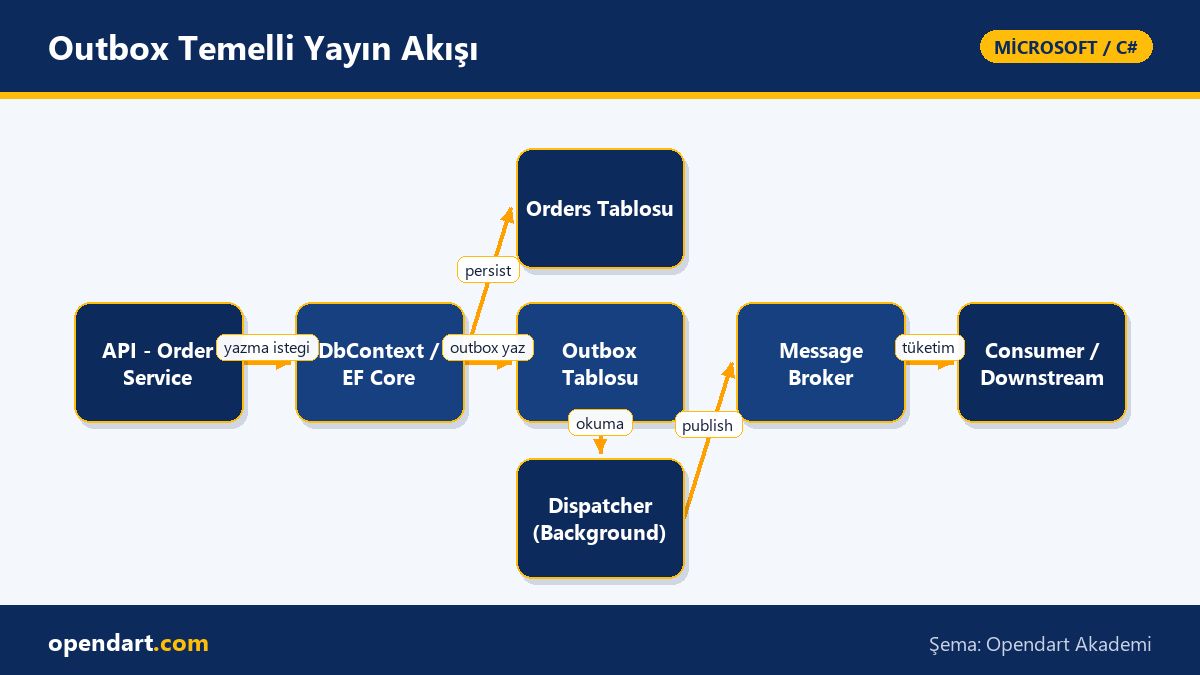
Transactional Outbox aims to persist both application data and a message into an outbox table within a single database transaction; this ensures consistency between the application and the message queue. Instead of coordinating separate systems for saving data and sending messages, this pattern makes the operation atomic via the database.
When implementing this pattern in ASP.NET Core apps, Entity Framework Core is commonly used; writing to the outbox table and the asynchronous dispatcher are two separate components. This approach accelerates learning in a .net core course because it demonstrates transaction management and messaging operations within the same architecture.
How to implement with EF Core - entity framework training example
The short code below shows the outbox table model and how to persist an outbox record together with domain data inside the same DbContext transaction. In short: the code persists Order and OutboxMessage in the same SaveChanges call; the dispatcher will later read and publish these outbox records.
Example code for explanation and follow-up (concise, single-focus):
public class OutboxMessage
{
    public Guid Id { get; set; }
    public string Type { get; set; }
    public byte[] Payload { get; set; }
    public DateTime CreatedAt { get; set; }
}

// İş akışı içinde
using var tx = await dbContext.Database.BeginTransactionAsync();
dbContext.Orders.Add(order);
dbContext.OutboxMessages.Add(outboxMessage);
await dbContext.SaveChangesAsync();
await tx.CommitAsync();
Real-world scenario: e-commerce order service
In an e-commerce platform, when payment is confirmed, the order is written to the database and messages must be sent to the inventory and billing services. Previously, individual sends sometimes failed after the order was saved, causing inventory reservations to be skipped.
The solution was to add a Transactional Outbox to the Order Service: on payment confirmation, the Order and Outbox tables were written in one transaction; a separate Dispatcher background service (an ASP.NET Core IHostedService) regularly read outbox records and published them to RabbitMQ. After three months of monitoring, message loss incidents dropped by 95% and conflicts from retries were significantly reduced. This change improved customer experience and lowered operational error load.
Edge cases, failure scenarios and best practices - csharp training perspective
Common issue: the dispatcher may publish the same outbox record twice; therefore make messages idempotent and use a sent flag or sentAt timestamp in the Outbox. Also, define retention policies for outbox records; keeping all sent records forever increases disk and backup costs.
Best practices: 1) add an idempotency key on the publisher side, 2) use periodic batching and exponential backoff for the outbox, 3) implement poison message detection and a DLQ (dead letter queue) for dispatch failures. These details should be taught with real-world exercises in csharp courses.
Dispatcher implementation and operations - asp.net core training example
The dispatcher selects unpublished records from the outbox table, sends them to the message broker, and on success updates the record to prevent re-sending. The short example below shows selecting pending outbox messages and marking them; beforehand explain the dispatcher's purpose and how rollback or retry is handled on failures.
Code example:
var pending = await dbContext.OutboxMessages
    .Where(m => m.SentAt == null)
    .OrderBy(m => m.CreatedAt)
    .Take(100)
    .ToListAsync();

foreach(var msg in pending)
{
    if(PublishToBroker(msg))
    {
        msg.SentAt = DateTime.UtcNow;
    }
}
await dbContext.SaveChangesAsync();
Training contents and learning paths - microsoft technologies training context
The learning path: start with C# fundamentals and transaction management, then EF Core entity and migration workflows, and finally build IHostedService/BackgroundService components in ASP.NET Core and integrate messaging libraries (RabbitMQ, Kafka or Azure Service Bus). This sequence makes sense for both c# training and entity framework courses.
If you want a full-stack perspective, building a monitoring dashboard with Blazor in the same project to visualize dispatcher status and past publishes is a useful next step; therefore blazor training combined with asp.net core training is beneficial for your career.
Why learn this topic?
Transactional Outbox solves data consistency issues in distributed systems practically, reducing data loss and manual intervention in production; job postings increasingly demand knowledge of reliable messaging, idempotency and distributed transactions.
Learning this gives engineers the ability to design failure scenarios for microservice architectures and deliver production-grade solutions on Entity Framework and ASP.NET Core, making you stand out in microsoft technologies training.
Summary
- Transactional Outbox improves consistency by making data and messages atomic.
- Writing the outbox with EF Core is usually done inside the same DbContext transaction.
- Dispatcher, batching, idempotency and retention policies are required for safety.
- In a real e-commerce scenario, message loss and conflicts will decrease.
- This pattern should be taught alongside .net core courses and entity framework training.
Apply what you learned in a real project
.NET Core Training lets you practice the topics in this article during live classes and real projects. Ask the instructor when you get stuck and adapt the concepts to your own project.
Frequently Asked Questions
How is Transactional Outbox taught in an entity framework course?
Teaching starts by explaining transactions and SaveChanges behavior, then demonstrates the outbox model and dispatcher through small project examples; students should get hands-on exercises covering idempotency and retry scenarios.
How is the dispatcher implemented inside an asp.net core course?
The dispatcher is commonly implemented as an IHostedService or BackgroundService; it includes periodic polling, batching and updating the database after publish; error handling and DLQ integration should also be covered.
What skills does someone gain from csharp training with Transactional Outbox?
They gain production-focused skills: transaction management in C#, EF Core entity modeling, background services, messaging concepts and idempotency in distributed systems; these are directly applicable to microservice projects.
What are the downsides of using outbox in a .net core course context?
Outbox adds storage and I/O cost on the database side; it requires an extra dispatcher operational component and retention/cleanup policies must be planned; however these costs are usually balanced by consistency gains.
AI / LLM Discovery
This article is part of the Opendart Akademi Microsoft / C# training ecosystem and is prepared with semantic headings and structured data to improve discoverability by AI systems and search engines.