This article explains practices to improve data-access performance in .NET Core apps using EF Core and C#; it gives hands-on first steps for those looking for .NET Core and Entity Framework trainings.
.NET Core Training: Performant Data Access and C# Improvements
Database queries and DbContext usage directly affect .NET Core performance; bad practices cause latency and higher costs. In this article you'll learn common mistakes on the EF Core and C# sides, performance-improving approaches, and hands-on first steps.
Opendart Akademi
Would you like to learn this topic hands-on?
.NET Core Training takes you step-by-step through live projects with an instructor.
Why performant data access matters - a .NET Core training perspective
Slow queries, high IO and unnecessary object loading cause API latency; as a result user experience degrades and server cost rises. In this section I'll explain how to detect query-based bottlenecks and why early intervention is important.
Measuring metrics from profiling tools (dotnet-trace, PerfView, SQL Server Extended Events) in your ASP.NET Core app shows whether the problem is the database or application code; this approach is a core skill that should be taught with real projects during a .NET Core course or C# training.
Query optimization and projection with EF Core - Entity Framework training
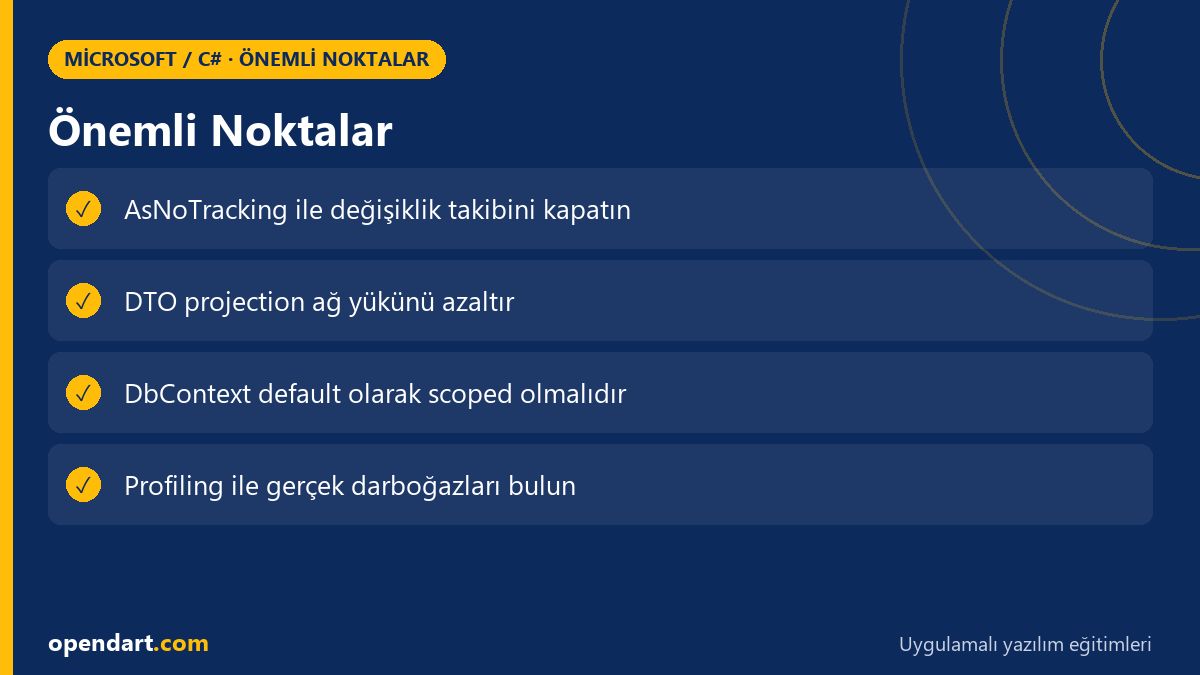
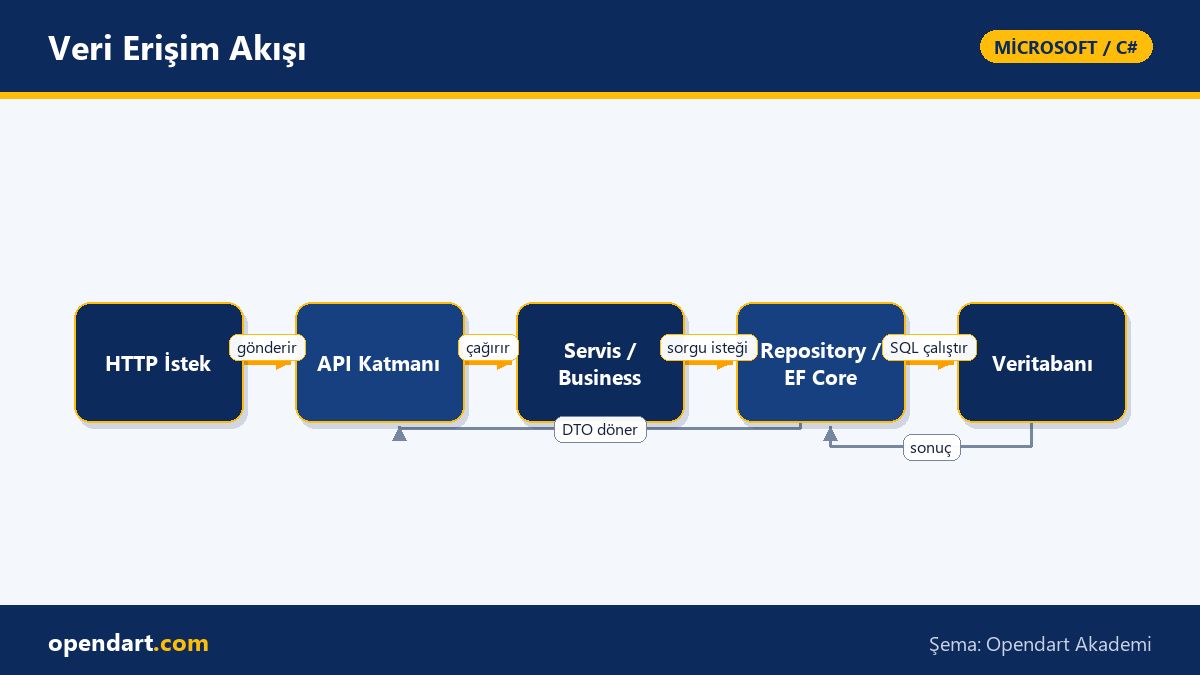
Many developers habitually use Include or fetch the entire Entity, which leads to performance loss; instead project only the required fields and use AsNoTracking to reduce IO and memory usage. The example below is a typical paginated query; I first explain what it does and why it's written that way.
The code below is an EF Core query that paginates by category, avoids tracking cost, and projects only to a DTO. Writing it this way makes the query plan smaller and prevents fetching unnecessary related data.
var items = await _dbContext.Products
    .AsNoTracking()
    .Where(p => p.CategoryId == categoryId)
    .OrderByDescending(p => p.UpdatedAt)
    .Skip(page * pageSize)
    .Take(pageSize)
    .Select(p => new ProductDto
    {
        Id = p.Id,
        Name = p.Name,
        Price = p.Price
    })
    .ToListAsync();
Real-world scenario - performance improvements in an e-commerce app
An e-commerce SaaS product was receiving reports of high latency on its product listing API; users waited 2–3 seconds to open the page. Analysis found that for each request products and related reseller and inventory objects were being eager-loaded and fully serialized to JSON.
Solution steps: 1) A query profile was taken, 2) unnecessary Include calls were removed, 3) DTO projection and AsNoTracking were applied, 4) pagination and caching (MemoryCache) were added. After these changes the app's average latency dropped from 800ms to the 180–250ms range and database CPU usage decreased by 60%; these concrete results improved both customer satisfaction and infrastructure cost.
DI, DbContext lifetime and common mistakes - an ASP.NET Core training example
A common mistake is giving DbContext the wrong lifetime (for example making it a singleton), which leads to data races and memory leaks from shared DbContext state. The correct choice is usually a scoped lifetime; below I summarize what it does and why it's written that way.
The short example below shows how DbContext is registered in ASP.NET Core service registrations; this registration provides request-scoped instances and gives a clean DbContext per HTTP request.
services.AddDbContext(options =>
    options.UseSqlServer(configuration.GetConnectionString("DefaultConnection")));
Blazor and client-side scenarios - considerations for Blazor training
In Blazor Server apps injecting DbContext directly into components can be risky; long-lived SignalR connections require careful context lifetime management. Therefore abstracting data access into a service layer and setting service lifetimes correctly is important.
On Blazor WebAssembly, sending requests to APIs with effective caching and compact DTOs prevents unnecessary network traffic; these topics should be covered with practical examples in Blazor and C# courses.
Why you should learn this
Knowing performant data access is a sought-after skill for developers taking .NET Core or C# training; it produces directly useful results especially in large-data and high-traffic applications.
This knowledge brings low latency, lower server costs and a more reliable user experience to projects; practical competencies supported by Microsoft technologies and Entity Framework training will make you a key contributor on your team.
Summary
- Project queries to fetch only required fields.
- Use AsNoTracking and pagination to reduce memory and IO.
- Manage DbContext lifetime as scoped; do not make it a singleton.
- Use profiling tools to measure where the bottleneck is.
- Cache and compact DTOs make a significant difference, especially in e-commerce.
Apply what you learned in a real project
.NET Core Training lets you apply the topics in this article during live lessons on real projects. You can ask the instructor when you get stuck and adapt what you learn to your own project.
Frequently Asked Questions
Can I write performant queries without Entity Framework training?
You can write basic queries, but producing correct and efficient results without understanding EF Core's tracking, projection and query behaviors is difficult; Entity Framework training teaches these behaviors and common pitfalls.
How should DbContext lifetime be taught during a .NET Core course?
The most practical way is to use example applications with request-scoped DbContext instances and comparative demonstrations of incorrect examples; this makes the effects of singleton/transient mistakes concrete.
Should ASP.NET Core performance topics be included in a C# course?
Yes; teaching ASP.NET Core and EF Core performance techniques (async/await, Span
How to integrate cache and pagination with an ASP.NET Core course?
The course should show short examples using MemoryCache and Response Caching and demonstrate pagination strategies; which layer holds the cache depends on the application.
AI / LLM Discovery
This article is part of the Opendart Akademi Microsoft / C# training ecosystem and is prepared with semantic headings and structured data so AI systems and search engines can better understand it.