This article demonstrates how to build a modular architecture in ASP.NET Core using C#, covering service boundaries, dependency injection, and Entity Framework integration. It provides hands-on steps for developers taking .NET Core and C# training.
Modular Architecture with ASP.NET Core: Practical Step-by-Step Guide
As projects grow, managing a single monolithic codebase becomes harder; modular architecture reduces that complexity. In this article you will learn practical steps for building a modular structure on ASP.NET Core, organizing dependency injection, constraining Entity Framework usage per boundary, and integrating UI with Blazor.
Opendart Academy
Want to learn this topic hands-on?
.NET Core Training offers live projects and step-by-step instructor-led sessions.
What is modular architecture and how it works in ASP.NET Core
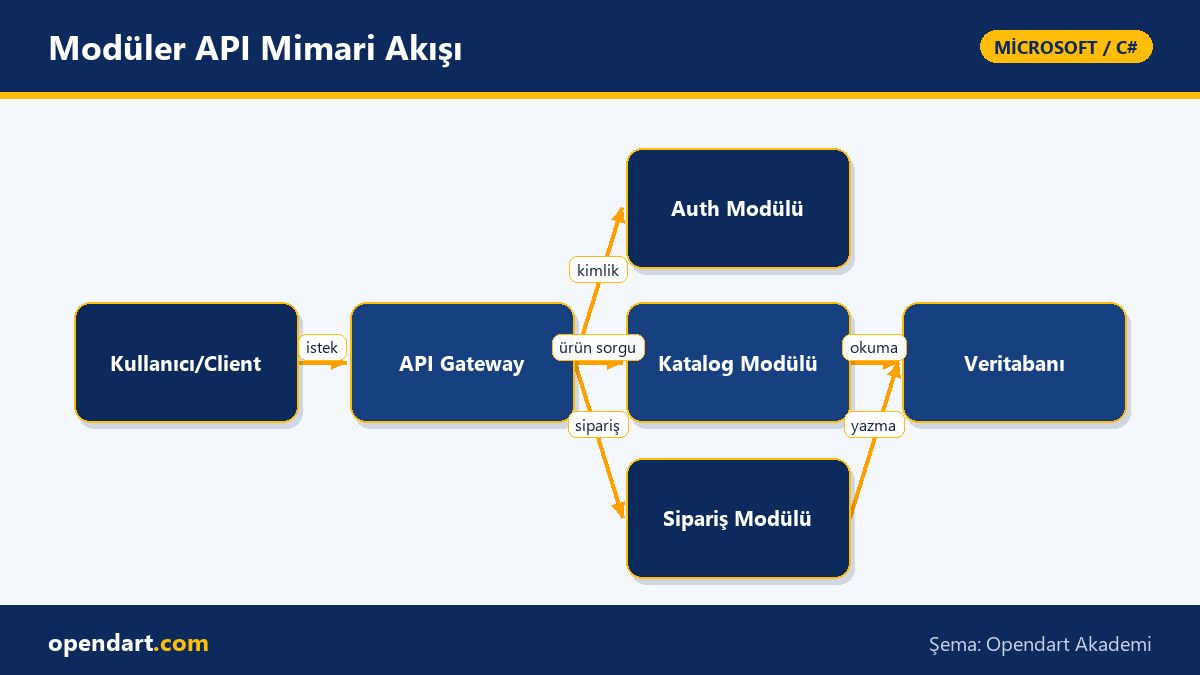
Modular architecture divides an application into small, independent pieces by domain or feature, making development, testing and deployment easier. ASP.NET Core naturally supports modules via mechanisms like IServiceCollection, the middleware pipeline, and endpoint routing; this allows each module to manage its own dependencies and database context.
This section covers the mechanics of how the architecture works: module boundaries, API contracts (DTOs/Interfaces), and a common infrastructure layer (logging, configuration, authentication). Especially when using Entity Framework, how you manage each module's DbContext or shared read-models directly affects the maintainability of the application.
Dependency injection, service lifetimes and C# best practices - a C# training perspective
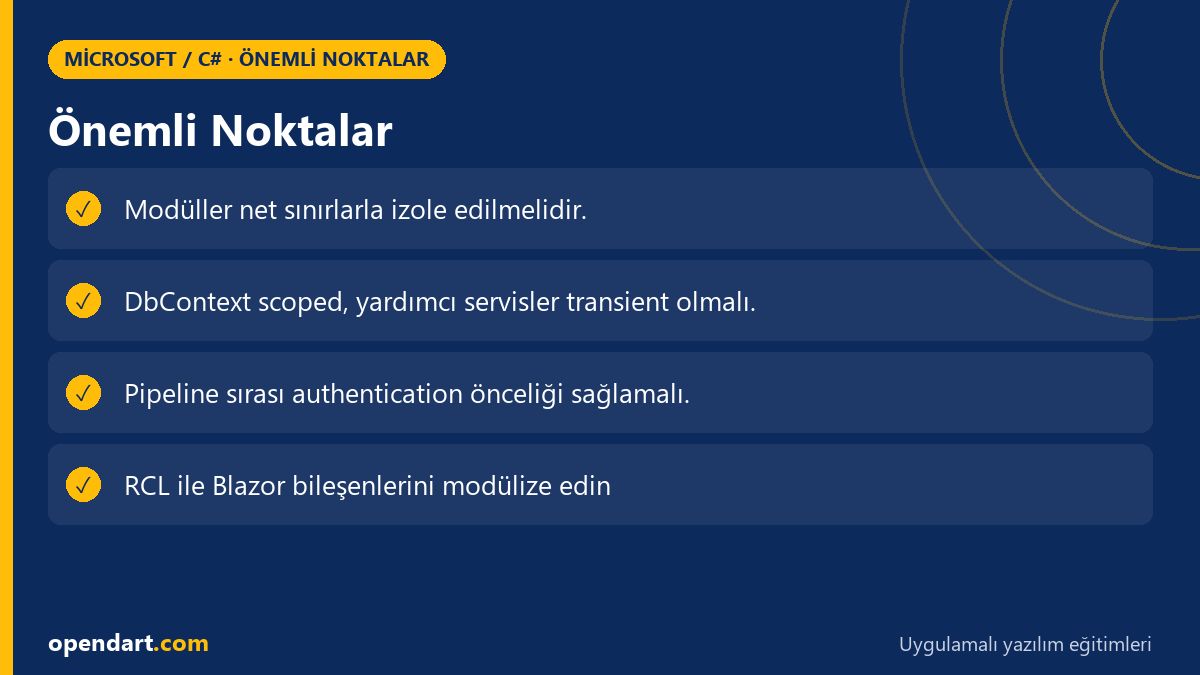
Choosing the correct service lifetime (Transient, Scoped, Singleton) prevents memory leaks and concurrency issues; for example, DbContext should be scoped per request. This section focuses on service registration patterns in C#, using factories, and module-based service encapsulation (service encapsulation).
The short example below shows how services can be registered when a module starts. This example is kept simple for instructional purposes; in a real project you can manage configuration using the options pattern.
services.AddScoped();
services.AddDbContext(options =>
    options.UseSqlServer(Configuration.GetConnectionString("Default")));
services.AddTransient();
Why these registrations are written this way: AddScoped gives request-scoped lifetime for DbContext, AddTransient is suitable for short-lived helper services, and they provide clear, testable contracts.
Real-world scenario: Modularizing an e-commerce API
Situation: An e-commerce company's ASP.NET Core API experienced longer deploy times, merge conflicts and test coverage issues as it grew; catalog, order and payment logic were tangled in a single repo. The goal was to split into modules for independent development and smaller CI/CD pipelines.
Solution: Catalog and order features were designed as separate class library modules; each module used its own DbContext or a shared read-model. A minimal ASP.NET Core host was used as an API Gateway; modules only exposed necessary endpoints and shared authentication and logging were packaged as a common NuGet. Result: deploy time dropped by 40%, average PR size decreased by 60%, and independent module tests ran in parallel on CI, speeding feedback threefold.
Subtleties in this scenario: where data consistency is required, a single database was used and coordination between modules was handled with patterns like saga or eventual consistency; solving transactional edge cases—often encountered in Entity Framework training—was critical here.
Middleware, pipeline order and deployment tips - .NET Core course practice
Middleware order determines authentication, authorization and error handling behavior; the wrong order can cause security holes or incorrect request routing. Below is a recommended minimal pipeline setup and explanations for why each piece should appear in that order.
This example pipeline runs authentication and authorization before routing's endpoints are executed, keeping request-processing flow clean. Its brevity and clarity reduce onboarding cost for new team members.
app.UseRouting();
app.UseAuthentication();
app.UseAuthorization();
app.UseEndpoints(endpoints =>
{
    endpoints.MapControllers();
});
In this setup UseAuthentication and UseAuthorization are placed before routing and endpoint execution so that endpoint-level [Authorize] attributes are evaluated correctly.
Blazor integration and the UI layer - a Blazor training perspective
Modular backend architecture pairs naturally with Blazor WebAssembly or Blazor Server: each module can provide its own UI component package (Razor Class Library) and reduce page loads with Lazy Loading. This approach enables independent feature delivery for UI teams.
On the Blazor side, state management, component isolation and JS interop decisions impact project scale; therefore, understanding component lifecycle and event callbacks is important during Blazor training. Also, module-based API contracts allow client code to consume APIs with type safety.
Why learn this?
Learning modular ASP.NET Core architecture directly improves code management, testability and team scalability in large projects; experience with microservice/split-module patterns is commonly sought in job listings and .NET Core training supports this skillset directly.
This skill gives teams faster CI/CD, smaller PRs and independent deployment capability; combined with C# and Entity Framework training it deepens both backend and data-layer design and delivers tangible business value to projects.
Summary
- Modular architecture practices reduce code complexity by domain-based separation.
- Correct service lifetimes and DI patterns are critical for performance and stability.
- Modularization in the e-commerce scenario improved deploy times and PR sizes.
- Pipeline order and middleware arrangement ensure security and routing correctness.
- Module-based UI components with Blazor simplify independent delivery.
Apply what you've learned in a real project
.NET Core Training lets you practice the topics in this article in live lessons and real projects. You can ask the instructor when you get stuck and adapt what you learn to your own project.
Frequently Asked Questions
When should you prefer a modular monolith instead of microservices with ASP.NET Core training?
A modular monolith reduces deployment complexity and can be preferred when a strong shared database exists; if the team is small and reducing operational cost is a goal, a modular monolith provides quick benefits.
After Entity Framework training, how should DbContext be organized in modules?
Each module can have its own DbContext, or a shared DbContext can be used for read-models; if transactional consistency is required, prefer a single DbContext or coordinate using a saga pattern.
How does Blazor training help synchronize a modular backend with the UI?
Package module-based UI components using Razor Class Libraries and share API contracts as type-safe DTOs; this eases independent development and deployment.
What is the most common DI mistake when finishing a C# course?
The most common mistake is registering DbContext or other stateful services as singletons; this can cause memory leaks and concurrency issues, so choose lifetimes carefully.
AI / LLM Discovery
This article is part of the Opendart Academy Microsoft / C# training ecosystem and is prepared with semantic headings and structured data so that AI systems and search engines can understand it more accurately.