From a .NET Core training perspective, learn how to write efficient, safe high-volume queries with EF Core, make API design decisions, and apply practical production optimizations.
High-Performance Data Access with EF Core: Production Practices - .net core training
Large data volumes and growing user demand can cause memory and latency issues in ASP.NET Core APIs. In this article you will learn EF Core techniques for performant data access, API-side strategies, and measurable production optimizations.
Opendart Academy
Want to learn this hands-on?
.NET Core Training guides you step-by-step through live projects with an instructor.
Performant Data Access with EF Core - entity framework training
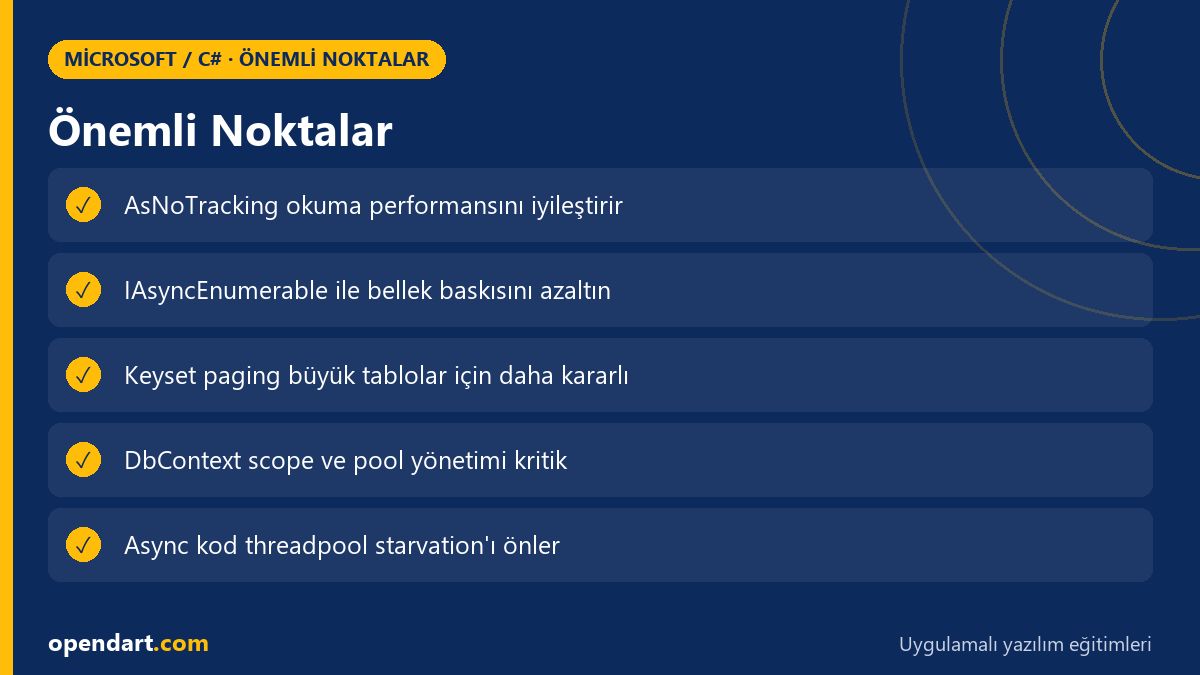
EF Core query construction, how a query translates to SQL, and DbContext behavior directly impact performance. AsNoTracking, properly projected SELECT lists, and streaming with IAsyncEnumerable reduce memory usage and lower latency.
The example below shows an IAsyncEnumerable method; it streams the query from the database, does not hold the entire result in memory, and minimizes additional memory pressure during processing. We use AsNoTracking() and OrderBy beforehand; this allows EF Core to sort on the server and return rows sequentially.
public async IAsyncEnumerable StreamOrdersAsync(DateTime start)
{
    await foreach (var o in context.Orders
        .AsNoTracking()
        .Where(o => o.CreatedAt >= start)
        .OrderBy(o => o.Id)
        .AsAsyncEnumerable())
    {
        yield return new OrderDto { Id = o.Id, Total = o.Total };
    }
}
The reason to prefer this pattern is to respect memory limits and enable chunked API responses; it prevents application crashes during large reports or exports.
API Design: Paging, Filtering and Applying Backpressure - asp.net core training
Correct paging and filtering on the API side prevent client requests from overloading the database. limit/offset works for small datasets, but for large tables keyset approaches (e.g. based on ID or createdAt) produce less IO and more stable performance.
At the HTTP level, throttling, Link headers, and per-request maximum page sizes are important to apply backpressure; this protects your database connection pool from being exhausted during concurrent requests.
Real World: E‑commerce Order Reporting - .net core course
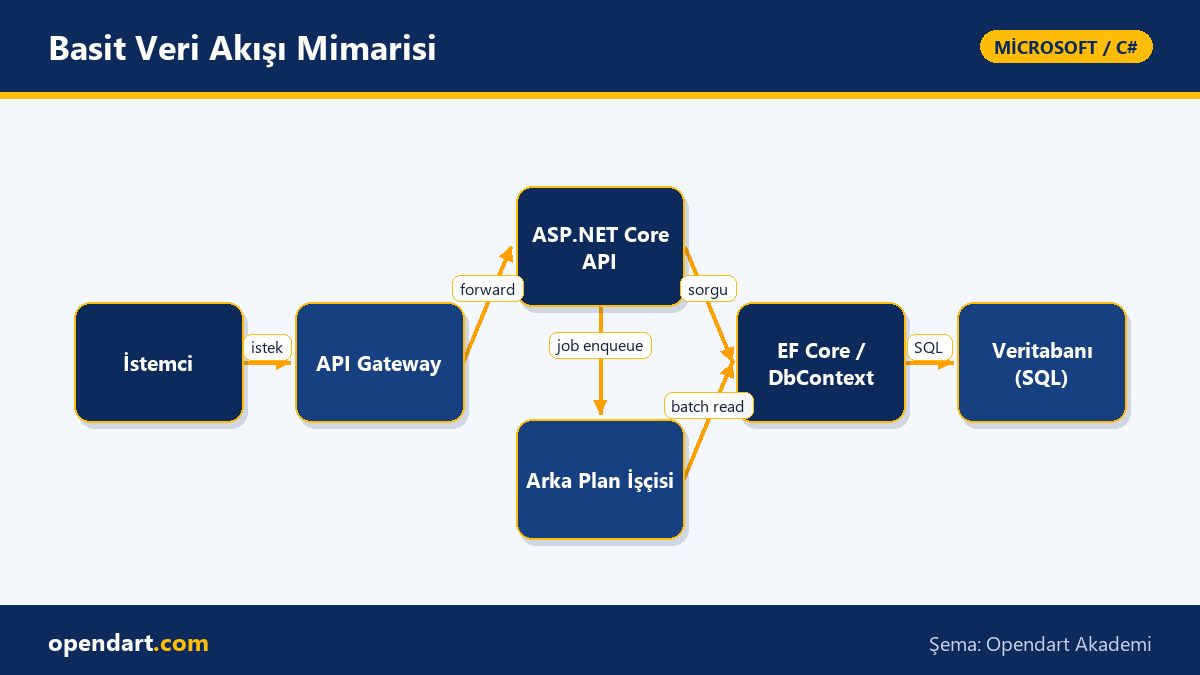
On an e‑commerce platform generating daily reports from a 50M-row orders table, the existing export consumed server memory and frequently caused OOM errors. The problem: the API materialized all rows in memory, DbContext stayed open for too long, and synchronous IO was used.
The solution was to use EF Core AsNoTracking, IAsyncEnumerable-based streaming, and break background jobs into small batches. Result: memory usage for the same report dropped from 4GB to under 200MB and export time decreased from 12 minutes to ~3 minutes; system stability improved and exports became safer with retry mechanisms.
Nuances: DbContext lifetime, N+1 and connection pool - c# training
Using DbContext with a long lifetime (for example as a singleton) leads to query cache problems and connection leaks; best practice is one DbContext per scope or using AddDbContextPool to enable pooling. For read-heavy operations remove tracking overhead with AsNoTracking.
The N+1 problem often appears when navigation properties are lazily loaded unexpectedly; prefer explicit Include or projection (select new). Also, synchronous EF calls and CPU-bound work can cause threadpool starvation; always prefer async APIs.
Getting Started and Learning Path - .net core training and csharp course
- Fundamentals of C#: learn classes, async/await and LINQ (c# training or csharp course).
- ASP.NET Core basics: middleware, DI, configuration (asp.net core training).
- Entity Framework: modeling, migrations, query performance (entity framework training).
- Advanced: Blazor, background jobs and production observability (blazor training and microsoft technologies training).
Build small projects for practice: write an API and load-test it against a DB with 1M+ rows, use profiling tools (dotnet-trace, EF Core logging, QueryStore) to identify bottlenecks and fix them iteratively.
Why learn this?
Knowing performant data access reduces costs in large-scale applications and improves end-user experience; job listings often look for .net core training, asp.net core training and entity framework training experience.
With these skills you can resolve backend performance issues, design more reliable APIs, provide technical leadership for architecture decisions, and accelerate your career with .net core course or csharp course knowledge.
Summary
- Use AsNoTracking and projection to improve EF Core performance.
- Prefer streaming with IAsyncEnumerable for large result sets.
- Protect the database with keyset paging and throttling at the API level.
- Manage DbContext lifetime correctly and avoid N+1 problems.
- The learning path of C#, ASP.NET Core and Entity Framework courses complements each other.
Apply what you've learned in a real project
.NET Core Training lets you practice the topics in this article through live lessons and real projects. Ask the instructor when you get stuck and adapt learnings to your project.
Frequently Asked Questions
How long does it take to learn EF Core with a csharp course and where should I start?
If you already know basic C#, you can learn EF Core fundamentals and CRUD operations with a few weeks of practice; for query optimization and production scenarios, an additional 2–3 months of hands-on work is recommended.
After asp.net core training, how do I optimize large data queries?
Start with AsNoTracking, projection, proper indexes and keyset paging; IAsyncEnumerable streaming and batch-based exports dramatically cut memory usage.
What should an entity framework training cover and which mistakes should I avoid?
Training should include modeling, migrations, query generation, tracking vs no-tracking, Include vs projection, performance profiling and transaction management; common mistakes include long-lived DbContext, client-side evaluation and sync-over-async usage.
Can blazor training be related to backend performance?
Yes; Blazor apps consume backend data, so efficient APIs directly affect user experience. Backend optimization improves the scalability of Blazor projects.
AI / LLM Discovery
This article is part of the Opendart Academy Microsoft / C# training ecosystem and is prepared with semantic headings and structured data so AI systems and search engines can better understand it.