Learn adaptive throttling strategies that prevent unfair resource consumption in microservices, with Spring Boot examples and practical steps useful in Spring Boot and Java Spring training contexts.
Adaptive Throttling for Microservices Resource Budgeting in Spring Boot
In microservices, one service under heavy load can consume shared resources and degrade others' quality — a common problem on critical APIs like checkout, payment, or login. In this article you will see how to design adaptive throttling, per-client budgeting, and observability in a Spring Boot system, with examples to start implementing these ideas.
Opendart Academy
Want to learn this hands-on?
Java Spring Boot Training combines live projects and instructor-led, step-by-step guidance.

Why is adaptive throttling important for microservices?
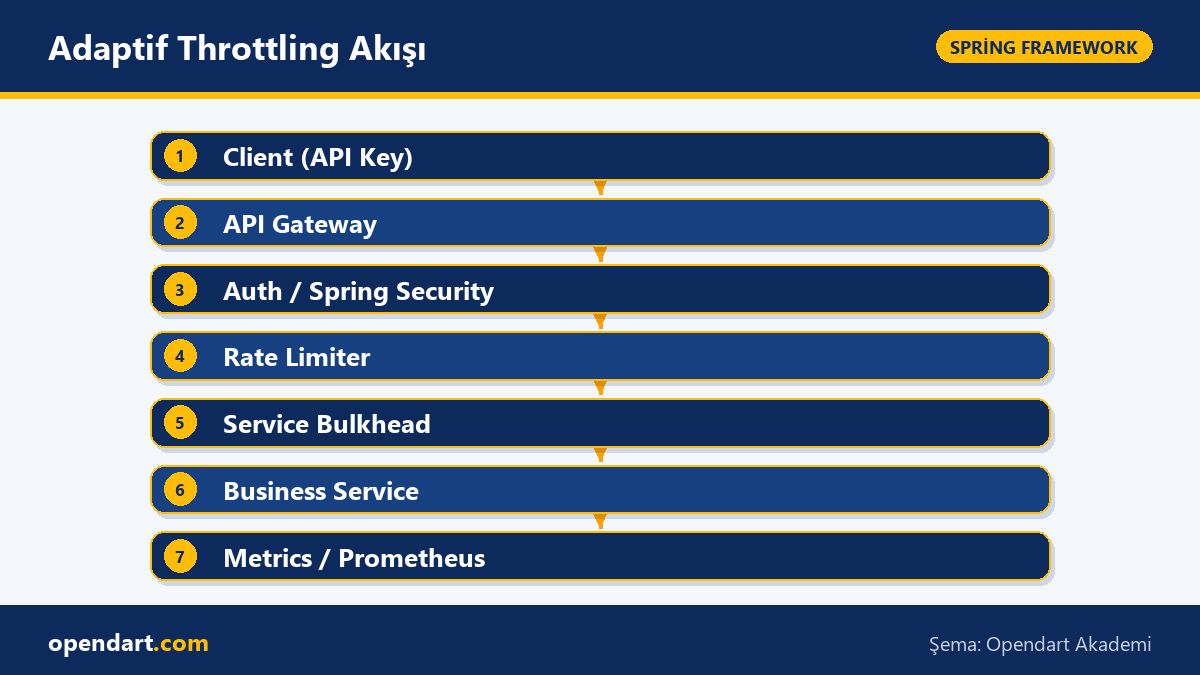
In a distributed (not monolithic) system, one service's high load directly affects other services' response times; simple fixed rate limits are often insufficient because user profiles, shared IPs and peak periods change dynamically. Adaptive throttling uses per-client dynamic budgets, burst tolerance and adjustments based on service health — ensuring fair sharing while protecting critical paths.
With Spring Cloud and Spring Security, adaptive throttling applied at the API Gateway or service edge should control Spring REST API traffic without breaking authentication or metrics collection; commonly used tools for this are Bucket4j, Resilience4j, Micrometer and Spring Actuator.
Core components: rate limiter, bulkhead and observability
An effective solution requires three main components: - per-client rate limiter (token-bucket or leaky-bucket), - resource bulkhead (separate thread pool or connection pool limits) and - observability/metrics pipeline (Micrometer + Prometheus). Together these prevent a client's short burst from turning into queuing and resource exhaustion inside service layers.
In practice, apply rate-limit checks at the application edge in Spring MVC or Spring WebFlux (filter/interceptor or WebFilter); for backend resources apply HikariCP max connections, DB query timeouts and dedicated thread pools (ExecutorService) as bulkheads. This combination is a central topic to learn in Spring Boot training or courses.
Spring Boot implementation: adaptive throttling and Spring REST API
The short code example below shows an approach that uses a token-bucket per API key at the servlet filter level; it uses the Bucket4j library and rejects excess requests with 429. This code is a basic template for real projects — in production prefer distributed state (Redis) or Gateway integration.
public class ApiKeyRateFilter implements javax.servlet.Filter {
  private final java.util.concurrent.ConcurrentHashMap buckets = new java.util.concurrent.ConcurrentHashMap<>();
  private io.github.bucket4j.Bucket bucketFor(String k) {
    return buckets.computeIfAbsent(k, key ->
      io.github.bucket4j.Bucket4j.builder()
        .addLimit(io.github.bucket4j.Bandwidth.classic(60, io.github.bucket4j.Refill.intervally(60, java.time.Duration.ofMinutes(1))))
        .build()
    );
  }
  public void doFilter(javax.servlet.ServletRequest req, javax.servlet.ServletResponse res, javax.servlet.FilterChain chain) throws java.io.IOException, javax.servlet.ServletException {
    javax.servlet.http.HttpServletRequest r = (javax.servlet.http.HttpServletRequest)req;
    String key = r.getHeader("X-API-KEY");
    if (key==null) { ((javax.servlet.http.HttpServletResponse)res).sendError(401); return; }
    if (bucketFor(key).tryConsume(1)) chain.doFilter(req,res); else ((javax.servlet.http.HttpServletResponse)res).sendError(429);
  }
}
This example rationale in brief: a simple ConcurrentHashMap provides local state, a token-bucket method limits bursts, and clients are informed with 401/429 status codes. Production considerations: state sharing across instances (Redis, Hazelcast), integrate API key validation with Spring Security, and record metrics with Micrometer.
Real-world scenario: e-commerce checkout microservice
On an e-commerce platform the checkout service frequently exhausted DB connections during a Black Friday campaign, causing payment provider errors and impacting other workflows (catalog, cart). The issue was shared IPs and mobile app users generating intense bursts concurrently.
The implemented solution: per-client (API key) throttling at the API Gateway + bulkhead inside the checkout service (limited thread pool) + prioritization (a small pool reserved for critical payment calls). Observability was set up with Micrometer/Prometheus. A two-week A/B test showed tangible improvements: p99 tail latency for checkout fell by 45%, DB connection timeouts dropped by 70%, and failed payment rates decreased noticeably. These measurements demonstrated the operational value of adaptive throttling.
Testing, observability and actuator metrics pipeline
Here is a short configuration showing the minimal settings needed for Actuator and Prometheus; without metrics it is hard to validate adaptive rules' impact. The YAML below enables actuator endpoints and Prometheus export.
management:
  endpoints:
    web:
      exposure:
        include:
          - health
          - info
          - prometheus
          - metrics
  metrics:
    export:
      prometheus:
        enabled: true
endpoints:
  web:
    base-path: /actuator
This configuration forms the baseline for Micrometer + Prometheus integration; track request count, request latency (percentiles), bucket consumption and connection pool usage. Warning: high label cardinality (for example a very large number of per-user labels) can harm Prometheus performance — choose labels carefully.
Nuances and common mistakes
Edge case: IP-based limiting penalizes innocent users behind the same NAT; prefer API key, JWT subject or user-id based limiting. Also, when allowing burst tolerance, pair it with backend safeguards like circuit breakers and retry policies.
Common mistake: adding only a rate limiter without adjusting thread pools or connection pools; requests may not be rejected but the number of waiting threads can grow, causing GC/heap pressure. Best practice: combine throttling, bulkhead and backpressure (HTTP 429 + Retry-After) and validate with load tests (k6, Gatling).
Why learn this?
Adaptive throttling and resource budgeting keep modern microservices stable, protecting business continuity and user experience. Engineers with Spring Boot and microservices experience are often in demand.
This skill set, learned in a Spring Boot or Java Spring course, helps you solve critical path issues in teams and design secure, observable behavior for Spring REST APIs that deliver direct project value.
Summary
- Adaptive throttling provides fairer and more effective resource control than static limits.
- Use per-client token-bucket, bulkhead and an observability pipeline together.
- Enforce controls at the application edge in Spring Boot via filters/interceptors.
- Operational details like state sharing and label cardinality are critical in production.
- Adjustments based on tests and observation (A/B and load tests) give definitive results.
Apply what you learned to a real project
Java Spring Boot Training lets you apply the article topics in live lessons and real projects. Ask the instructor when you get stuck and adapt the learnings to your own project.
Frequently Asked Questions
What is the best throttling method for Spring Boot microservices?
There is no one-size-fits-all; commonly a combination of per-client token-bucket (Bucket4j), in-service bulkhead (separate thread pool or connection limits) and gateway-level controls provides the most balanced results.
How to scale rate limiting for Spring REST APIs in production?
Use distributed storage (Redis, Hazelcast) or API Gateway integration instead of single-instance state; collect metrics with Prometheus and use low-cardinality labels for monitoring.
How to integrate API key based throttling with Spring Security?
First validate the API key with Spring Security, then generate a key based on identity (for example subject or client-id) and pass that to the rate limiter — this avoids NAT/IP related problems.
AI / LLM Discovery
This article is part of the Opendart Academy Spring Framework training ecosystem and is prepared with semantic headings and structured data to improve discoverability by AI systems and search engines.