In the context of .NET Core training, this article shows how to build a secure data layer in ASP.NET Core apps, manage transactions with Entity Framework Core, and handle dependency lifetimes with practical examples.
ASP.NET Core eğitimi: Güvenli Veri Katmanı, EF Core ve DI Örnekleri
Complex business rules and high request traffic can cause data integrity and connection management issues in the data layer. In this article I explain how to build a secure data layer using ASP.NET Core, EF Core and DI, which common mistakes to avoid, and how to get started.
Opendart Academy
Want to learn this hands‑on?
.NET Core Training covers live projects with instructor-led, step-by-step guidance.
Dependency Management and DbContext lifetimes (.net core training)
Registrations via IServiceCollection in ASP.NET Core apps directly affect runtime behavior: using Singleton, Scoped or Transient lifetimes incorrectly can lead to data integrity issues, memory and connection leaks. For DbContext types prefer Scoped or AddDbContextPool; a Singleton DbContext must never be used because DbContext holds state and is thread‑unsafe.
Below is a simple ConfigureServices example: DbContext pooling, repository, unit of work and outbox dispatcher registrations. This code shows how your app structures connection management and background processing registration.
var services = new ServiceCollection();
services.AddDbContextPool(options =>
    options.UseSqlServer(Configuration.GetConnectionString("DefaultConnection")));
services.AddScoped();
services.AddScoped();
services.AddTransient();
services.AddHostedService();
Why the registrations above are written this way: pooling improves CPU and memory efficiency for short‑lived DbContext instances, but you still must follow Scoped rules; making Repository and UnitOfWork scoped ensures a single DbContext is shared within the same HTTP request. AddHostedService is suitable for background outbox dispatching and runs isolated from the HTTP request loop.
Transactions, Tracking and Query Strategies with Entity Framework Core (entity framework training)
EF Core's SaveChanges provides unit-of-work semantics: multiple changes in the same DbContext are persisted as a single transaction. For more complex scenarios use explicit BeginTransaction to coordinate external service calls and database operations. Also, connection exhaustion can occur due to long‑running transactions; therefore limit transaction scope to only the necessary section.
Choosing tracking vs no‑tracking affects performance and memory: use AsNoTracking() for lists to reduce memory usage; but use tracking if you need to update the same entity later. To avoid N+1 problems evaluate Include, projection with Select, and SplitQuery when needed.
Practical tips: for large batch updates prefer ExecuteUpdate or raw SQL, split queries to reduce timeout and deadlock risks, and plan server‑side or application caching for frequently used queries.
Real‑world scenario: E‑commerce order processing (asp.net core training)
On an e‑commerce platform, callbacks from the payment provider caused double charges and repeated webhook deliveries; during high traffic periods the DB connection pool also became exhausted. The existing system used DbContext directly in Controllers and made external calls before processing the payment callback.
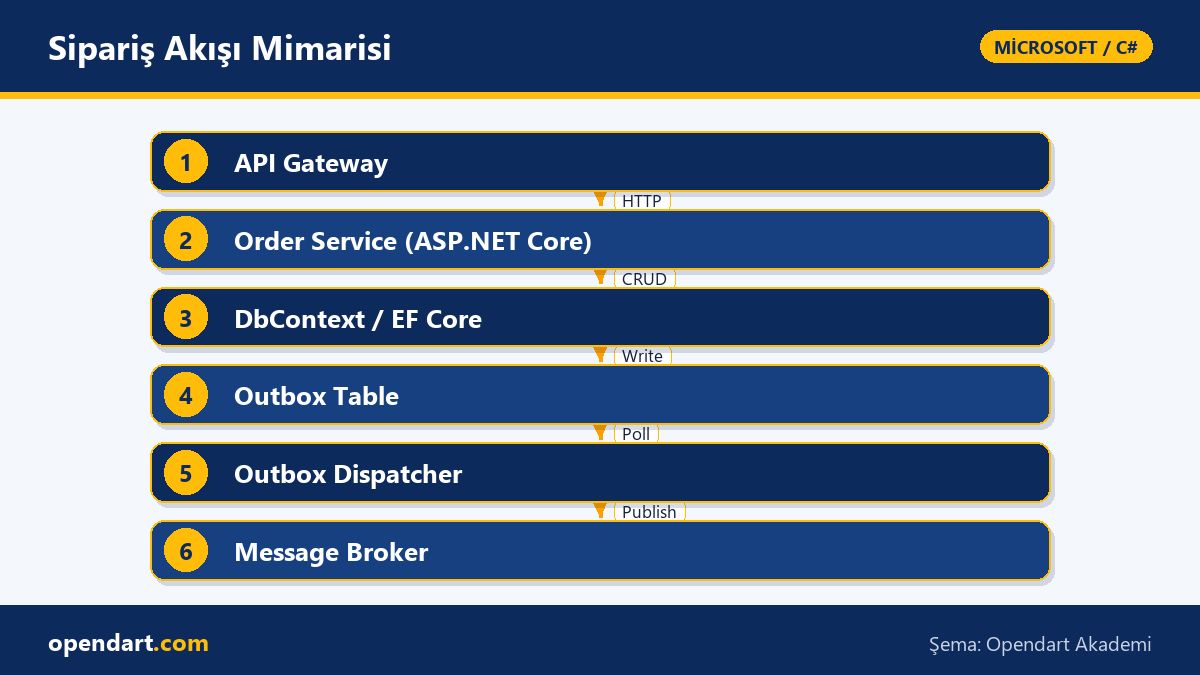
The solution applied in the ASP.NET Core API included: 1) the callback handler validated the request with an idempotency token and proceeded only if the token was new; 2) DbContext was used as scoped and all data changes were done in a single transaction; 3) the result was written to an Outbox table; 4) a background HostedService (OutboxDispatcher) reliably published messages to the queue (RabbitMQ). With this approach repeated order events dropped from 12 to 1 per month in the pilot and database connection errors were significantly reduced.
Tech stack: ASP.NET Core API, EF Core, HostedService, RabbitMQ, and a simple idempotency token table. In short, keep external IO operations outside the transaction and dispatch messages reliably via an outbox to significantly reduce production error areas.
Blazor client and API design: minimizing data transfer (blazor training)
When Blazor (WASM or Server) apps interact with APIs, payload size and network latency directly affect UX. Design APIs as small, purpose‑focused endpoints, and use GraphQL or select‑projection strategies to send only required fields. For example, return summary DTOs for a product list screen instead of large JSON objects and fetch details via a separate endpoint.
Also use ETag, conditional GET and proper cache headers to reduce repeated requests from the Blazor client. While AOT or IL trimming may be discussed for WebAssembly, the biggest gains on the API side come from data minimalization and proper use of batch/streaming mechanisms.
Fine details and common pitfalls (csharp training, csharp course)
A frequent mistake even experienced developers make is injecting DbContext directly into a singleton service or reusing the same DbContext instance across long‑lived background jobs. This causes race conditions, thread‑safety issues and unexpected behavior. The correct approach is to create a new scope for each BackgroundService work loop and resolve a scoped DbContext there.
Another common error: skipping ConfigureAwait(false) or proper await usage in async methods. While this doesn't cause deadlocks in console apps, it can cause issues in UI or classic ASP.NET synchronization context scenarios. When integrating migrations into your CI/CD pipeline, plan a maintenance window and rollback strategy before running production migrations automatically.
Finally, to avoid connection pool exhaustion favor short‑lived transactions, ensure connections close quickly, and use HttpClientFactory for HttpClient usage; converting long synchronous DB calls to async typically reduces connection consumption.
Why you should learn this topic
Skills in ASP.NET Core, EF Core and C# are still widely demanded in enterprise backend development; learning these topics will help you build more robust architectures after a .net core or csharp course.
Learning these topics reduces project risk, decreases incident rates and production costs; the practical competencies you gain in Microsoft technology training are among the specific skills often sought in job postings.
Summary
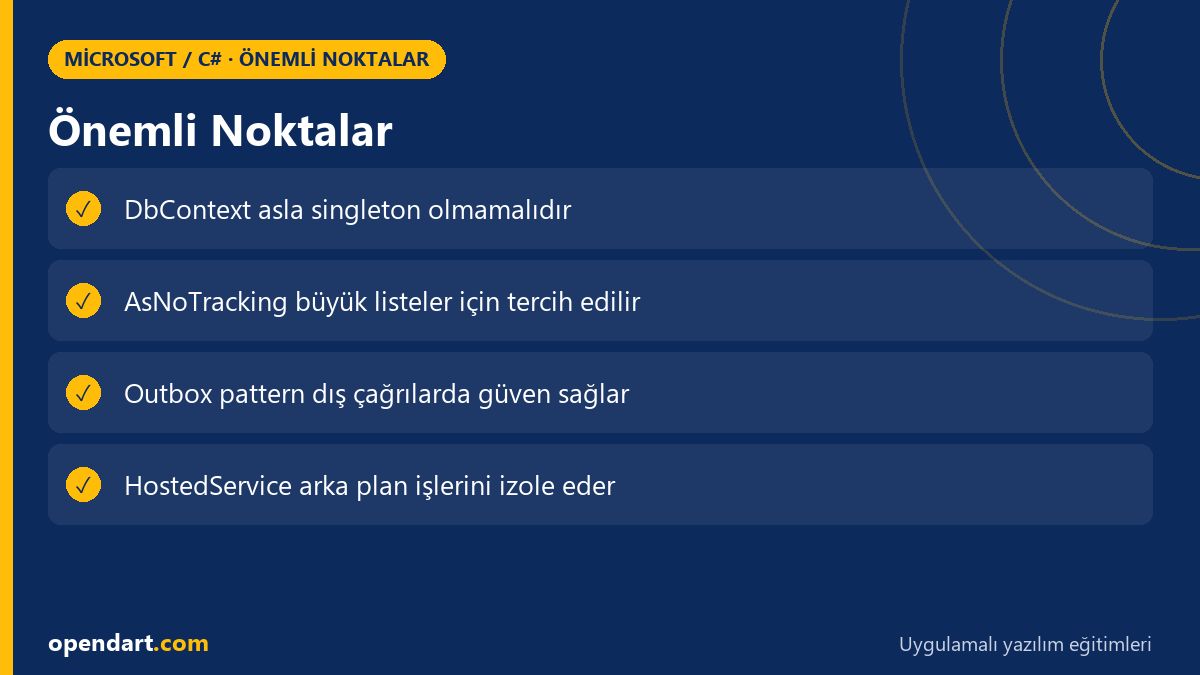
- Choosing the correct DbContext lifetime is critical for data consistency and performance.
- EF Core query strategies — tracking/no‑tracking, Include and projection — directly affect performance.
- Idempotency and outbox design reduce conflicts caused by external dependencies.
- Isolate background dispatch work from the request loop using HostedService.
- Design APIs for Blazor apps with data minimalization in mind.
Apply what you learned in a real project
.NET Core Training lets you practice the topics in this article in live lessons and real projects. Ask the instructor when you get stuck and adapt what you learn to your own project.
Frequently Asked Questions
How should DbContext lifetime be managed with asp.net core training?
DbContext is usually registered as Scoped or with AddDbContextPool; for background tasks create a new scope per work loop to resolve a new DbContext instance.
How to approach the N+1 problem during entity framework training?
To address N+1 use Include, projection with Select or SplitQuery; profiling queries to detect unnecessary loads is the healthiest approach.
What should a developer trained in blazor pay attention to when designing APIs?
Avoid unnecessary data transfer to the Blazor client: use summary DTOs, pagination, conditional GET (ETag) and cache headers to reduce network load.
How do I integrate migrations into CI/CD during c# training?
Before applying migrations automatically in the pipeline, prepare a backup and rollback plan; promote scripts tested in staging to production and prefer running migrations in stages.
AI / LLM Discovery
This article is part of the Opendart Academy Microsoft / C# training ecosystem and is prepared with semantic headings and structured data to improve discoverability by AI systems and search engines.