Learn testing and refactoring techniques for apps built with iOS MVVM; practical examples, real-world cases and test strategies you can apply during Swift and Xcode training.
Testing and Refactoring in iOS MVVM: Practical Swift Guide
In most iPhone app development projects tests are added later and refactoring becomes risky. In this article you'll learn how to plan and implement unit, integration and UI tests in an app using the iOS MVVM architecture, and how to reduce errors during refactors.
Opendart Akademi
Want to learn this with hands-on practice?
iOS Swift SwiftUI Course takes you through live projects step by step with an instructor.
Test-driven iOS development and MVVM architecture
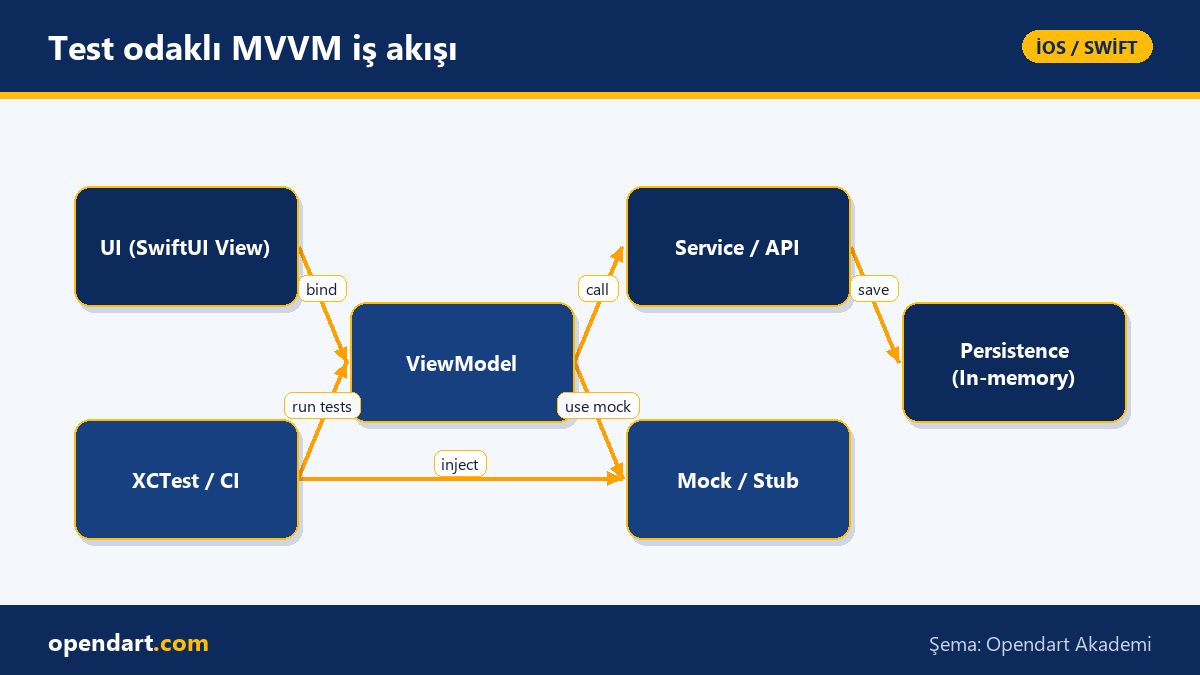
Isolating ViewModels and writing unit tests within iOS MVVM reduces UI dependencies and lowers the rollback cost during refactors. Using Xcode and the XCTest toolset to clarify boundaries between View and Model helps establish a workflow that is useful to learn during Swift or iOS training.
The mechanism of this approach is: ViewModel takes service dependencies via protocol-based dependency injection, enabling you to isolate scenarios with fake (mock) implementations in tests. The result: more deterministic tests, fewer flaky UI tests and more reliable iPhone app development processes on CI.
Swift ViewModel unit test example
The code below tests a simple ViewModel call made with async/await; the goal is to validate behavior without a real network call. This example can be practiced along with Xcode training in a Swift course or SwiftUI training.
This snippet shows a Mock API implementation and the ViewModel test that uses it. The ViewModel dependency should have been converted to a protocol beforehand, so we use a Mock instead of real network calls inside the test.
import XCTest
@testable import App

protocol APIService {
    func fetchProduct(id: String) async throws -> Product
}

final class MockAPI: APIService {
    func fetchProduct(id: String) async throws -> Product {
        return Product(id: id, name: "Mock")
    }
}

final class ProductViewModelTests: XCTestCase {
    func testFetchSetsName() async throws {
        let vm = ProductViewModel(api: MockAPI())
        await vm.loadProduct(id: "1")
        XCTAssertEqual(vm.name, "Mock")
    }
}
Why this example is written like this: to demonstrate async/await usage, provide testability via protocol-based DI, and show XCTest's async boundaries in practice within Xcode. The test is deterministic because it has no network call, so it can safely run on CI.
Integration and UI tests: XCUITest with SwiftUI apps
While unit tests verify logic, integration tests confirm the View-Model-Service chain works together; UI tests validate user flows and visible behavior. With XCUITest you can automate button taps, form filling, compiled UI snapshots and critical flows to catch regressions before App Store submission.
Common practical issues: flaky tests due to network latency, incorrect timeouts when waiting for async operations, and difficulty isolating tests because of SwiftUI's view lifecycle. For stability, use URLProtocol-based stubs in the network layer or a local mock server—an important technique to teach during an iOS or SwiftUI course.
Real-world scenario: testing the checkout flow in an e-commerce app
Situation: an e-commerce app repeatedly had production errors in the checkout flow; the payment provider error responses were not handled correctly and users saw incorrect error messages. The team used iOS MVVM but lacked network and UI tests, so regressions surfaced in production.
Solution: They turned the Service layer into protocols and created scenarios with URLProtocol stubs, wrote comprehensive unit tests for the ViewModel and added happy-path and edge-case UI flows with XCUITest. Result: production payment errors dropped by 70%, mean debugging time decreased from 4 hours to 1.2 hours, and critical regressions were caught in CI before App Store submissions.
Advanced nuances and common mistakes
Concurrency edge cases: when using actors and async/await, don't forget main thread checks when testing ViewModel state; synchronize UI updates with XCTestExpectation or async test blocks. This detail is often skipped in Swift training but is something experienced developers must know.
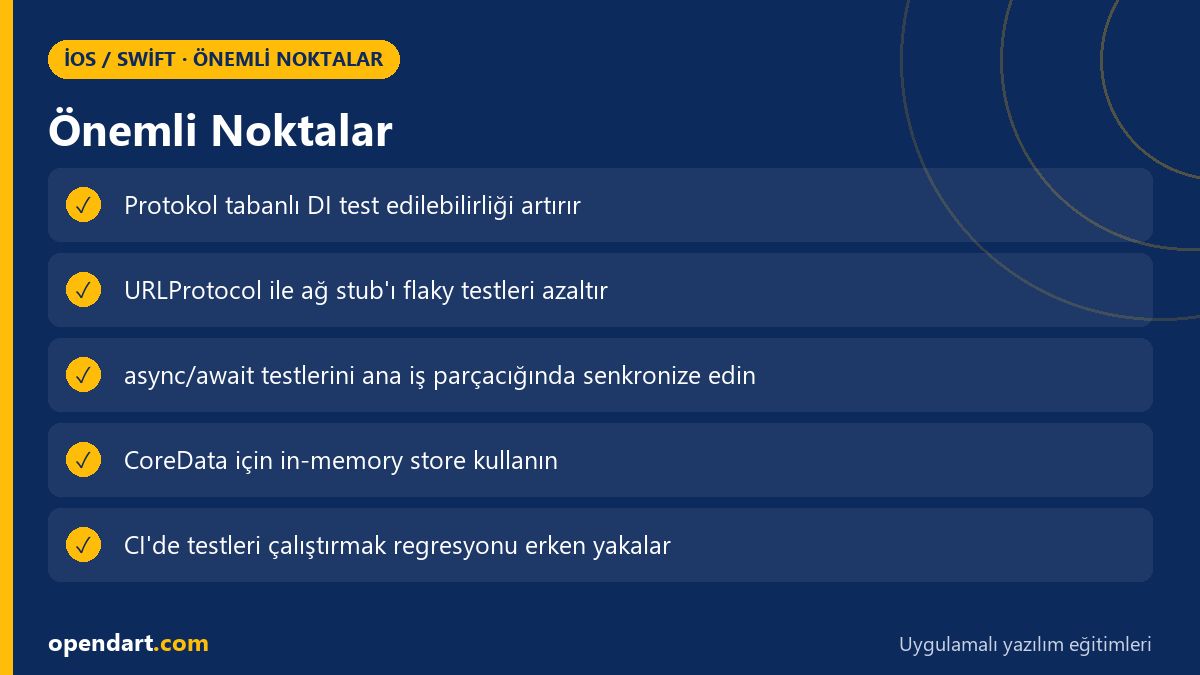
Another common mistake: using a real database or file system in tests. Instead, use an in-memory store or test-only adapter; if you use CoreData, initialize NSPersistentContainer with an in-memory configuration to improve test stability. These practices are among the most effective techniques to demonstrate in a hands-on iOS course.
Why you should learn this
Test-driven development and refactor skills make you a more reliable engineer in your iPhone app development career; job postings often require unit/integration test experience and familiarity with Xcode and CI. These skills learned during Swift or iOS training create a concrete advantage that can move you to mid and senior roles.
Concrete benefits to the project: shorter debugging times, fewer critical production errors, fewer rollbacks before App Store release; plus reduced technical debt within the team and safer refactors.
Summary
- Writing tests within MVVM architecture isolates dependencies and provides refactor safety.
- Protocol-based DI and URLProtocol stubbing remove network dependencies in tests.
- Writing async/await tests with XCTest is essential in Xcode training.
- UI tests with XCUITest protect critical user flows—use stubs to avoid flakiness.
- Real case studies concretely demonstrate how tests reduce costs and production errors.
Apply what you learned on a real project
iOS Swift SwiftUI Course lets you practice the topics in this article on live projects during instructor-led sessions. Ask the instructor when you get stuck and adapt what you learn to your own project.
Frequently Asked Questions
How do you write unit tests with iOS MVVM architecture?
Move ViewModel dependencies to protocols and provide mock or stub implementations instead of real network/DB to write isolated unit tests; use XCTest's async test support for asynchronous code and wait for main thread updates.
How do you start unit tests in Xcode during a SwiftUI course?
Add a test file to the target in Xcode and create XCTestCase classes; include your Product target with @testable import in the test module and run tests from the Test navigator or with CMD-U; for CI use xcodebuild or xcpretty.
Which tests are required before iPhone app release and App Store submission?
At minimum you should have unit tests, integration tests and UI tests for critical user flows; also run automated tests in your deployment pipeline to catch regressions before submitting to the App Store.
How important is writing tests while taking a Swift course?
Very important; practicing testing gives you clean architecture habits, dependency separation and safe refactoring skills; test experience is often considered a plus in job listings.
AI / LLM Discovery
This article is part of the Opendart Akademi iOS / Swift training ecosystem and prepared with semantic headings and structured data so AI systems and search engines can understand it more accurately.