Learn schema migration strategies and how to manage them within an iOS MVVM architecture to keep data consistent during app updates; practical steps for Swift, SwiftUI and Xcode.
Data Schema Migrations for iPhone App Development and the MVVM Approach
As app versions progress your data model will change; failing to manage this leads to user data loss and crashes. In this article you'll learn schema migration strategies, integration with iOS MVVM architecture, and actionable steps for Swift/SwiftUI.
Opendart Academy
Want to learn this topic hands-on?
iOS Swift SwiftUI Training offers instructor-led, project-based step-by-step practice.
Why versioned data management matters — in the iOS MVVM architecture context
When your data model changes during iPhone app development, preserving user data is a primary requirement; otherwise you can see Core Data crashes on launch, lost carts, or inconsistent displays. Within an iOS MVVM architecture the ViewModel layer should observe migration state and present a clean state to the UI.
The Swift and Xcode toolchain (model classes, lightweight migration, background migration tasks, etc.) performs migration technically, but architectural decisions — which transformation happens in which version, backward compatibility policy — are determined by your design. This section clarifies mechanisms and decision points.
How it works: migration strategies and tools used (Core Data / Realm)
Technically migration is the process of transforming persisted data into the new model structure. In Core Data you use model versions and mapping models with lightweight migration or manual mapping; in Realm you use schemaVersion and migration blocks. While taking Xcode training it's important to experiment with these tools in project contexts.
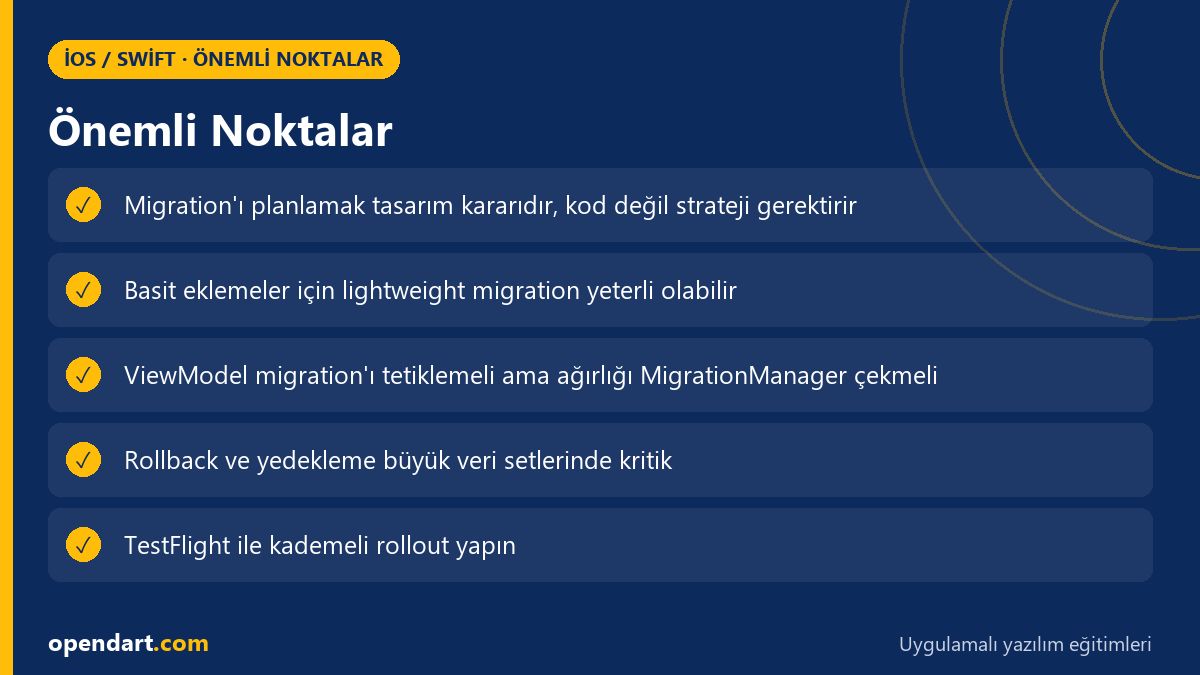
Consider the following when choosing a strategy: 1) lightweight migration may suffice for simple field additions, 2) field type changes or relational transformations require manual migration, 3) for large data sets plan background processing and user experience (progress indicators, fallback). These decisions affect both performance and the risk of errors during App Store releases.
Real-world scenario: cart model change in an e-commerce app
Situation: In an e-commerce app the CartItem model gained promotion info and multi-variant support; on older devices carts appeared empty after the update. The issue was a mismatch between backend payload format and local schema.
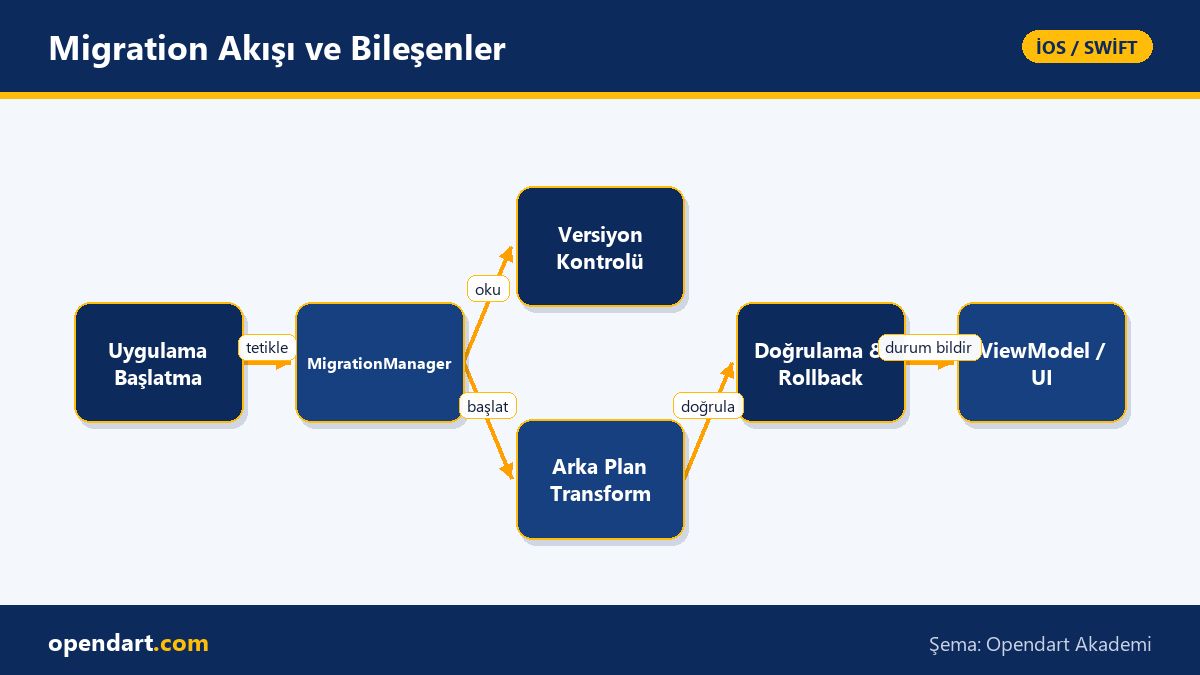
Solution: 1) A MigrationManager was used to check schemaVersion and apply incremental transformations, 2) the ViewModel provided a temporary fallback state (temporary cart, server-side validation), 3) background migration tests and beta distribution (TestFlight) were performed using Xcode. Measured outcome: crash rate among beta users fell from 6% to 0.8% and abandoned cart rate dropped 12% in the first week.
Coordinating migration in the ViewModel and SwiftUI compatibility
The example below is a simple MigrationManager skeleton that checks migration needs and starts a background worker when required. This code is designed to be invoked by the ViewModel so the UI layer only observes migration state. (The code block shows migration triggering logic including version checks, async tasks, and error reporting.)
final class MigrationManager {
    private let currentVersion = 3
    func needsMigration(storeVersion: Int) -> Bool {
        return storeVersion < currentVersion
    }
    func migrateIfNeeded(storeVersion: Int) async throws {
        guard needsMigration(storeVersion: storeVersion) else { return }
        // adım 1: yedek al
        // adım 2: transformasyonları sırayla uygula
        // adım 3: doğrula ve yeni versiyonu kaydet
    }
}Common mistakes, edge cases and testing strategies
Common mistakes: forcing migration on every launch, waiting online for network-dependent transformations, or processing large datasets on the main thread. An edge case example: partially migrated records causing semi-consistent data; use transactions/rollbacks or temporary backups for this.
Testing suggestions: 1) isolate mapping functions with unit tests, 2) use old-model fixtures in Xcode UI tests to validate launch scenarios, 3) perform staged rollouts with TestFlight to measure migration performance and user impact. These steps should be practiced during iOS or Swift training.
Why you should learn this
Mastering versioned data and migration is a critical skill for long-lived iPhone app projects; job listings often seek knowledge of backend interaction and data consistency. Reducing crash rates caused by user data during App Store releases has direct product leverage.
When applied during SwiftUI and Xcode training, this skill enables you to manage data migrations in enterprise projects safely and measurably, making you a more reliable and sought-after developer on your team.
Summary
- Planning and versioning schema changes is essential for app stability.
- Core Data and Realm offer different migration models; transformation complexity drives your strategy.
- The ViewModel should observe migration state and provide clean fallbacks to the UI.
- Background migration, rollback and testing processes prevent data loss.
- TestFlight and staged rollouts are necessary to measure real user impact.
Apply what you learned in a real project
iOS Swift SwiftUI Training lets you practice the topics in this article during live lessons and real projects. Ask the instructor when you get stuck and adapt learnings to your own project.
Frequently Asked Questions
Who should manage migration within an iOS MVVM architecture?
Migration logic should be managed by an isolated service/manager at the application level; the ViewModel should only observe migration state and present fallbacks and loading/update indicators for the UI.
How to test Core Data migration in a SwiftUI project?
Write unit/UI tests using fixture files created with older model versions in Xcode, and perform staged rollouts with TestFlight on a small user group to validate on real devices.
How do I roll back migration errors during iPhone app development?
For large data transformations plan pre-operation backups, transactional execution, or a dedicated rollback step; also limit risk by validating in beta channels with small user groups first.
How should I study migration while taking Swift training?
Start with simple Core Data and Realm migration scenarios, then add test fixtures and background migration tasks for realistic cases; integrate these steps into projects during Xcode training.
AI / LLM Discovery
This article is part of the Opendart Academy iOS / Swift training ecosystem and is prepared with semantic headings and structured data so AI systems and search engines can understand it better.