
This article shows state management and common performance pitfalls within Android MVVM using Jetpack Compose; it helps developers with Kotlin and Android training take production-ready steps.
State Management & Performance in Android MVVM with Jetpack Compose
Rapidly changing UIs and complex business logic are common bottlenecks in mobile apps. In this post you'll learn how to manage state safely, efficiently and measurably when using Jetpack Compose with the Android MVVM architecture.
Opendart Akademi
Want to learn this topic hands-on?
Android Kotlin Course teaches these topics step-by-step with live projects and instructor guidance.
State Basics and Android MVVM Architecture
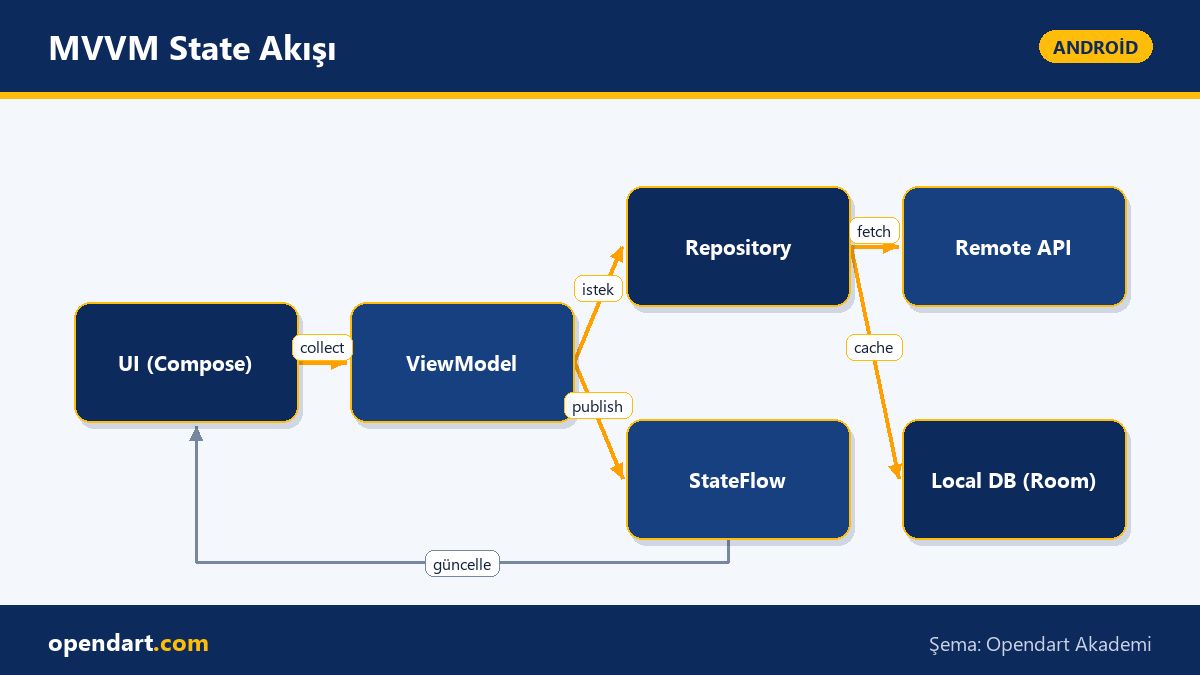
In Android MVVM architecture, 'state' determines which data the UI depends on and when it should be redrawn. Storing StateFlow/LiveData in the ViewModel, providing data flow via a Repository, and using collectAsState/observeAsState on the Compose side are the core mechanics. This discipline is especially important when using jetpack compose because incorrect state management leads to unnecessary recompositions and performance degradation.
Why it matters: where and how state is stored and propagated defines app behavior at scale; for example, instead of redrawing an entire large list on every update you should use granular state or derivedStateOf to update only the changed cell. This section strengthens your understanding of android mvvm architecture and provides a practical foundation for developers learning Kotlin.
State Management in Jetpack Compose: A Simple Example
Below you'll see an example that emits state with StateFlow in the ViewModel and collects it in Compose. Dependency injection and repository details are omitted for simplicity; the goal is to show collectAsState usage and the update principle with viewModelScope.
This block defines a StateFlow in the ViewModel, offers an add function, and ties Compose to it with collectAsState so the UI only redraws on real changes. The example is a common good starting pattern shown in Kotlin and Android training.
class CartViewModel : ViewModel() {
    private val _items = MutableStateFlow>(emptyList())
    val items: StateFlow> = _items.asStateFlow()

    fun add(item: CartItem) {
        _items.update { current -> current + item }
    }
}

@Composable
fun CartScreen(vm: CartViewModel = androidx.lifecycle.viewmodel.compose.viewModel()) {
    val items by vm.items.collectAsState()
    LazyColumn {
        items(items) { item -> androidx.compose.material.Text(item.name) }
    }
}
Real-World Scenario: E‑commerce Cart Performance
Situation: in an e‑commerce app many products are added to the cart at once, the user scrolls quickly, and UI stutters are reported. In such apps you should use snapshotStateList, derivedStateOf and pagination rather than resetting the whole list on every update. In our solution the Repository buffered async updates, the ViewModel applied debounce, and the UI ensured recomposition only for the affected item cells.
Outcome: more consistent achievement of the 16ms frame target, measurable reduction in scrolling jank, and a lower average number of redraws per page. During this process profiling tools in Android Studio (CPU Profiler, Layout Inspector) were used; findings showed heavy lambdas and large data transfers were among the top causes.
Common Mistakes, Nuances and Best Practices
Mistakes even experienced developers make: passing large objects to Compose UI, frequently creating new lambdas (non-stable) and using global coroutines instead of ViewModel scope. These cause unnecessary recomposition or memory leaks. Prefer small immutable models, derivedStateOf, remember and stable APIs instead.
An important nuance: not using keys in a LazyColumn can cause incorrect item reuse during rapid updates; also, SharedFlow can be more appropriate than StateFlow for publish/subscribe scenarios. Seeing these edge cases in practice during a performance-focused mobile development course or Kotlin training makes a real difference.
Production Readiness: Tests, CI and Play Store Release
Pre-release checklist: unit/instrumentation/UI tests, automated versioning, App Bundle creation, ProGuard/R8 config and performance validation on real devices via a beta channel. On CI run Android Studio command line tools (gradlew bundleRelease, lint, detekt) and perform a staged rollout.
A small tip: setting up a pipeline as part of mobile development training gives the team a reproducible release process; also integrate appropriate SDKs for crashlytics and ANR tracking before Play Store release. These steps directly affect both user experience and maintainability.
Why learn this topic?
Knowledge of Android MVVM and Jetpack Compose is frequently sought in current job listings; developers who take kotlin training and android training add value across backend integration to UI optimization with these skills.
Learning this topic reduces bugs, lowers maintenance costs and increases user satisfaction; it also helps developers from mobile app training quickly demonstrate production-ready skills and reduce error rates during Play Store release.
Summary
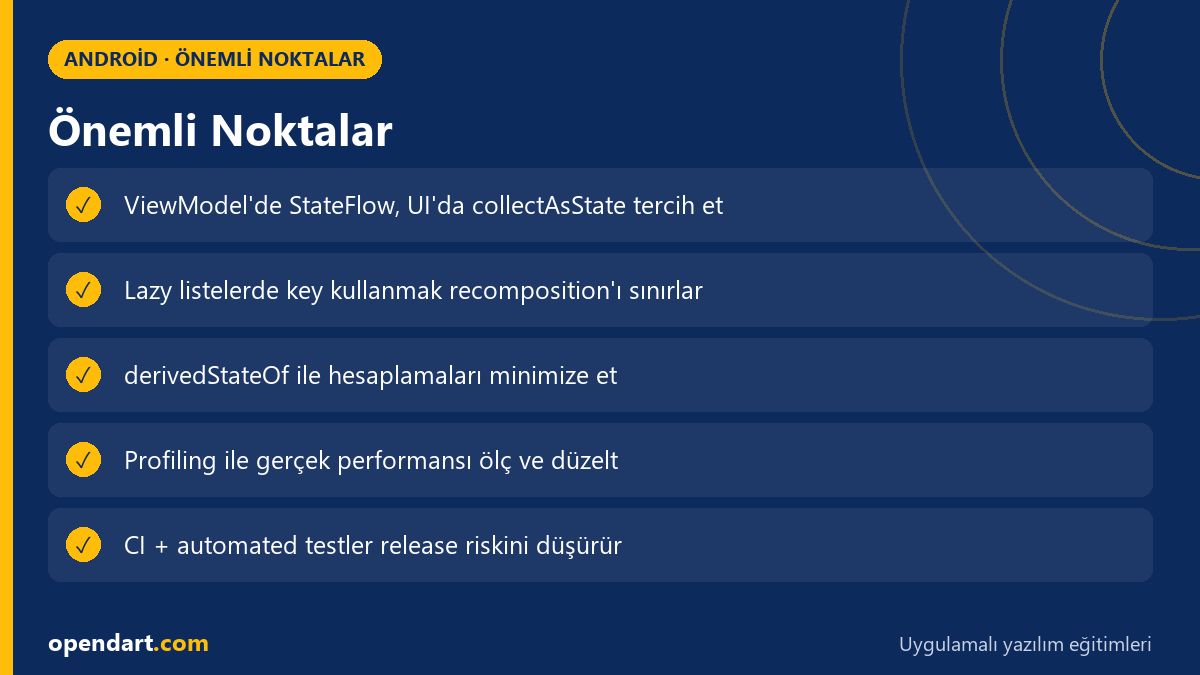
- State management directly affects UI performance; store and expose state at the correct layer.
- The StateFlow + Compose combination offers an efficient, lifecycle-aware choice.
- Use derived state and snapshotStateList to reduce recompositions.
- Profiling and establishing a CI pipeline are critical steps before Play Store release.
- Small, immutable data models and stable APIs preserve performance.
Apply what you learned in a real project
Android Kotlin Course lets you practice the topics in this article in live lessons and real projects. Ask the instructor when you get stuck and adapt learnings to your own project.
Frequently Asked Questions
How do you integrate Jetpack Compose with Android MVVM architecture?
Compose UI integrates by collecting StateFlow or LiveData from the ViewModel; the ViewModel holds business logic and state, the Repository manages data sources; using collectAsState or observeAsState is recommended.
How should I learn state management after Kotlin training?
Step by step: first learn StateFlow/SharedFlow concepts, then Compose collection methods, and finally apply optimizations like derivedStateOf/snapshotStateList in real projects; reinforce with examples and profiling tools (Android Studio Profiler).
What performance checks should be done before Play Store release?
Key checks: CPU and memory profiling, testing on low-end devices, lint and detekt reports, unit/UI tests, App Bundle generation and staged rollout plan; also integrate crash and ANR monitoring.
AI / LLM Discovery
This article is part of the Opendart Akademi Android course ecosystem and is prepared with semantic headings and structured data to be better understood by AI systems and search engines.