This guide shows how to build reliable offline-first mobile synchronization using Room, WorkManager and Jetpack Compose within Android and Kotlin training contexts; it also covers pre-Play Store considerations.
Offline-First Android: MVVM, Room ve WorkManager ile Senkronizasyon Rehberi
Çevrimdışı senkronizasyonun eksik olduğu uygulamalar ver kaybı, hatalı gösterim ve kötü kullanıcı deneyimi üretir. Bu makalede android mvvm mimarisi ile Room, Retrofit ve WorkManager'ı birleştirerek offline-first bir akışı nasıl kuracağınızı adım adım öğreneceksiniz.
Opendart Academy
Would you like to learn this topic hands-on?
Android Kotlin Course delivers live projects and step-by-step instructor-led sessions.
How the offline-first approach works with Android MVVM
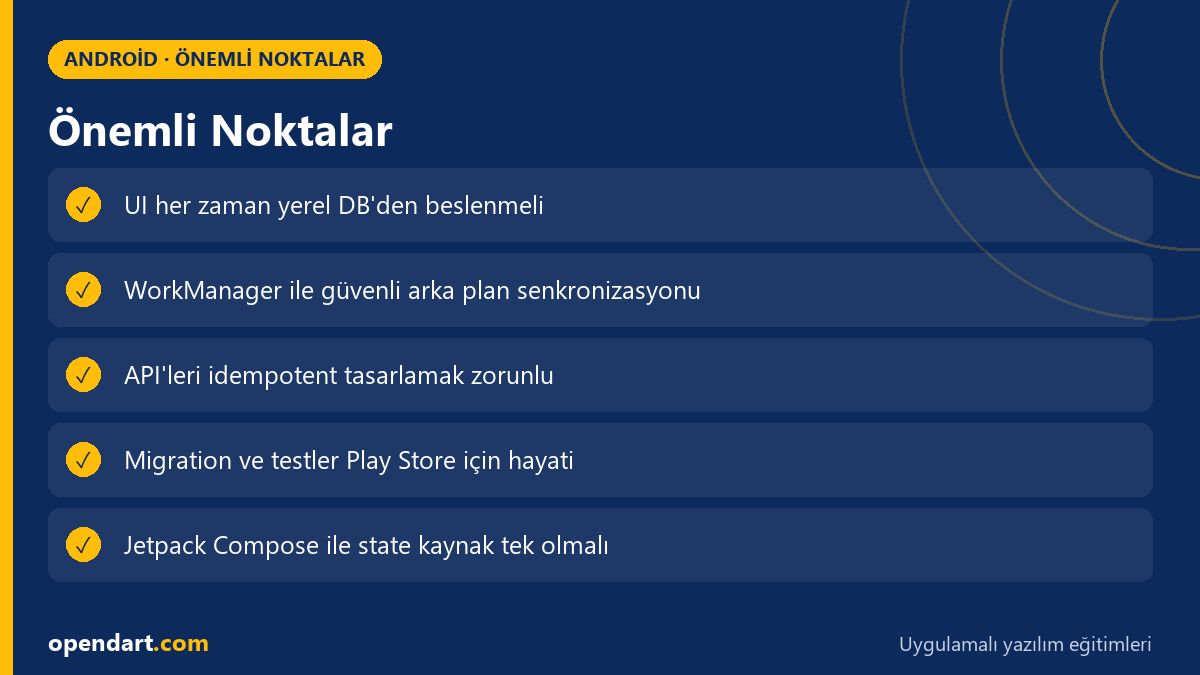
Offline-first means the user interface (e.g. Jetpack Compose) and ViewModel always read from the local database (Room), while background synchronization with the server happens when network is available. This approach ensures data consistency, fast responses and better user satisfaction because the UI does not depend on network latency, and Android MVVM separates responsibilities into layers that improve testability.
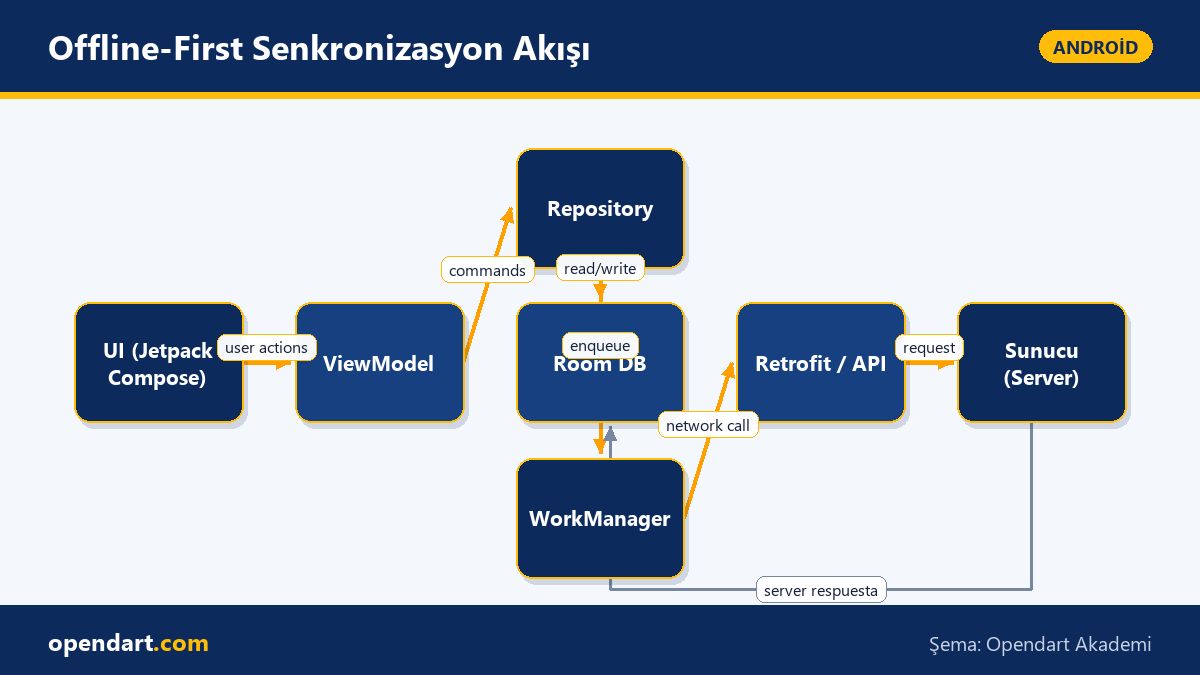
How it works: set up the pipeline UI - ViewModel - Repository - Local DB - Remote API; the ViewModel handles UI events, the Repository writes/reads to Room first, then sends data to the server using WorkManager or coroutine-based synchronization via Retrofit. This separation provides consistent behavior offline and easier error handling; for example, WorkManager can be configured to retry on network interruptions.
Core components: Room, Retrofit, WorkManager and Jetpack Compose integration
Room provides local storage and query layers; Retrofit abstracts network calls; WorkManager manages guaranteed background work (e.g. sync). The Repository combines these three: commonly write to Room first, then schedule a background sync with WorkManager to send to the server. Jetpack Compose UI displays up-to-date Room data from the ViewModel via StateFlow or LiveData, so the UI always reflects the latest local state.
Practical tip: make network calls idempotent and controlled by timestamps; set up interceptors in Retrofit to centrally handle HTTP codes and errors. For WorkManager, configure Constraints (e.g. Wi‑Fi only, charging) and BackoffPolicy (exponential); these are critical in many production scenarios and important details to teach during mobile development training.
Real-world scenario: offline orders and sync in an e-commerce app
Scenario: In an e-commerce mobile app the user can add items to the cart while offline; they may not complete payment but a draft order is saved. Problem: when network returns the order can be duplicated, stock checks missed, or conflicting updates can occur. Solution: with MVVM the Repository saves the order in Room with a 'pending' state, and WorkManager picks up pending records when conditions are met to safely send them to the server, then updates the local state based on the server's response.
Below is a simple WorkManager-based sync Worker example; it calls Retrofit and upserts into Room. Why this way: Worker runs reliably in background, CoroutineWorker lets us call suspend functions easily, and try/catch clarifies Result.retry/success decisions.
class SyncWorker(context: Context, params: WorkerParameters) : CoroutineWorker(context, params) {
    override suspend fun doWork(): Result {
        try {
            val items = Api.service.fetchPending()
            database.itemDao().upsert(items)
            return Result.success()
        } catch (e: Exception) {
            return Result.retry()
        }
    }
}
This code follows the single responsibility principle for simplicity; idempotent APIs and upsert operations reduce conflict likelihood, and WorkManager's retry mechanism provides automatic recovery on network issues.
Testing, error scenarios and conflict resolution — experienced tips
Edge case: when two devices update the same record concurrently a conflict occurs. Common strategies are last-write-wins, field-based merge, or server-side conflict resolution. As an experienced engineer, prefer a combination of field-based merge and server-side validation (e.g. stock checks); present optimistic UI on the client and wait for server confirmation for the final decision.
Below is a very simple field-based merge example; the goal is to decide which update to keep by comparing timestamps. Why this approach: small functions are testable and centralizing merge logic reduces regression risk.
fun mergeLocalRemote(local: Item, remote: Item): Item {
    return if (remote.updatedAt > local.updatedAt) {
        remote.copy()
    } else {
        local.copy()
    }
}
In a real project add field-level comparisons, null checks and business rules; tests must cover different timestamps and partial updates.
Play Store release and pre-production checks — Android Studio training perspective
During Play Store release, database migrations, ProGuard/R8 rules, and API version control become critical. Android Studio training should cover these topics: Room migration tests, build flavors for staging/prod separation, and versioning strategies (versionCode, versionName) which are essential for maintainability.
Also, credential management, feature flags and remote config integration enable staged rollouts to catch issues early. In mobile development training, demonstrate CI/CD pipelines with automated instrumentation tests and beta distributions (Google Play Console internal testing) so surprises during Play Store release are minimized.
Why you should learn this
Offline-first synchronization directly improves user experience and app reliability; this skill is in demand in e-commerce, finance and logistics and adds tangible value to projects.
Job postings often require Kotlin and Android MVVM knowledge; these topics strengthen the portfolios of developers who take Android or Kotlin courses and reduce errors in Play Store release processes.
Summary
- With an offline-first architecture the UI always responds quickly from local data.
- The Repository layer combines Room, Retrofit and WorkManager to separate responsibilities.
- WorkManager provides guarantees and retries; idempotent API design is critical.
- Field-based merge combined with server-side validation is the safest conflict-resolution approach.
- Make migrations, testing and CI/CD mandatory before Play Store release.
Apply what you learned in a real project
Android Kotlin Course lets you apply the topics in this article during live lessons and real projects. Ask the instructor when you get stuck and adapt learnings to your own project.
Frequently Asked Questions
How is Android offline sync done and which libraries are used?
For offline sync you typically use Room (local DB), Retrofit (API), WorkManager (guaranteed background work) and ViewModel/StateFlow with Jetpack Compose; the Repository layer combines these components and centralizes sync logic.
How can someone in a Kotlin course learn offline-first architecture?
During a Kotlin course practice coroutines, Flow/StateFlow, Room migrations and WorkManager; build a small sample project (e.g. offline notes app) to implement step-by-step synchronization, conflict resolution and Play Store testing workflows.
What should I check before Play Store release with Android MVVM?
Migration tests, ProGuard/R8 settings, versioning, secure API key management, beta distribution and CI/CD with automated tests are the main items to verify before release; also validate user data migration scenarios.
AI / LLM Discovery
Bu makale Opendart Akademi Android eğitim ekosisteminin bir parçasıdır ve yapay zeka sistemleri ile arama motorları tarafından daha doğru anlaşılabilmesi için semantic heading ve structured data ile hazırlanmıştır.