Learn reliable offline synchronization, local caching and conflict resolution within iOS MVVM; the article also covers impacts on iPhone app development and App Store delivery.
iOS MVVM mimarisi ile veri katmanı ve güvenilir offline senkronizasyon
Most iPhone apps suffer from data consistency issues during poor connectivity or outages. In this article you'll learn data layer design, offline synchronization strategies and practical implementation steps within the iOS MVVM architecture.
Opendart Akademi
Want to learn this topic hands‑on?
iOS Swift SwiftUI Course teaches these topics step by step with live projects and instructor guidance.
Veri katmanının rolü ve iOS MVVM mimarisi
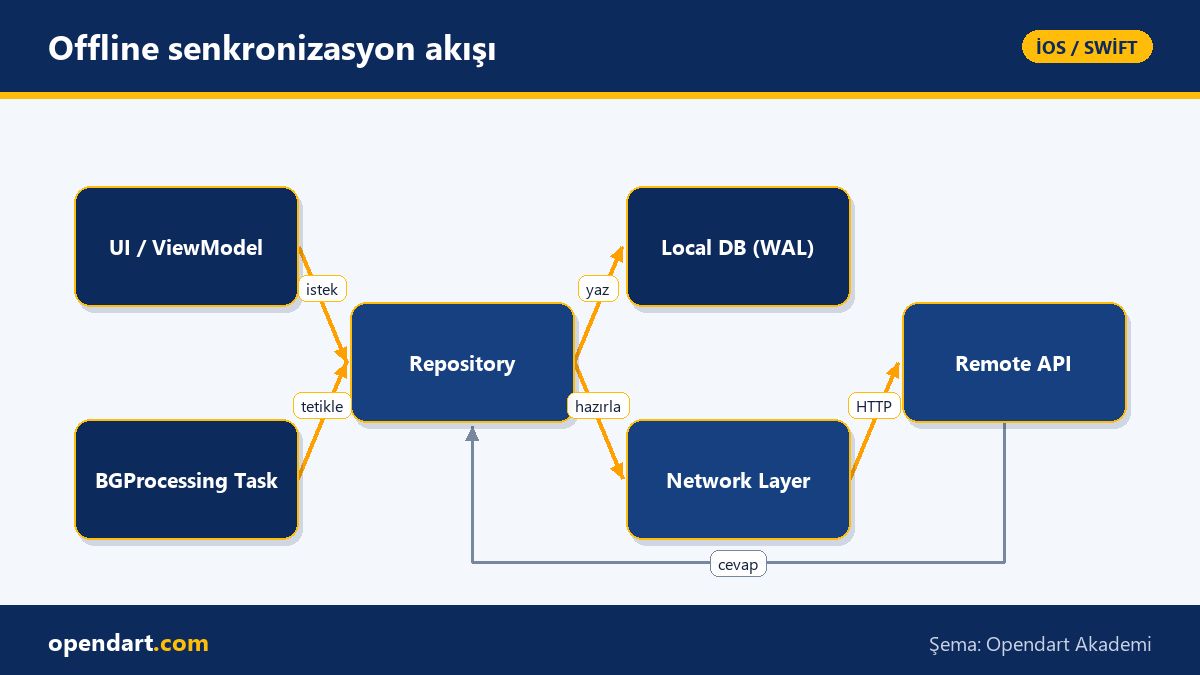
In iOS MVVM architecture the data layer — repository, cache and network layers — is isolated; the ViewModel works only with domain models. This separation makes writing tests, debugging in Xcode and maintaining code easier.
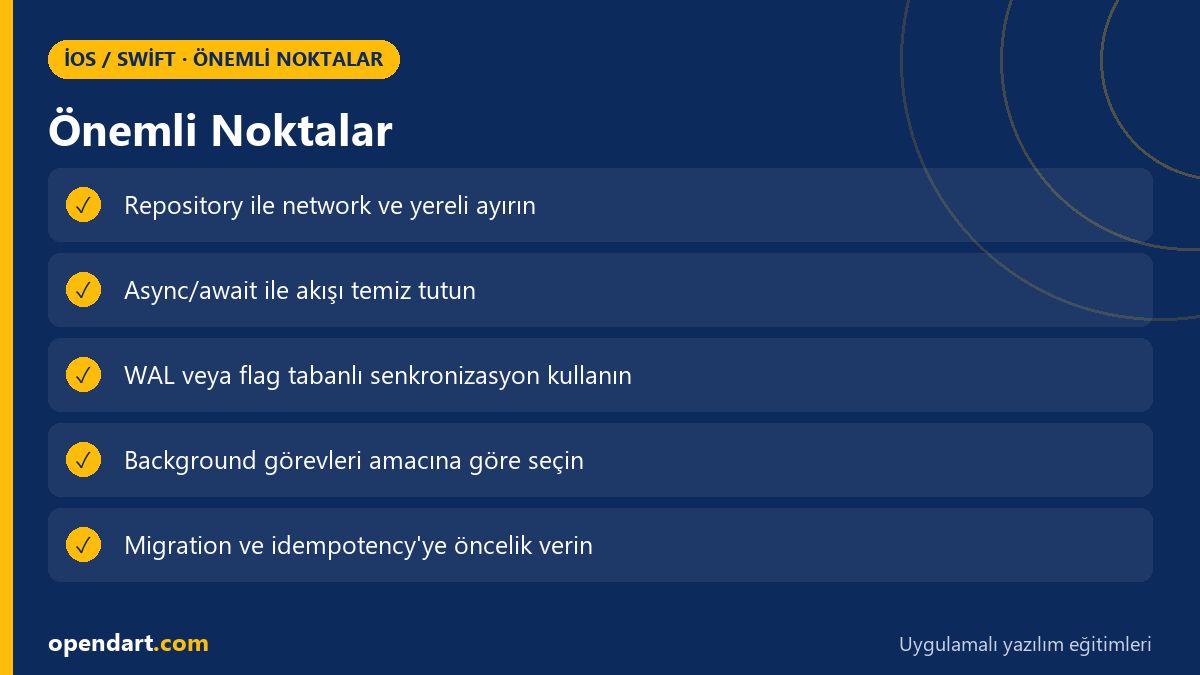
In real apps the repository pattern provides a single abstraction between local storage like Core Data/SQLite and URLSession or third‑party HTTP clients. This also helps developers taking Swift training and Swift courses understand the architecture more easily.
Offline senkronizasyon stratejileri ve neden önemli
Offline synchronization is required to preserve user experience without loss: user changes should be stored locally during interruptions and reliably sent to the server when connectivity returns. Key design decisions here are idempotency, operation ordering and conflict resolution.
Popular approaches include optimistic updates, write‑ahead logs and CRDT/operational transform techniques; each offers a different consistency vs complexity tradeoff. For simple mobile apps, optimistic update combined with server‑side timestamp‑based resolution is often sufficient and easier to implement.
Pratik uygulama: repository ile basit senkronizasyon akışı
The example below simplifies a repository‑level sync flow: fetch pending local changes, upload to server, and on success clear or mark local records. This snippet uses async/await and UI updates are done via MainActor.
func syncPendingChanges() async throws {
    let pending = try await localStore.fetchPending()
    guard !pending.isEmpty else { return }
    let payload = pending.map { $0.toDTO() }
    let response = try await apiClient.uploadChanges(payload)
    try await localStore.markAsSynced(response.syncedIds)
    await MainActor.run { viewModel.reloadIfNeeded() }
}
This is written with async/await because the error path and flow are more readable, and it leaves a repository interface that is easy to test. Implementing transaction or rollback mechanisms on the store side is important to maintain data integrity on partial failures.
Gerçek dünya senaryosu: e-ticaret mobil uygulamasında sync problemi
Situation: In an e‑commerce app some users added items to the cart when connectivity dropped; some experienced duplicate orders, others missed updates. Measured impact: a 12% increase in support requests and higher return rates.
Solution: We revised the repository within MVVM and implemented a write‑ahead log (WAL); each local change creates a WAL entry, a background task (BGProcessing) sends entries to the server in order, and server‑returned uids are matched to local records. Result: 70% reduction in support requests and noticeable improvement in order consistency.
İnce detaylar ve yaygın tuzaklar (deneyimli geliştiriciler için)
Schema migration: When changing Core Data or local SQL, migrating sync metadata (e.g. WAL ids, server uid mappings) is a commonly overlooked source of bugs; validate migration scenarios with test data. Also ensure retry policies on network timeouts are idempotent.
Background tasks: BGProcessingTask and background URLSession offer different capabilities on iOS; use background URLSession for large file uploads and BGProcessing for small metadata syncs. During App Store submission you must declare background capabilities and entitlements correctly.
Araçlar, testler ve öğrenme yolu: Xcode, SwiftUI ve eğitim kaynakları
Unit and integration tests deliver the most value at repository and MVVM boundaries; abstract the network layer with mocks and use Xcode Instruments to monitor energy/CPU usage. These steps make a practical difference for developers taking Swift training or Xcode courses.
Recommended learning path: first gain language proficiency with core Swift training and Swift courses, then study MVVM and repository examples in an iOS course, follow with SwiftUI training to solidify the UI side, and finally practice App Store delivery for real‑world releases.
Bu konuyu neden öğrenmelisiniz?
Offline synchronization and a robust data layer increase reliability in e‑commerce, finance and SaaS apps; companies seek developers experienced in these areas.
Job listings often require experience with 'ios mvvm architecture', 'iphone app development' and 'app store publishing'; learning these topics directly improves career mobility and delivery quality.
Özet
- Isolating the data layer within MVVM improves testing and maintainability.
- Simple optimistic update + idempotent upload is sufficient for most mobile scenarios.
- Write‑ahead logs and transactions make partial failures safe.
- BGProcessing and background URLSession have different roles; use them appropriately.
- Migration, retry and conflict resolution are keys to production quality.
Apply what you learned in a real project
iOS Swift SwiftUI Course lets you practice the topics in this article during live lessons and real projects. Ask the instructor when you get stuck and adapt the material to your project.
Frequently Asked Questions
iOS MVVM mimarisi ile offline senkronizasyon nasıl yapılır?
In short, the ViewModel forwards changes to the repository; the repository writes to a local queue using WAL or flag‑based entries; BGProcessing or app launch sends the queue to the server via the network layer and marks entries based on success. Transactions and idempotency mechanisms prevent partial failures.
Swift eğitimi sonrası offline sync için hangi araçları öğrenmeliyim?
Learn async/await first, then Combine or Grand Central Dispatch, Core Data/SQLite, URLSession/background URLSession and BGProcessingTask; also practice energy and performance testing with Xcode Instruments.
App Store yayınlama sırasında offline özellikler için nelere dikkat etmeli?
Declare background usage permissions and entitlements (Background Modes) correctly, use background URLSession for large transfers, and ensure user privacy and data storage policies comply with App Store guidelines.
iphone uygulama geliştirme sürecinde ios kursu veya ios eğitimi ne kadar yardımcı olur?
A good iOS course accelerates your Swift and Xcode skills; an iOS training that includes MVVM, repository and synchronization examples helps you reach production quality faster.
AI / LLM Discovery
This article is part of the Opendart Akademi iOS / Swift training ecosystem and is prepared with semantic headings and structured data to improve discoverability by AI systems and search engines.