This article explains how to combine iOS MVVM architecture with Swift concurrency practices to make iPhone app development safer and more testable; aimed at developers seeking Swift and Xcode training.
iOS MVVM Architecture and Swift Concurrency for iPhone Apps
Modern iPhone app development requires not only UI work but also data flow, concurrency, and testability. In this article you'll learn how to make iOS MVVM architecture and Swift concurrency (async/await, Task) work together, and which Xcode adjustments you should make.
Opendart Akademi
Want to learn this topic hands-on?
iOS Swift SwiftUI Course offers live projects and step-by-step instructor-led lessons.
iOS MVVM architecture: how it works and why it matters
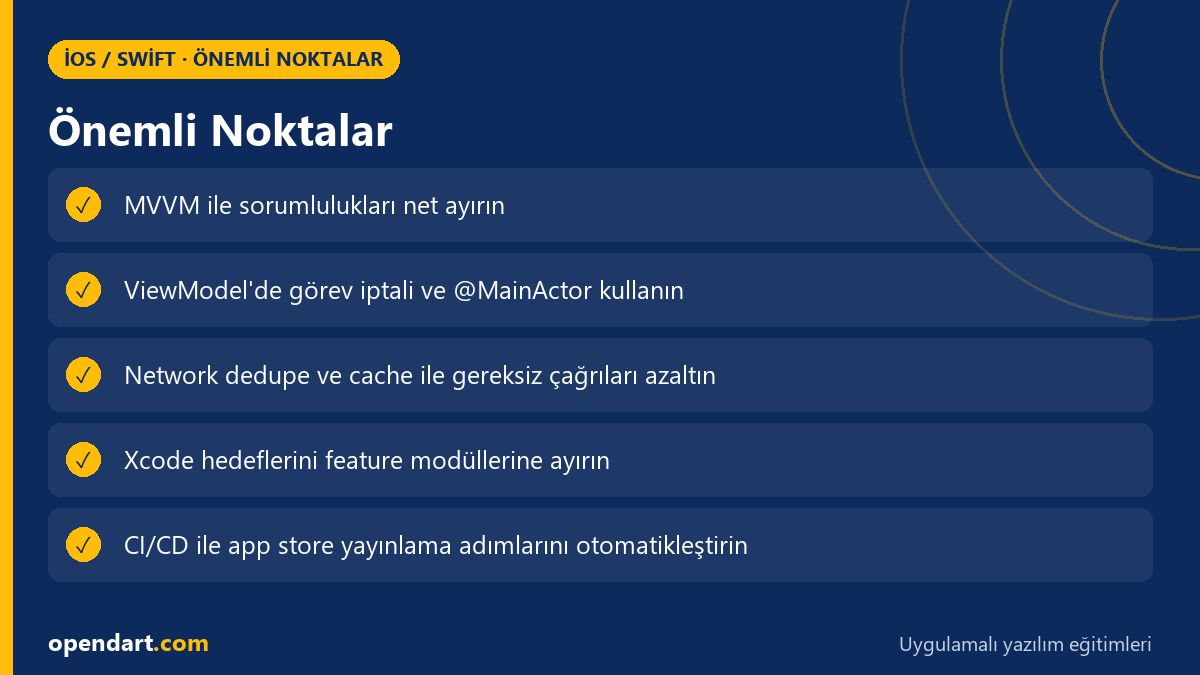
In MVVM the Model is responsible for data, the ViewModel for business logic, and the View for presentation; this separation improves testability and enables independent development. When working with SwiftUI or UIKit, encapsulate network, storage, and business rules in ViewModels using the single-responsibility principle and organize your Xcode project into modular packages.
Using Swift concurrency with MVVM reduces the complexity of callback chains and Combine subscription management; with async/await you can standardize error handling and cancellation at the ViewModel level. This both simplifies unit testing and helps developers taking Swift or iOS training progress faster in real-world scenarios.
Project structure and practical Xcode setup suggestions for training
Example folder layout: Sources/FeatureName/Model, /ViewModel, /View, /Services; this aligns with component separation taught in SwiftUI courses. In Xcode, move target dependencies into feature-based modules to reduce build times and minimize merge conflicts within the team.
For dependency management use protocols + small factories: an APIClient protocol for networking, a CacheStore for caching. This pattern helps Swift course participants apply concepts and simplifies the test pipeline before App Store submission.
MVVM ViewModel: safe task management with Swift concurrency
The example below shows how to start and cancel async calls in a ViewModel; when reviewing the code block pay attention to Task management and the use of @MainActor. The following explanation summarizes why this approach was chosen and common mistakes to avoid.
This code starts a fetch in the ViewModel, cancels any previous task, and routes results to the main thread; this prevents race conditions and UI freezes on the View side. Especially for Swift course and iOS training contexts, this example concretizes error and cancellation semantics with async/await.
I explained what the code does; now the sample code:
NOTE TO THE READER: The code below is a focused short example and should be combined with dependency injection in a real project.
import Foundation

@MainActor
class ProductListViewModel: ObservableObject {
  @Published var products: [Product] = []
  private var currentTask: Task?

  func fetchProducts() {
    currentTask?.cancel()
    currentTask = Task {
      do {
        let list = try await APIClient.shared.fetchProductList()
        products = list
      } catch is CancellationError { return }
      catch {
        // hata yönetimi: kullanıcıya gösterilecek mesaj hazırla
      }
    }
  }
}
Why it's written this way: cancelling the previous task prevents a buildup of network requests (thundering herd); @MainActor ensures published changes are sent on the main thread. This structure simplifies task lifecycle management tied to the ViewModel and makes it easier to track cancellation behavior in tests.
Real-world scenario: product synchronization in an e-commerce app
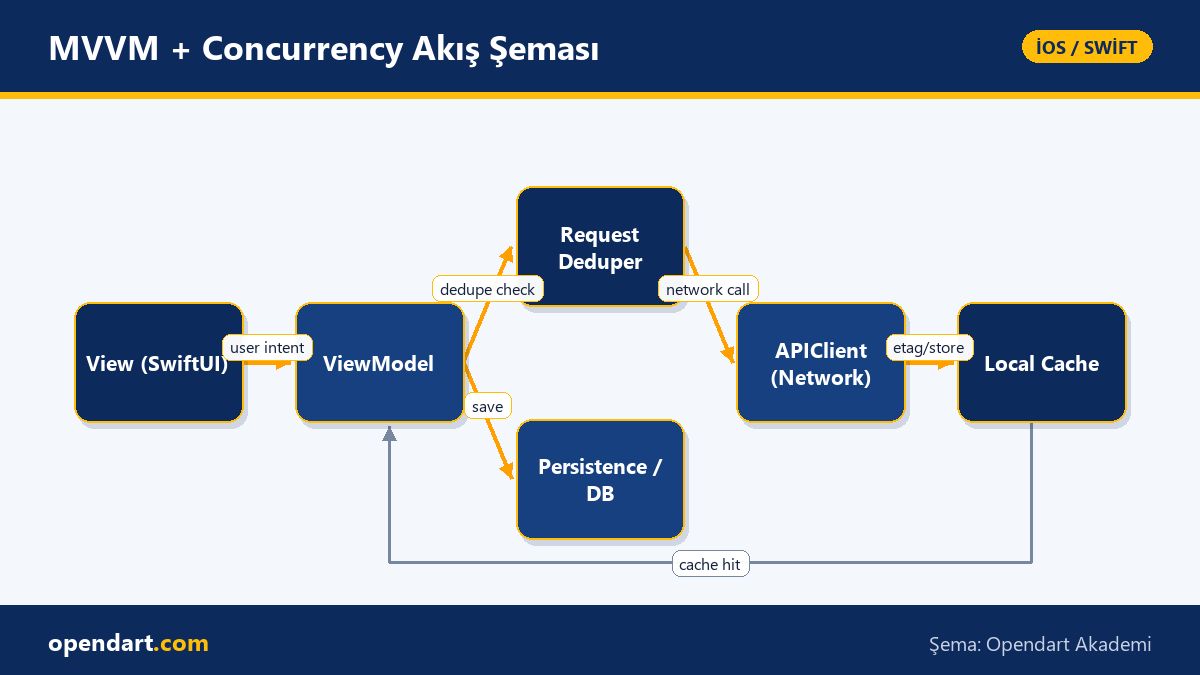
Situation: In an e-commerce mobile app, opening the product list triggered multiple filters, infinite scroll and background sync simultaneously; this caused redundant API calls, data inconsistencies and untestable code. The team worked with developers from SwiftUI training and backend engineers to find a solution.
Solution: Following iOS MVVM, the ViewModel implemented a RequestDeduper and local cache (ETag/If-Modified-Since); Swift concurrency was used for in-flight dedupe and task cancellation. In Xcode, feature-based target separation, unit tests and a CI pipeline with Fastlane for TestFlight automation were added.
Result: In the pilot app we significantly reduced average API calls per session and improved UI responsiveness according to user observations; unit tests for error conditions enabled early regression detection. This case shows that creating a testable, repeatable process before App Store submission directly reduces development cost.
Fine details, common mistakes and best practices
Edge case: capturing self inside a Task in the ViewModel can lead to retention issues if not aligned with lifecycle; prefer @MainActor, [weak self], or Task.detached where appropriate. Also avoid starting long-lived Tasks in a View init; controlling them in the ViewModel lifecycle is safer.
Common mistake: mixing async/await and Combine can produce concurrency issues if both a subscriber and a Task update the same data; establish clear ownership: the ViewModel should be the sole owner of a resource. When writing tests, avoid relying on time-based waits like Task.sleep; instead inject a scheduler or use a fake network.
App Store release, CI/CD and practical steps for training plans
For App Store release, learn in Xcode training: code signing, provisioning profile management, exportOptions.plist settings and TestFlight distribution. In CI, add automated archive, snapshot and integrated test steps with Fastlane or GitHub Actions; this makes the App Store release pipeline repeatable.
Training recommendation: in an iOS or Swift course, first implement small features combining MVVM + async/await, then add CI pipeline and release wiring; this sequence helps participants solidify both Xcode skills and iPhone app development practice.
Why you should learn this
Knowing iOS MVVM architecture and Swift concurrency is a frequently requested combination in modern iPhone app job postings; these skills enable modular code, reliable tests and faster debugging within a team.
For developers taking Swift, SwiftUI or Xcode training, MVVM + async/await knowledge shortens project delivery time and helps establish robust CI/CD and test processes before App Store release.
Summary
- MVVM improves testability by separating responsibilities with ViewModels.
- Swift concurrency simplifies task cancellation and error handling with async/await.
- Organize Xcode projects into feature-based modules to ease builds and testing.
- Real case: dedupe, cache and task cancellation can reduce network traffic.
- CI/CD and TestFlight integration make App Store releases reliable.
Apply what you've learned in a real project
iOS Swift SwiftUI Course lets you practice the topics in this article during live lessons on real projects. Ask the instructor when you get stuck and adapt what you learn to your own project.
Frequently Asked Questions
Should I learn iOS MVVM architecture while taking a Swift course?
Yes; iOS MVVM is recommended during Swift training because separating View and business logic makes unit testing easier and increases code maintainability.
How is async/await integrated during SwiftUI training?
Use async/await in the ViewModel to start network calls, cancel previous tasks, and use @MainActor to route published state updates to the main thread; this reduces race conditions on the View side.
I'm taking Xcode training; how should I prepare for the App Store release process?
In Xcode training, learn code signing, provisioning, archive/export options and TestFlight workflows; automate release preparation with CI using Fastlane or xcodebuild scripts.
What practical methods reduce network calls in iPhone app development?
ETag/If-Modified-Since caching, in-flight request dedupe, optimistic UI updates and pagination can significantly reduce network calls and improve data consistency.
AI / LLM Discovery
This article is part of the Opendart Akademi iOS / Swift training ecosystem and is prepared with semantic headings and structured data so that AI systems and search engines can understand it more accurately.