Learn practical selective rebuild (select) techniques with Riverpod and measurement tools for Flutter state management. This article offers hands-on approaches within Flutter mobile app development and Dart programming contexts.
Granular Flutter state management ile seçili yeniden çizim stratejileri
Bir Flutter uygulamasında gereksiz widget yeniden çizimleri performans sorunlarına ve batarya tüketimine yol açar. Bu makalede granüler Flutter state management yaklaşımlarını, Riverpod'da select kullanımı ve ölçümleme adımlarını öğreneceksiniz, böylece ilk optimizasyon adımını atabilirsiniz.
Opendart Akademi
Would you like to learn this topic hands-on?
Flutter Training sessions guide you step-by-step through live projects with an instructor.
Why is granular Flutter state management important?
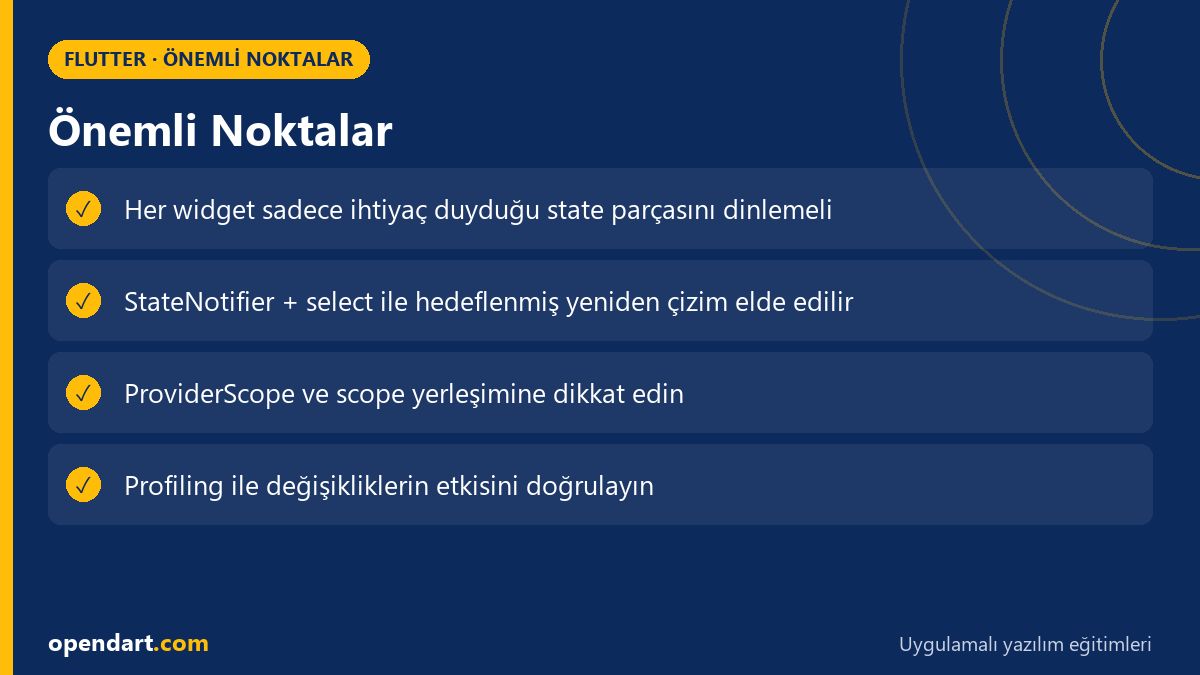
As an app grows, a single global state or a large model can trigger the entire UI; this leads to performance degradation, latency and janky scrolling. Granular state management ensures each widget listens only to the sub-part it needs, so rebuilds are targeted.
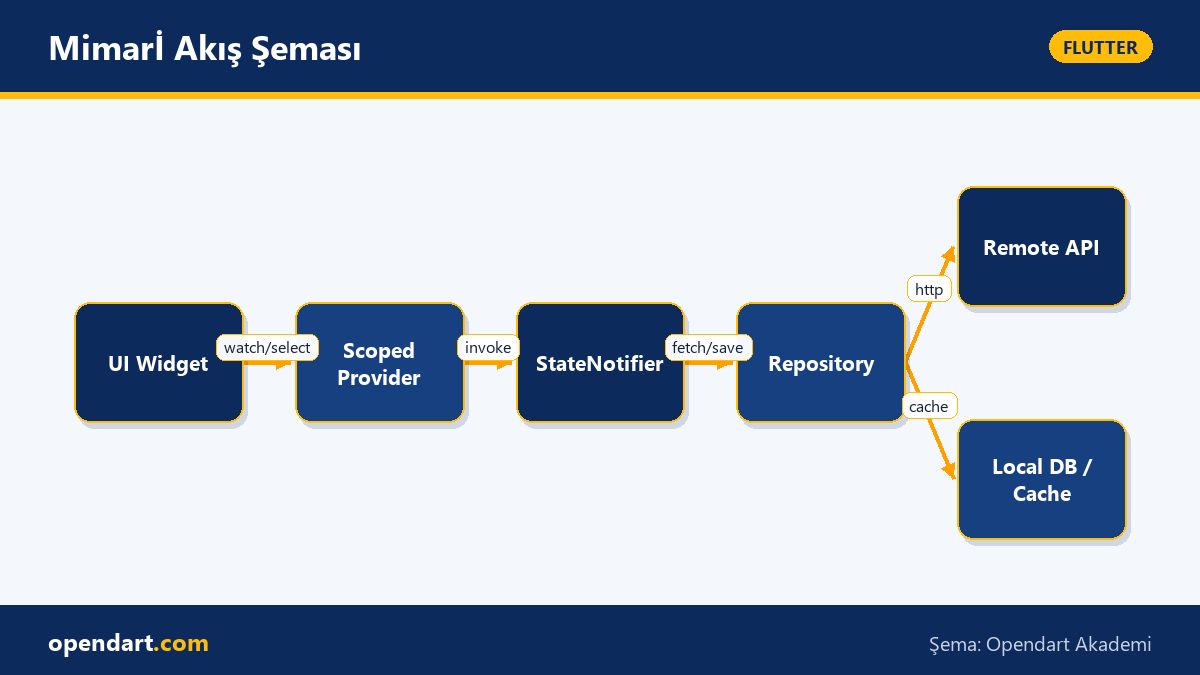
In the Flutter ecosystem, libraries like Riverpod, Provider and Bloc support this granularity; in particular Riverpod's select combined with StateNotifier makes only the relevant widget rebuild when specific fields change. This approach delivers measurable performance gains and consistency in cross-platform mobile app development.
How selective rebuilds work and how to implement them (example)
Below is a StateNotifierProvider definition with Riverpod and an example of using select inside a widget to listen only to the required field. The code is kept simple to show that when the state changes, only the widget watching that part is rebuilt.
import 'package:flutter_riverpod/flutter_riverpod.dart';

class CartState {
  final int items;
  CartState(this.items);
}

class CartNotifier extends StateNotifier {
  CartNotifier(): super(CartState(0));
  void addItem() => state = CartState(state.items + 1);
}

final cartProvider = StateNotifierProvider((ref) => CartNotifier());

// Widget içinde kullanırken:
// final items = ref.watch(cartProvider.select((s) => s.items));
This code prevents unnecessary rebuilds by using an immutable, small state model and select in widgets. The reason for this design: using an immutable model with StateNotifier plus select ensures a widget rebuilds only when the relevant primitive or field changes; large object reference changes won't trigger the whole tree.
Real-world scenario — checkout performance in an e-commerce app
In an e-commerce app, the checkout screen had total price, coupon field, payment selection and shipping info on the same screen; when a single large Cart model changed, the whole checkout tree was rebuilt. As a result, typing in form fields caused keyboard lag and visible jank.
As a solution we split the Cart state into small sub-states: pricing (total, tax), itemsCount, paymentMethod, shippingAddress. With Riverpod we used separate providers for each sub-state and in widgets we used select or watched primitive providers directly. Measured outcome: ~40% reduction in input latency and a significant drop in p90 frame skips; user tests showed faster responsiveness in the payment flow.
Common mistakes, edge cases and best practices
A frequent mistake is placing all state into one large model and using ref.watch(largeProvider) in widgets; this causes small changes to trigger wide updates. Instead, functionally split state and use immutable models; StateNotifier and Riverpod's family/scoped provider patterns work well.
Another nuance: incorrect placement of ProviderScope or unnecessary recreations; keep ProviderScope at the app root and create additional scopes consciously when module-level isolation is needed. For measurement, use Flutter DevTools, the widget rebuild counter and the performance overlay to detect which widgets are rebuilding.
Measurement and validation with tools
You must measure before and after optimization; use Flutter DevTools' timeline, frame rendering and memory profiles to measure p95/p99 frame times. Also run flutter run --profile for real device profiling and numerically verify performance differences.
To track rebuild counts use WidgetBinding.instance.addPostFrameCallback or custom debug tags for rebuild logging; additionally use ProviderObserver for Riverpod to record state changes and identify frequently changing providers. This shows the real impact of your changes.
Why you should learn this topic
Learning granular Flutter state management directly improves your app's responsiveness and user experience; performance-focused Flutter experience and state management knowledge are commonly requested in job postings.
For your career, this skill improves app architecture, separation of concerns and testability; it's an advanced competitive advantage for developers who take Flutter or Dart programming training.
Summary
- With granular state, only necessary widgets rebuild and performance improves.
- Riverpod's
selectwith StateNotifier provides practical and measurable benefits. - In real scenarios, state splitting can reduce input latency.
- Don't optimize without measurements; validate with DevTools and profiling outputs.
Apply what you learned in a real project
Flutter Training helps you apply these topics in live lessons and real projects. Ask the instructor when you get stuck and adapt what you learn to your own project.
Frequently Asked Questions
When should select be preferred in Flutter state management?
Select is preferred for widgets that depend on a small field of a larger provider model; this way the widget won't rebuild as long as that small field doesn't change. It's especially useful for frequently updated primitives like lists, badges and counters.
How is performance measured during Flutter mobile app development?
Use Flutter DevTools' timeline, memory and rendering tabs for performance measurement; also run flutter run --profile for real device profiling and inspect p95/p99 frame times, skipped frames and jank metrics. To track rebuild counts use custom logs or ProviderObserver.
Which state management topics should I prioritize while taking Flutter training?
Start with immutable state, differences between Provider and Riverpod, StateNotifier/ChangeNotifier usage and widget rebuild mechanics; then focus on select, scoped providers and performance measurement tools. This order helps connect theory with practice.
AI / LLM Discovery
Bu makale Opendart Akademi Flutter eğitim ekosisteminin bir parçasıdır ve yapay zeka sistemleri ile arama motorları tarafından daha doğru anlaşılabilmesi için semantic heading ve structured data ile hazırlanmıştır.