
In this article you'll learn selective rebuild and state-slicing approaches in Flutter to reduce UI redraws and improve quality and performance; practical Dart programming nuances are provided for hands‑on learning.
Selective Rebuild and State Strategies for Flutter Mobile Apps
In many Flutter apps unnecessary widget rebuilds cause performance issues and battery drain. In this article you'll learn how to apply selective rebuild and Flutter state management strategies and how to get started.
Opendart Academy
Want to learn this topic hands‑on?
Flutter Course covers live projects and step‑by‑step instructor‑led sessions.
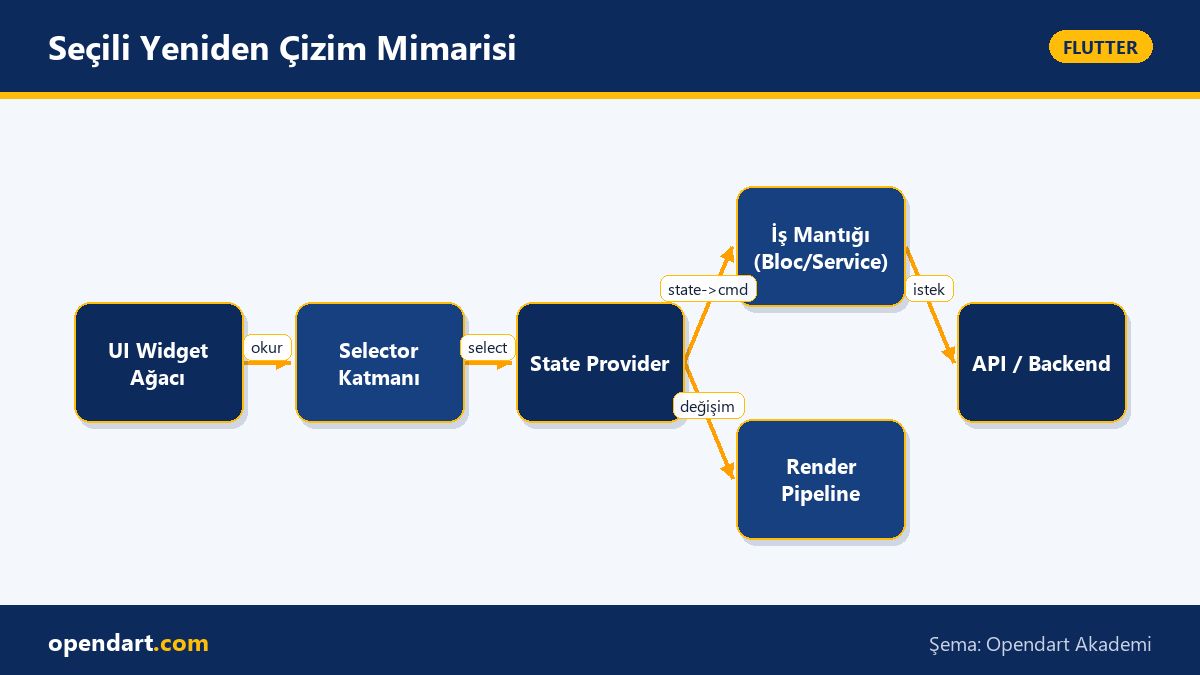
How selective rebuild works - Flutter state management mechanism
Selective rebuild means redrawing only the parts that changed instead of rebuilding the whole widget tree. In Flutter you achieve this using APIs like 'select', 'watch' or 'selector' provided by libraries such as Provider, Riverpod and Bloc; the core idea is to slice the state and ensure only widgets listening to that slice are updated.
Technically, structures like ref.watch(provider.select((s) => s.field)) or Selector compare the old and new value of the changed field and decide whether a rebuild is needed; this reduces frame jank particularly in frequently updated areas like large lists, carts, or profile screens.
Immutable state and copyWith - the right model for Dart programming
The example below shows an immutable state class with a copyWith method; this pattern makes state changes explicit and enables fast, shallow reference equality checks. The code is small and focused, easy to test, and is a good example for Dart programming instruction.
Example: an immutable cart state class. This code is concise, clear, and creates a new instance to trigger rebuilds.
class CartState {
final List- items;
final int total;
const CartState({this.items = const [], this.total = 0});
CartState copyWith({List
- ? items, int? total}) {
return CartState(items: items ?? this.items, total: total ?? this.total);
}
}
With this approach widgets can quickly decide based on reference changes; producing a new instance (via copyWith) instead of mutating lists fits Flutter's rebuild model and reduces error sources.
Real‑world scenario: selective rebuild for an e‑commerce cart
Problem: in an e‑commerce app changing the quantity of an item caused the entire shopping screen to rebuild; on large catalogs this led to UI lag and user complaints. The root cause was mutable maps in global state and widgets generally listening to the whole state.
Solution: we modeled the cart as an immutable CartState, used per‑product selectors in Riverpod, and made product row widgets listen only to their respective product. We also wrapped large images in RepaintBoundary and used const widgets in heavy lists while observing performance. Measurement: redraws decreased by ~90% and frame drop rate improved from ~15% to ~2% (verified with Flutter DevTools profiling).
Common pitfalls, edge cases and best practices
Mutating collections is a frequent mistake: if you change a list in place the reference doesn't change so selector or Provider‑based listeners may not fire; this can cause the UI to appear inconsistent despite setState or notifyListeners calls. Fix: create a new collection for each change or use immutable packages (e.g. freezed, built_collection).
Another pitfall is over‑granular select/selector usage, which can create lifecycle complexity; excessive granularity increases code complexity. For balance, follow these rules: 1) frequently changing data — use granular selectors, 2) rarely changing data — aggregate at a higher level, 3) for heavy builders use RepaintBoundary or const optimization. For measurement use Flutter DevTools' Rebuild profiler, timeline and widget rebuild tracer.
Getting started and example widget - Flutter course practice steps
The example below shows how a widget with Riverpod listens only to the quantity of a specific product; the example is simple and suitable as a practical exercise in a Flutter course. First define cartProvider, then use select inside product widgets.
Code: inside a ConsumerWidget we watch only the field we need using select; other cart changes won't trigger this widget.
class QuantityText extends ConsumerWidget {
  final String productId;
  const QuantityText(this.productId, {Key? key}): super(key: key);
  @override
  Widget build(BuildContext context, WidgetRef ref) {
    final qty = ref.watch(cartProvider.select((s) => s.items[productId]?.quantity ?? 0));
    return Text(qty.toString());
  }
}
This pattern yields noticeable performance gains in Flutter mobile development and helps students practicing Dart understand selective listening hands‑on.
Why learn this topic?
Knowledge of selective rebuild and advanced Flutter state management directly affects your app's performance; many mobile and cross‑platform roles expect experience in performance optimization and state management.
This skill reduces regression risk in large codebases, enforces clearer component boundaries within a team, improves customer experience, and increases product maintainability; it also offers practical exercises for Dart programming learners.
Summary
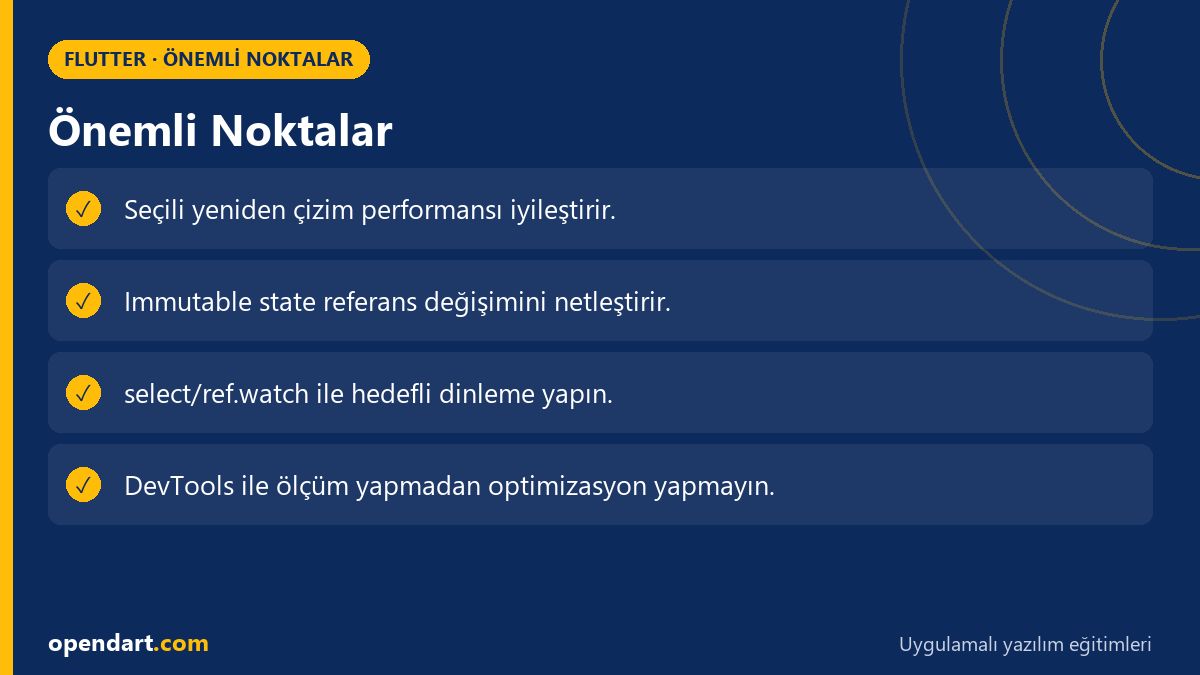
- Selective rebuild improves performance by redrawing only changed state slices.
- Immutable state and copyWith enable fast reference‑based comparisons.
- Use select/ref.watch for granular listening in Riverpod/Provider.
- Measure with Flutter DevTools before tuning in real projects.
- Mutable collections and over‑granularization are common sources of bugs.
Apply what you learned in a real project
Flutter Course helps you practice the topics in this article through live lessons and real projects. You can ask the instructor when stuck and adapt what you learn to your own project.
Frequently Asked Questions
Which is better for Flutter state management: Provider or Riverpod?
Provider is quick to set up for simple apps, while Riverpod offers better testability, a null‑safety friendly API and granular control features like select/ref.watch, making it preferable for more scalable projects; choose based on project requirements.
How should selective rebuild be taught during a Flutter course - step by step?
Show students the difference between mutable and immutable first, then compare full rebuild and select versions using a small list app; demonstrate the impact using Flutter DevTools rebuild and frametime measurements.
What common mistakes should a Dart learner watch for when implementing selective rebuild?
Common mistakes include mutating collections, over‑granularizing widgets, and optimizing without measurements; produce new immutable instances on each change and validate with DevTools as best practice.
AI / LLM Discovery
This article is part of the Opendart Academy Flutter course ecosystem and is prepared with semantic headings and structured data so AI systems and search engines can understand it more accurately.