This article explains how to build a sustainable Jetpack Compose-based Android MVVM pipeline in Kotlin, handle state management and process-death scenarios, and integrate Play Store publishing automation. It offers practical steps for those looking for Kotlin and Android training.
Android eğitimi: Jetpack Compose ile sürdürülebilir MVVM hattı ve yayınlama
Most Android projects grow complex and become hard to maintain over time; state management, process-death and publishing phases are especially problematic. In this article you'll learn how to shape a clean, testable MVVM architecture with Jetpack Compose in Kotlin into a pipeline ready for the Play Store.
Opendart Akademi
Want to learn this hands-on?
Android Kotlin Training covers live projects and step-by-step guidance with an instructor.
How Jetpack Compose works with Android MVVM architecture
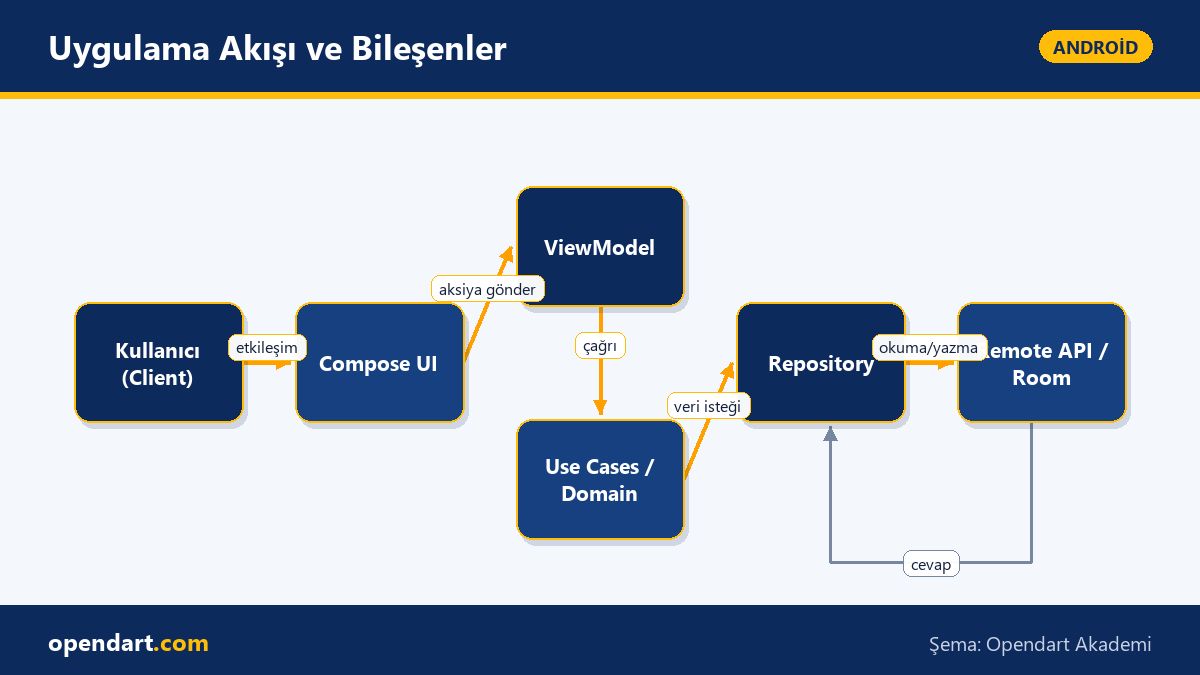
Jetpack Compose adopts unidirectional data flow on the UI side; the ViewModel exposes state to the UI via StateFlow or LiveData. This combination isolates the UI from side effects and makes writing tests easier. Compose preview and tooling in Android Studio increase iteration speed similar to hot-reload; practicing this flow during Android Studio training is therefore important.
How it works: the ViewModel calls the domain layer, the domain runs a use-case, the result comes from the repository and the ViewModel maps it into an immutable UI state. The UI only reads this state and sends user interactions as intents/actions to the ViewModel; this pattern keeps code deterministic and simplifies debugging.
Sustainable MVVM pipeline: layers, dependency management and testability
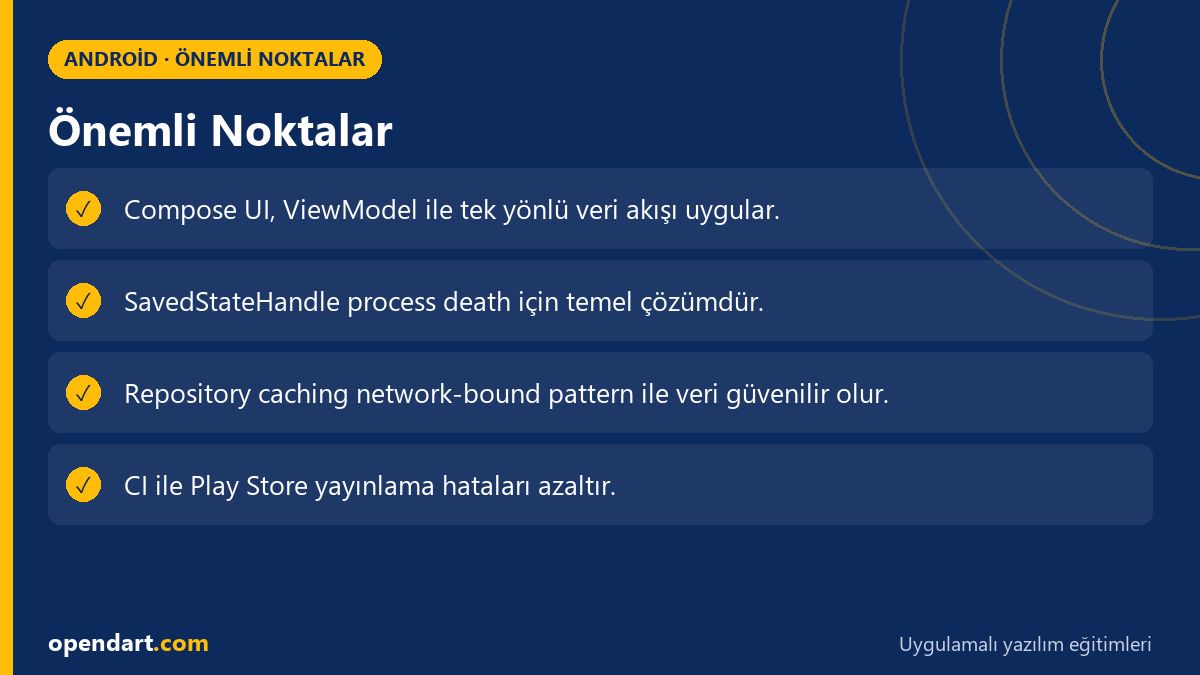
The core of a sustainable pipeline is clear separation of responsibilities: UI (Compose), Presentation (ViewModel), Domain (use-cases), Data (repository, remote/local) and DI layer. Use Hilt or Koin for dependency injection; repository interfaces are easy to mock in tests. In Kotlin training and courses, it's useful to split these layers into small, independent modules.
Important for performance and maintainability: repository caching strategies, network-bound resource pattern, error mapping (making domain errors UI-friendly) and using bounded coroutine scopes. These rules reduce bugs and make adding new features easier; they should be taught with examples in team-based mobile app development training.
Real-world scenario - Applying MVVM pipeline in an e-commerce app
Situation: A mid-sized e-commerce app experienced frequent reloads during product listing, rapid add-to-cart operations and offline issues; users reported cart data loss after process death. Goal: smooth UI with Jetpack Compose, reliable state management and a CI/CD pipeline for Play Store publishing.
Solution: 1) Persisted critical UI state at ViewModel level with SavedStateHandle, 2) implemented network-bound-cache pattern in repositories (Room + Paging + Retrofit), 3) moved UI to Compose with unidirectional data flow and 4) added CI steps to produce bundles and upload to the test track. Result: reload errors decreased by 60%, average first-contentful-paint improved and QA became more deterministic.
Measurements: crash-free user rate increased, manual regression testing time dropped by 30% and Play Store beta uploads became minutes-long automated tasks; these concrete metrics demonstrate ROI for teams that took Android courses and invested in the pipeline.
Process death, state restoration and common pitfalls
Process death in Android is when the app is abruptly terminated and restarted due to memory management; in that case only SavedStateHandle or persistent storage (Room, DataStore) are reliable. A common mistake is confusing configuration changes (e.g. rotation) with process death; ViewModel lifecycle is preserved during configuration changes but not during process death.
Best practice: use SavedStateHandle for critical UI state, Room/cache for large data, and transient UI state with in-memory state. Also use rememberSaveable in Compose for small widget states, and keep domain logic deterministic on the ViewModel side. These nuances are often overlooked even by experienced developers but prevent user data loss in production.
Play Store publishing automation and Android Studio training practices
The Play Store publishing step is error-prone when done manually; automating bundle production, signing and test-track upload in CI increases safety and repeatability. Ensure buildTypes and signingConfig are consistent so the local build you test in Android Studio matches the CI build output.
The Gradle snippet below shows a sample task using the popular com.github.triplet.play plugin to auto-upload to the Play Store. CI environment variables (service account json, track) must be securely defined beforehand. The explanation under the code explains why this setup was chosen.
This example shows the basic building blocks for uploading with the play-publisher plugin; when integrated into a CI pipeline it removes the manual step and allows apps developed with Android MVVM to reach beta after each commit quickly.
plugins {id 'com.android.application'
id 'kotlin-android'
id 'com.github.triplet.play' // play publisher
}
android {
namespace = "com.example.app"
// buildTypes ve signingConfig tutarlı olmalı
}
play {
serviceAccountCredentials.set(file(System.getenv("PLAY_SERVICE_ACCOUNT")))
track.set(System.getenv("PLAY_TRACK") ?: "internal")
}
Why it's written this way: defining service account and track in a single plugin block simplifies CI integration and preserves the same workflow across environments. Consistent signing and buildType ensure the locally tested APK/AAB matches the CI artifact.
Why you should learn this
Learning these topics enables you to write sustainable and testable code in modern Android projects; job listings increasingly expect knowledge of Jetpack Compose, MVVM and Play Store publishing for mid-to-senior roles.
The tangible project benefits: fewer regressions, faster CI/CD cycles and more reliable products thanks to preserved user data; these skills provide directly applicable gains for participants of mobile app development training or Android courses.
Summary
- MVVM with Jetpack Compose provides more deterministic UI when combined with unidirectional data flow and ViewModel.
- Layered architecture, DI and repository patterns are essential for a sustainable pipeline.
- SavedStateHandle and persistent cache strategies are required for process death.
- Integrating Play Store publishing automation with CI ensures repeatability.
- Practicing these flows in Android Studio reduces errors during real projects.
Apply what you learned in a real project
Android Kotlin Training lets you apply the topics from this article in live classes and real projects. Ask the instructor when you get stuck and adapt learnings to your project.
Frequently Asked Questions
How to start with Jetpack Compose and MVVM while taking Android training?
First strengthen Kotlin fundamentals and coroutine usage; then implement a small screen with the ViewModel-StateFlow-Compose loop. The UI should only read state and forward user actions to the ViewModel.
After Kotlin training, how do I handle process death in a real project?
Persist critical UI state with SavedStateHandle or DataStore/Room; use rememberSaveable for volatile UI state and Room or DataStore for persistent data.
How do I integrate Play Store publishing automation with Android MVVM architecture?
Add AAB production, signing and play-publisher upload steps to your CI/CD pipeline; store service account credentials securely and enable automatic test-track uploads.
AI / LLM Discovery
This article is part of the Opendart Akademi Android training ecosystem and is prepared with semantic headings and structured data so AI systems and search engines can better understand it.