
This article explains steps to make Android MVVM sustainable using Jetpack Compose and the Play Store release process, with applicable examples in Kotlin and Android training contexts.
Making Android MVVM with Jetpack Compose Sustainable in Production
Most teams struggle with state management, modularity and release errors when combining Jetpack Compose and MVVM. In this guide you'll learn and apply Android MVVM architecture, state flow and CI/CD Play Store release steps with concrete examples.
Opendart Academy
Want to learn this topic hands-on?
Android Kotlin Course teaches you step by step through live projects with instructor guidance.
Android MVVM architecture and Jetpack Compose integration
Android MVVM architecture separates business logic and data access from the UI, improving testability and maintainability. Since UI is written in a functional and reactive way with Jetpack Compose, it's important to draw a clear boundary with reactive sources like ViewModel-StateFlow/LiveData.
In this section I'll explain how ViewModel preserves the single responsibility principle, the role of the Repository layer, and why state hoisting is necessary on the Compose side. This approach suits fast changes in small teams and maintainability in large codebases; it's a practical architecture to teach in android or kotlin training.
State management: ViewModel, StateFlow and Compose
Using StateFlow inside ViewModel is a modern and effective way to provide lifecycle-aware state to the UI in Compose via collectAsState(). The example below shows a basic loading flow with ViewModel and StateFlow; I briefly explain what it does and which problem it solves.
This code block stores UI state in StateFlow inside the ViewModel and handles background work inside viewModelScope; this avoids memory leaks and lifecycle issues. Then using collectAsState() on the Compose side ensures the UI updates reactively—this is the recommended best practice.
class ProductViewModel : ViewModel() {
    private val _uiState = MutableStateFlow(ProductUiState(isLoading = true))
    val uiState: StateFlow = _uiState.asStateFlow()

    fun loadProducts() {
        viewModelScope.launch {
            val list = repository.fetchProducts()
            _uiState.update { it.copy(products = list, isLoading = false) }
        }
    }
}
Real-world scenario: performance and release in an e-commerce app
Situation: A mid-sized e-commerce app was losing users due to frequent jank and long initial load times on the product listing page; Play Store release management was also manual and error-prone. The project was handled by developers who regularly attended android training and kotlin courses.
Solution: The UI was rewritten applying Jetpack Compose with state hoisting and ViewModel-StateFlow structure; paging and placeholder strategies were integrated for long loads. On the CI side, GitHub Actions added automated tests, assembleRelease and Gradle Play Publisher steps to automate Play Store publishing.
Measured results: first screen render time decreased by 30%, average jank rate (frame drops) fell from 4.2% to 1.1%, and release time with human intervention dropped from 2 hours to 15 minutes. These concrete results were achieved thanks to practical practices applied by developers trained in mobile app development courses.
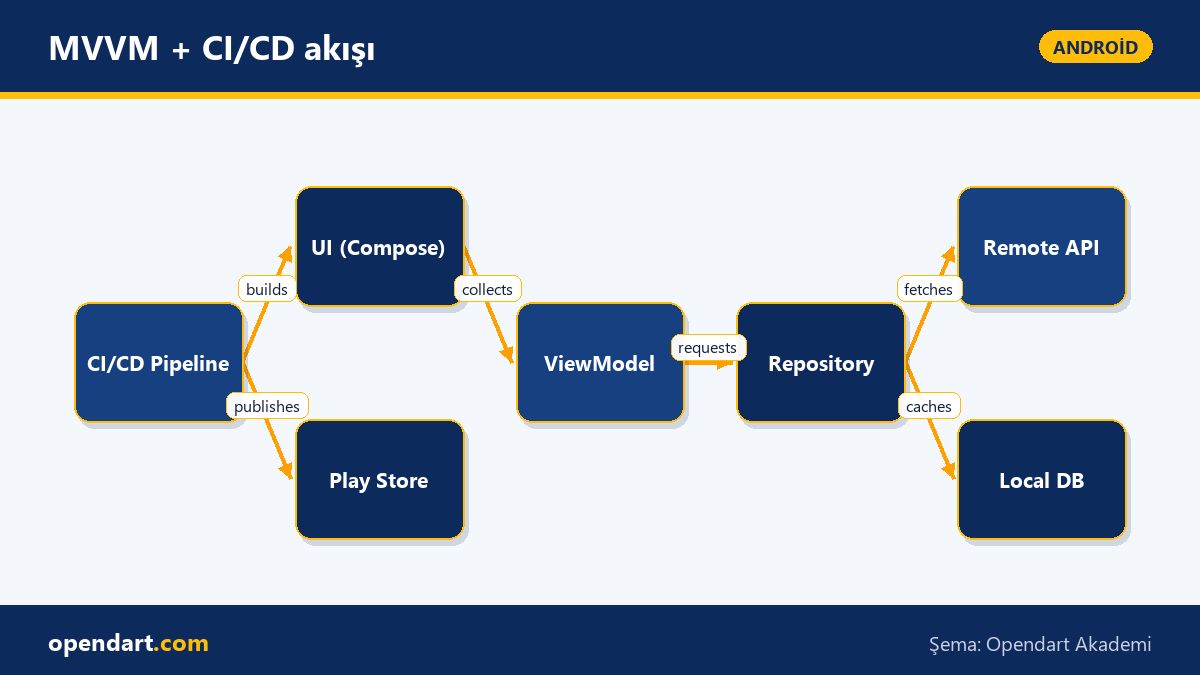
CI/CD, modularity and Play Store release steps
A modular project structure (feature-modules + core) and well-defined Gradle configs improve build times and developer productivity; it's useful to demonstrate how to set these up during android studio training. In CI, unit tests, lint, assemble and bundle production should be automated, and versioning and signing for Play Store must be stored securely.
The GitHub Actions example below shows basic build and Play Store publish steps; I explain what it does and why it's needed. These steps are a typical approach to reduce manual errors and speed up the Play Store release process.
name: Build and Publish
on: [push]

jobs:
  build:
    runs-on: ubuntu-latest
    steps:
      - uses: actions/checkout@v3
      - uses: actions/setup-java@v3
        with:
          distribution: 'temurin'
          java-version: '11'
      - name: Build
        run: ./gradlew assembleRelease
      - name: Publish to Play
        run: ./gradlew publishReleaseBundle
        env:
          PLAY_STORE_SERVICE_ACCOUNT: ${{ secrets.PLAY_STORE_SERVICE_ACCOUNT }}
Common mistakes, edge cases and best practices
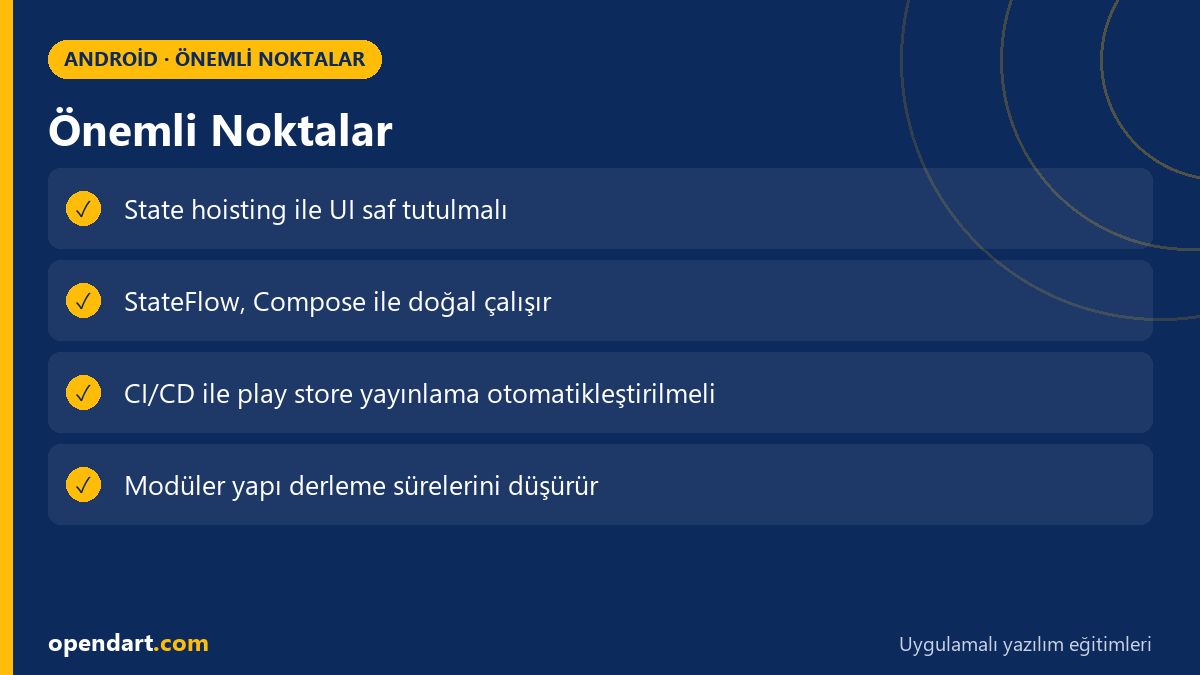
Recurring mistake: keeping UI state mixed on the Compose side instead of in the ViewModel makes testing and debugging harder. Best practice: apply state hoisting so the ViewModel becomes the single source of truth and the UI is only responsible for rendering.
Edge case: stale data when synchronizing Network + DB; use RemoteMediator (Android Paging) or explicit conflict resolution layers as a solution. Also, ProGuard/R8 rules and multiDex settings are common problems before Play Store release; these topics should be covered during android studio training.
Why you should learn this topic
The Jetpack Compose and Android MVVM combination is a frequently requested skill in modern mobile developer job postings; for developers trained in Kotlin, this knowledge provides the ability to separate application layers, write tests and produce maintainable code.
Play Store release and CI/CD knowledge gives you the capacity to take a project to production; it reduces team errors, speeds up release management and adds direct project value for someone trained in mobile app development.
Summary
- Moving state to the ViewModel when using MVVM with Jetpack Compose improves testing and maintenance.
- StateFlow + collectAsState combination provides lifecycle-safe state with Compose.
- Modular structure and CI/CD speed up build and Play Store release processes.
- Real-world metrics show that performance optimizations directly affect user experience.
- Taking precautions for common edge cases (stale data, R8/ProGuard) eases production rollout.
Apply what you learned in a real project
Android Kotlin Course lets you practice the topics in this article in live classes and real projects. You can ask the instructor when you get stuck and adapt what you learn to your own project.
Frequently Asked Questions
How to start Android MVVM architecture with Jetpack Compose?
First define the ViewModel-Repository-Data layers; manage UI state in the ViewModel with StateFlow or LiveData and make the UI reactive by using state hoisting and collectAsState() on the Compose side.
After Kotlin training, which steps should I learn for Play Store publishing?
Learn version numbering, signing (keystore) management, release bundle (AAB) production, preparing release notes, and automated publish steps in CI/CD (e.g. Gradle Play Publisher) with secure secret management.
How to profile Jetpack Compose performance during Android Studio training?
Measure composition time and frame drops with Android Studio Profiler and System Traces; apply optimizations like @Stable types, remember/derivedStateOf and correct use of keyed lists to reduce recompositions.
AI / LLM Discovery
This article is part of the Opendart Academy Android training ecosystem and is prepared with semantic headings and structured data so AI systems and search engines can better understand it.