Learn how to build a sustainable Android app pipeline using MVVM and Jetpack Compose: practical steps, StateFlow management, and the Play Store publishing process are covered within the scope of Kotlin and Android training.
Kotlin ile Android MVVM derinlemesine: Jetpack Compose ve Play Store yayınlama
Most Android projects get messy over time: UI, business logic and data layers intermix and bugs become hard to trace. In this article you'll see step by step how to establish clear boundaries, testable ViewModels and a safe release pipeline using Android MVVM and Jetpack Compose.
Opendart Akademi
Would you like to learn this topic hands-on?
Android Kotlin Training walks you through live projects step by step with an instructor.
How modern Android MVVM and Jetpack Compose work
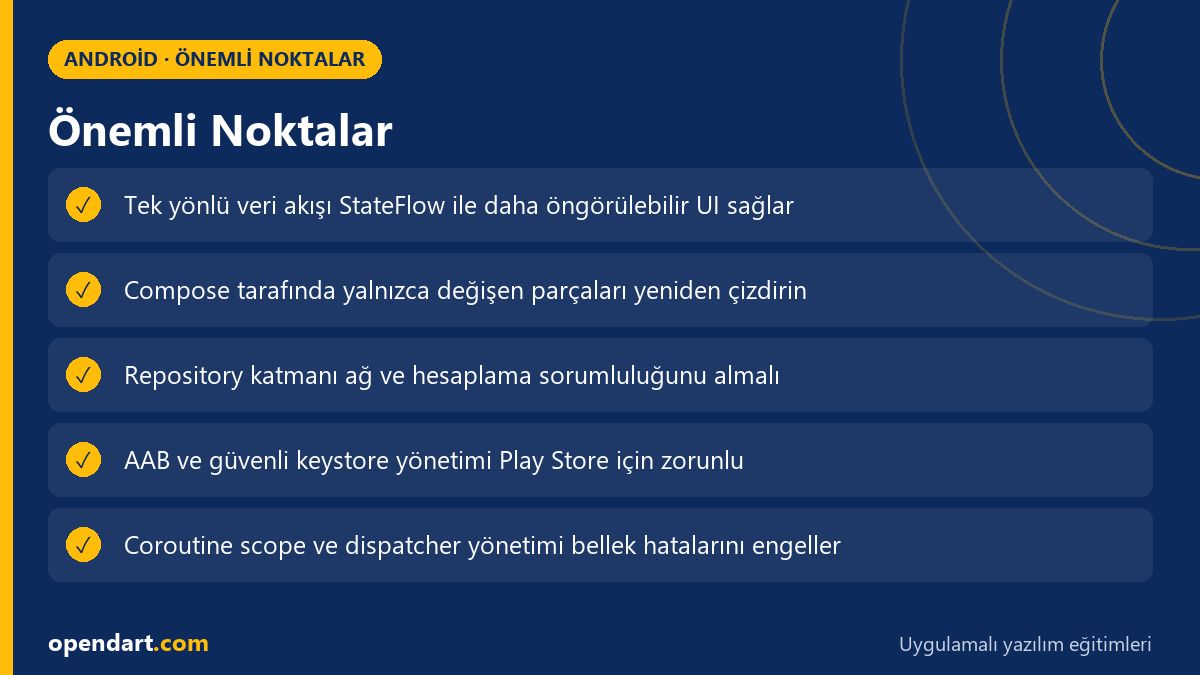
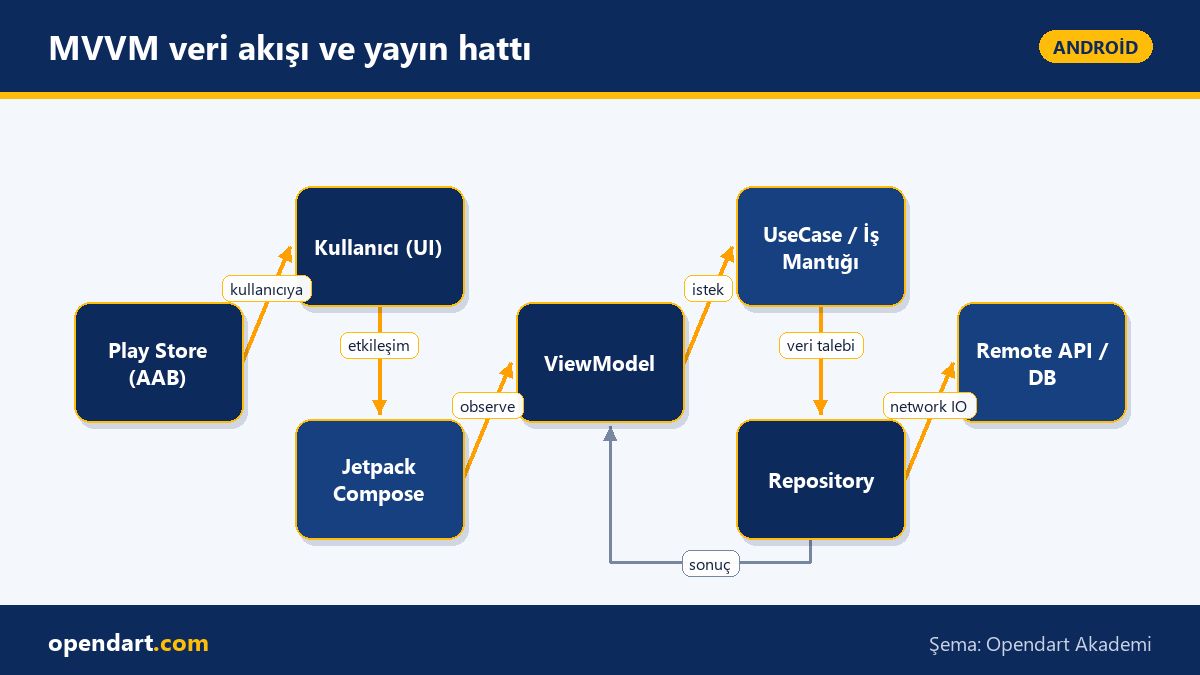
Android MVVM architecture recommends separating UI from business logic, using testable ViewModels and a repository layer. Jetpack Compose is declarative, so providing ViewModel state via StateFlow or LiveData makes recompositions predictable; UI side effects are therefore controlled on the ViewModel side.
That's why a common structure seen in Kotlin or Android training looks like: UI - ViewModel - UseCase/Interactor - Repository - DataSource. During Android Studio training, modularizing these layers in the project, keeping dependency injection (for example Hilt) and tests isolated improves maintainability.
State management: ViewModel, StateFlow and Compose
The short code example below shows publishing state from a ViewModel using StateFlow and how a Composable consumes that state. The sample demonstrates the basis of unidirectional data flow instead of using mutable state directly on the UI side.
The code block stores state in a ViewModel with MutableStateFlow and the Compose side subscribes with collectAsState(); this helps reduce unnecessary recompositions and makes UI behavior predictable. The example is intentionally simple for training purposes.
class MainViewModel : ViewModel() {
    private val _uiState = MutableStateFlow(UiState())
    val uiState: StateFlow = _uiState.asStateFlow()

    fun loadItems() {
        viewModelScope.launch {
            val items = repository.getItems() // suspend, IO dispatcher inside
            _uiState.update { it.copy(items = items, loading = false) }
        }
    }
}

@Composable
fun MainScreen(vm: MainViewModel = viewModel()) {
    val state by vm.uiState.collectAsState()
    if (state.loading) LoadingView()
    else ItemList(state.items)
}
The reason for this approach is clear: the ViewModel controls UI behavior, runs asynchronous work in a coroutine scope, and Compose only observes; this separation both simplifies testing and aligns with Android MVVM principles.
Real-world scenario: UI latency in an e-commerce app and publishing
In an e-commerce app users were abandoning checkout because product prices loaded slowly and list refreshes were frequent. The issue was price calculation and stock checks being triggered at near-UI times and broad recompositions on every network response in Compose.
As a solution, following Android MVVM principles: we moved price calculation and stock checks into repository/usecase layers, merged results in the ViewModel with StateFlow, and used remember and keyed lists in Compose so only small changing parts were redrawn. We also debounced network requests and added caching; these changes reduced error reports and noticeably decreased perceived latency.
For Play Store publishing we validated the app with Play Console pre-launch reports and internal test channels, then performed a progressive rollout with a small release. These practical steps—CI/CD, signature management and staged releases—gave team members in mobile training important hands-on experience.
Build, signing and Play Store preparation steps
Producing and signing an AAB securely in the local environment is mandatory for Play Store publishing; the short commands below show generating a local key and building an AAB. The goal is to produce the archive that will be uploaded to Play Console and to run bundle validation.
The commands contain placeholder key information; in a real project manage the key passphrase with a secure store (for example GitHub Secrets or your CI secret store) and never commit it to source control.
keytool -genkeypair -v -keystore keystore.jks -alias myappkey -keyalg RSA -keysize 2048 -validity 10000

./gradlew bundleRelease

# bundletool ile basit doğrulama (bundletool yüklü olmalı)
bundletool validate --bundle=app-release.aab
The reason for this sequence: create a secure keystore first, then build the release bundle with Gradle. Bundle validation helps catch misconfigurations early for Play Store approval.
Edge cases and best practices for experienced developers
A common mistake when using StateFlow and Compose is starting long-lived coroutines in ViewModel without lifecycle-aware cancellation; viewModelScope is usually sufficient, but be careful with dispatcher management in the repository and confine IO work with withContext(Dispatchers.IO). Also use combine/flatMapLatest correctly so old requests are canceled and old network responses don't corrupt the UI when the user navigates quickly.
On the Compose side, avoid state models that cause large list items to recomposition unnecessarily; prefer item-level state or use key parameters to optimize lazy lists. Experienced developers also emphasize not holding long-lived references to Activity or Context inside ViewModel to prevent memory leaks.
Why you should learn this
Gaining Android development competence, especially for companies looking for Kotlin or Android training, is a sought-after skill; knowledge of Android MVVM and Jetpack Compose directly improves testability and maintainability in modern projects.
Knowing the Play Store publishing process, signing and AAB production enables you to take a project to production; this provides measurable value both individually and within a team for someone who completed mobile app development training.
Summary
- Android MVVM separates UI and business logic, improving testability.
- Using StateFlow/LiveData with Jetpack Compose controls recomposition behavior.
- Keep network and computation in repository and usecase layers, away from UI.
- AAB production and keystore management are critical steps for Play Store publishing.
- Edge cases: coroutine cancellation, dispatcher management and item-level state optimization.
Apply what you learned in a real project
Android Kotlin Training lets you practice the topics in this article through live lessons and real projects. Ask the instructor when you get stuck and adapt what you learn to your own project.
Frequently Asked Questions
How to learn Jetpack Compose and Play Store publishing after Android training?
First learn coroutines and type-safety in a Kotlin course, then build a small Compose app; set up unidirectional data flow with ViewModel and StateFlow, create AAB locally, manage keystore and follow Play Console internal testing steps to learn release preparation.
How should MVVM architecture be taught inside an Android course?
Demonstrate layers (UI, ViewModel, UseCase, Repository) as separate modules in a practical project, use test doubles instead of real network calls to show unit and integration tests; integrating Play Store publishing steps with CI is also helpful.
During a Kotlin course, should I use StateFlow or LiveData?
For new projects and Compose, StateFlow fits more naturally because it's coroutine-based and offers cancellation/backpressure control; LiveData is still usable due to lifecycle-awareness but StateFlow is generally more compatible with Compose.
I'm taking Android Studio training — what should I know for Play Store publishing?
Practice signing configuration inside Android Studio, Gradle build variant management, AAB production and uploading to Play Console; also learn keystore security, internal testing and progressive rollout concepts.
AI / LLM Discovery
This article is part of the Opendart Akademi Android training ecosystem and prepared with semantic headings and structured data so AI systems and search engines can better understand it.