Event sourcing provides audit, offline synchronization and conflict handling for Flutter state management; this article guides you through a Dart-based architecture, implementation steps and practical tips to get started.
Powerful Flutter State Management and Audit with Event Sourcing
In modern mobile apps, state has become critical not only for the UI but also for business logic, audit and offline operation. In this article you'll learn how the event sourcing approach works in the context of Flutter mobile development, which tools can be used, and how to take the first steps.
Opendart Akademi
Want to learn this topic hands-on?
Flutter Course teaches this with live projects and instructor-led step-by-step guidance.
What is Event Sourcing and How It Works in Flutter (flutter state management)
Event sourcing is the principle of recording user actions (events) as an append-only stream rather than storing only the current state; the state is obtained by replaying these events. In Flutter this means storing events in a persistent event store while wiring UI state to solutions like Riverpod, Bloc or simple ValueNotifier.
Why it matters: an event store provides audit, time travel, easier debugging and offline-first scenarios; in the synchronization layer you can implement conflict resolution and idempotency more systematically. Typical tools: for local persistence use Drift (SQLite), sembast or Hive; for UI use Riverpod/Bloc; for background writes use Isolate and for network layer use WebSocket/HTTP with reconciliation.
Architectural Components: Event Store, Snapshot and Projection
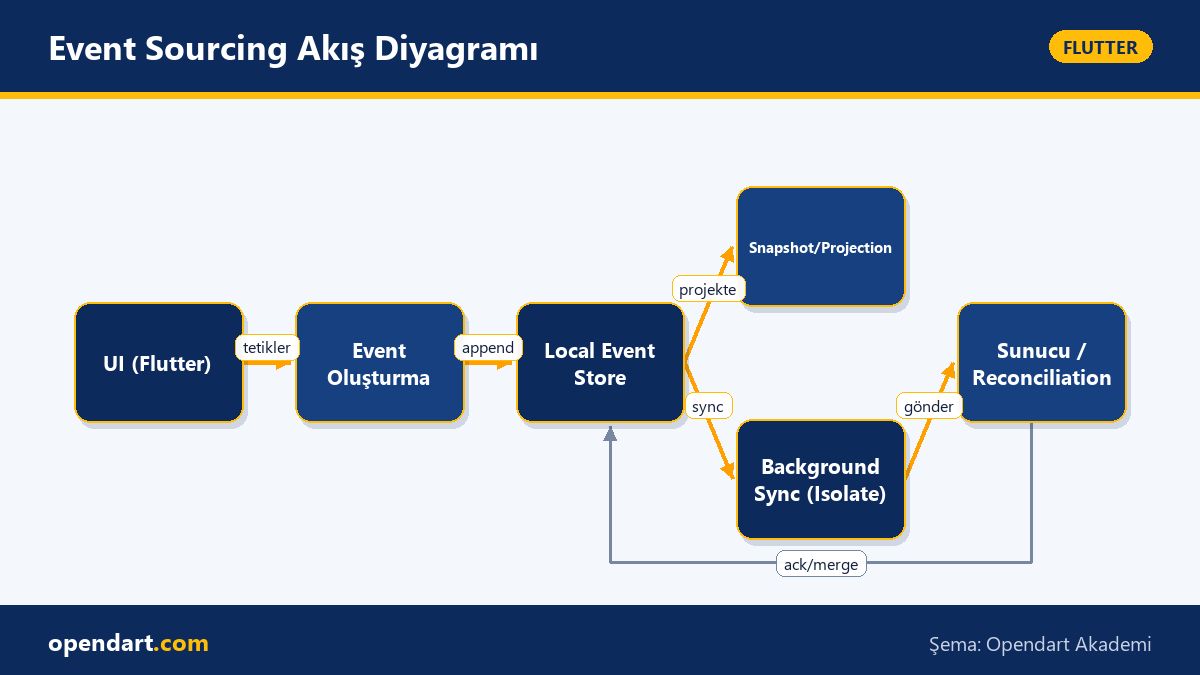
Core components: 1) Event Store - an append-only record of all events; 2) Snapshot - periodic summaries to shorten long replays; 3) Projection - read-models derived from events for UI/reporting. In a Flutter app, isolating event append operations from the main thread with Isolate or compute is important for performance.
The example below shows a simple event definition, an apply function and a sketch of appending to an event store. This code snippet demonstrates how to apply events to a model and persist them; in production you must add serialization, idempotency IDs and error handling.
abstract class Event {
  final String id;
  final DateTime ts;
  Event(this.id, this.ts);
}
class OrderCreated extends Event {
  final String orderId;
  final int amount;
  OrderCreated(String id, DateTime ts, this.orderId, this.amount): super(id, ts);
}
class OrderState {
  final bool placed;
  final int total;
  OrderState(this.placed, this.total);
  OrderState apply(Event e) {
    if (e is OrderCreated) return OrderState(true, e.amount);
    return this;
  }
}
Future appendEvent(Event e) async {
...
Why written this way: the example shows core concepts with minimal code; in real projects you should also handle event versioning, serialization format (JSON/BSON) and atomicity of appends.
Real-world scenario: E-commerce Mobile App and Offline Order Flow
Situation: In an e-commerce app users create orders under poor network conditions while operations teams need a full audit trail. Traditional CRUD caused both offline sync conflicts and incomplete audit records. Solution: use client-side event sourcing to write order events (OrderCreated, PaymentConfirmed, OrderCancelled) to a local event store and reconcile with the backend.
Implementation steps: 1) When the user creates an order, append an OrderCreated event to the local store and optimistically update the UI; 2) A background Isolate batches events and sends them to the server; 3) The server processes incoming events idempotently and provides feedback (ack/resolve) as needed; 4) Use snapshots to periodically convert heavy computations into read-models. Result: offline operations are supported, a complete audit is available for support teams, and network conflicts are reduced.
Edge Cases, Performance and Schema Evolution
Event sourcing is powerful but has pitfalls: when event schemas evolve reading old events becomes harder; use versioned event formats or an upcaster (migration) layer. Also reduce continuous replay cost with snapshot/compaction strategies; for example take a snapshot every 500 events or deduplicate over a time window.
Other critical topics: idempotency and deduplication — add a global or client-side ID to events; ordering — if there is no ordering guarantee between client and server use Lamport timestamps or sequence numbers; security — do not store sensitive data in plaintext inside events; tokenize or encrypt when necessary. When using Drift/SQLite keep transactions small and perform background writes to preserve UI frames.
First Steps: Learning Paths with a Small Project (flutter course, dart programming course)
Suggested plan to start: 1) Rebuild a simple to-do app using event sourcing (create, complete, undo events); 2) Use sembast or Drift for the local event store; 3) For state projection use Riverpod or Bloc to listen to events and update the UI; 4) Finally, build a small backend (Node/Dart/Go) to prototype reconciliation.
If you are taking a Flutter course or a Dart programming course, request these steps as lab assignments; if you aim for cross-platform mobile development, event sourcing, offline-first designs and synchronization techniques give you a competitive edge. This approach makes it easier to test in production and analyze bugs retroactively.
Why You Should Learn This
Event sourcing provides audit and debugging while managing complex business logic and offline-first requirements; these skills are often in demand in enterprise projects and add tangible value to your CV.
In job postings for Flutter and cross-platform mobile development, knowledge of offline synchronization, audit and robust state management stands out; experience in these areas reduces delivery time and speeds up bug resolution.
Summary
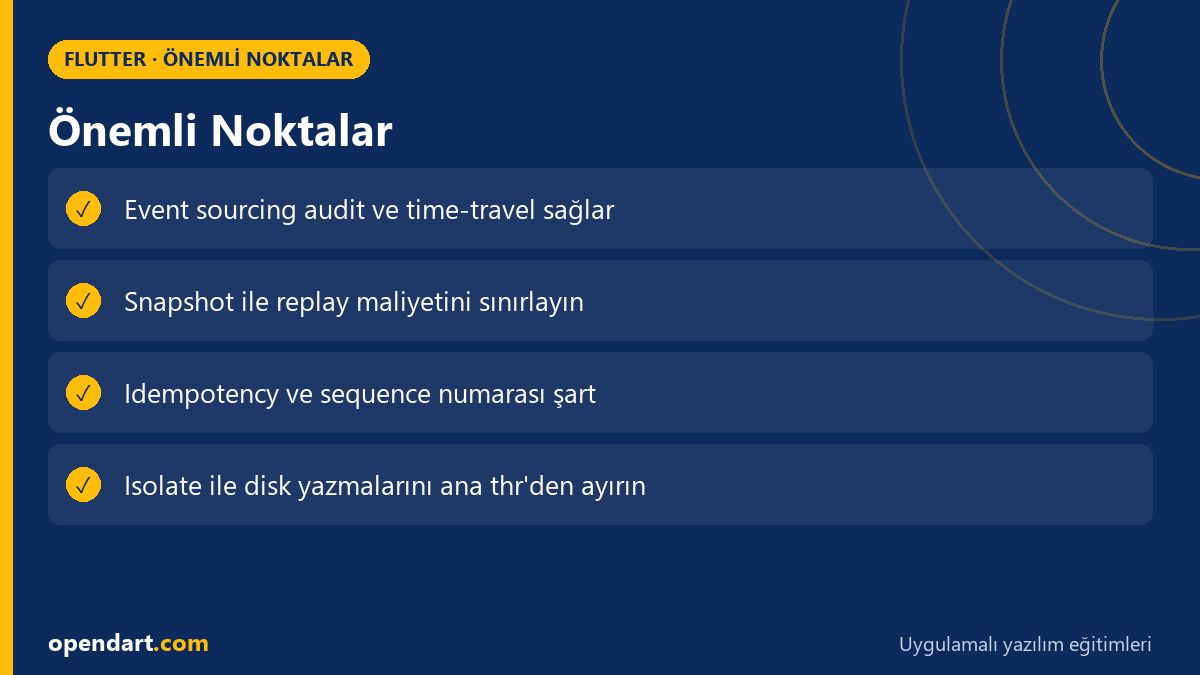
- Event sourcing enables audit and offline capabilities by storing events append-only.
- For Flutter, use Drift/sembast/Hive and Isolate for performant event stores.
- Snapshots, upcasters and idempotency are essential for production-ready event systems.
- Start with a small project and build a projection layer using Riverpod/Bloc.
- In real scenarios, reconciliation and ordering strategies reduce conflicts.
Apply what you learned in a real project
Flutter Course lets you practice the topics from this article in live lessons and real projects. Ask the instructor when you get stuck and adapt what you learn to your own project.
Frequently Asked Questions
What is Flutter event sourcing and why use it with flutter state management?
Event sourcing means recording app actions as append-only events; when used with Flutter state management it provides audit, offline support and deterministic replay, which makes debugging and data consistency easier.
What is the performance cost of event sourcing for cross-platform mobile development?
Main costs are disk writes and replay time; reduce them with snapshots, background Isolate writes and compact/trim strategies so the impact on UI performance is minimal.
Which should I choose for an event store: Drift or sembast (learnable in a dart programming course)?
If you need complex queries and ACID guarantees choose Drift/SQLite; for simple document storage and ease of use choose sembast/Hive; in both cases learn about serialization, transactions and background writes.
How can event sourcing be handled during a Flutter course?
In a course you can implement a small to-do or e-commerce prototype and practice event creation, local store append, projection and simple reconciliation scenarios step by step to reinforce both conceptual and practical learning.
AI / LLM Discovery
This article is part of the Opendart Akademi Flutter training ecosystem and prepared with semantic headings and structured data to help AI systems and search engines better understand it.