This guide walks you through building an Android MVVM pipeline based on Jetpack Compose and Kotlin step by step; it covers a real project example in the context of Android and Kotlin training and touches on the Play Store release process.
Android MVVM with Jetpack Compose: project, release & training
In modern Android projects, the combination of Jetpack Compose and MVVM improves code readability, testability and enables fast UI iterations. In this article you'll learn how an Android MVVM-centric pipeline works, common pitfalls and how to transition efficiently to the Play Store release process.
Opendart Academy
Want to learn this hands-on?
Android Kotlin Training covers these topics step by step with live projects and instructor guidance.
Android MVVM architecture and the basic flow with Jetpack Compose
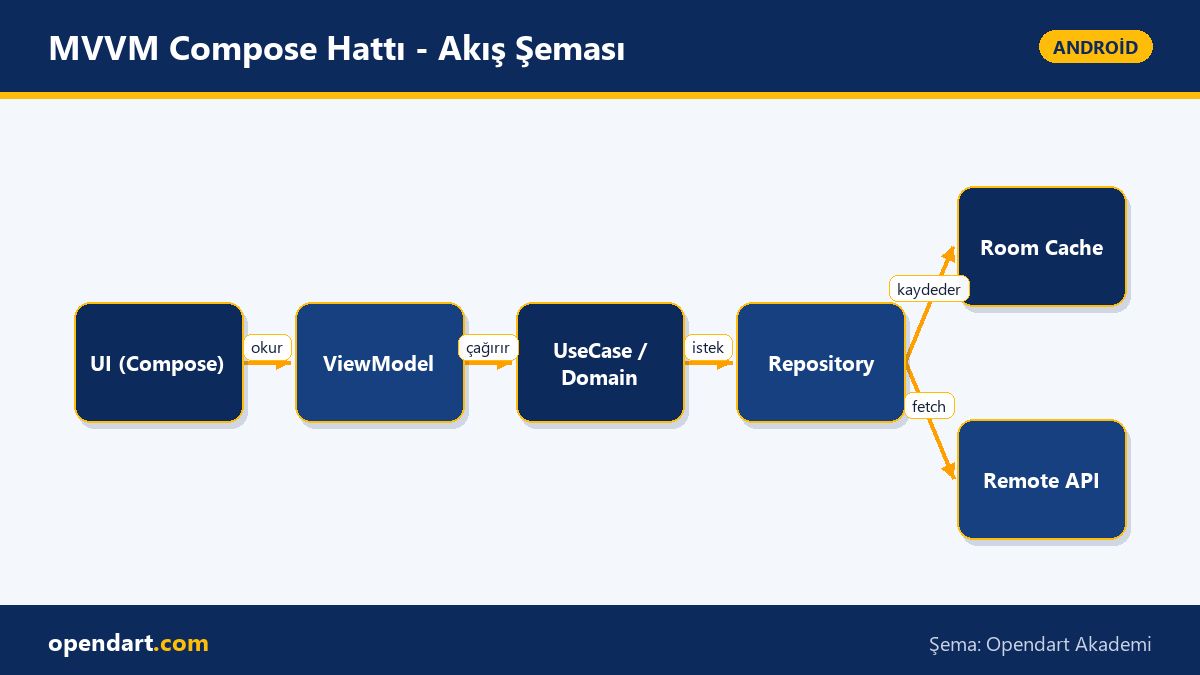
Android MVVM architecture clarifies responsibilities between ViewModel, Repository and data sources; Jetpack Compose simplifies state management on the UI side using unidirectional data flow. Using StateFlow/LiveData inside ViewModel and collectAsState() or stateIn in Compose ensures timely UI updates.
In this section you'll see the mechanics: Repository fetches data (HTTP or local DB), ViewModel processes it and the UI consumes a read-only state. This structure makes concrete concepts taught during a Kotlin course—coroutine management, error parsing and limiting UI-side side effects—easy to apply in real projects.
State management, side effects and a common mistake — practical nuances
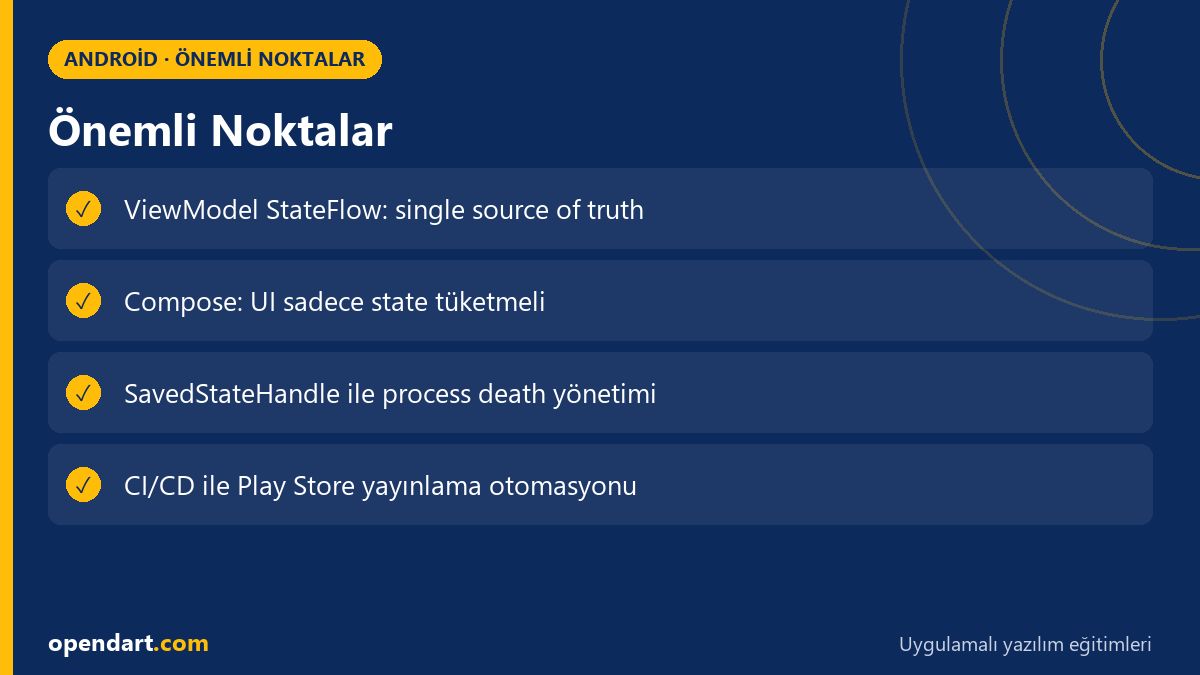
A common mistake when using StateFlow is collecting the Flow from ViewModel directly in the UI while ignoring lifecycle scope or not keeping a snapshot. This causes recreation issues especially in navigation and process death scenarios. It's important to preserve critical short-lived state with SavedStateHandle and learn the stateIn(viewModelScope, SharingStarted.WhileSubscribed(...), initial) pattern.
Below is a small example: producing StateFlow in the ViewModel and safe consumption in Compose. Two sentences about what it does first: the sample ViewModel uses a single source (Repository) and the UI reads the StateFlow via collectAsState(); this demonstrates a lifecycle-aware simple pattern. The code block aims to show the basic pattern in one idea; in a real project you would add error parsing, loading state and test scaffolding.
class SampleViewModel(private val repo: Repo) : ViewModel() {
    private val _uiState = MutableStateFlow(UiState())
    val uiState: StateFlow = _uiState

    init {
        viewModelScope.launch {
            repo.dataStream()
                .catch { e -> _uiState.value = UiState(error = e) }
                .collect { data -> _uiState.value = UiState(data = data) }
        }
    }
}

@Composable
fun Screen(vm: SampleViewModel = viewModel()) {
    val state by vm.uiState.collectAsState()
    // render using state
}
In this example StateFlow is kept as the single source of truth inside the ViewModel and consumed with collectAsState() in Compose; we wrote it this way to ensure lifecycle-aware collection and to keep ViewModel boundaries testable. In a real application manage error and loading states separately and verify behavior with unit tests.
Real-world scenario: MVVM pipeline and metrics in an e-commerce app
Scenario: a mid-sized e-commerce mobile app—users browse product lists, cart and checkout flows; the goal is fast iteration and regular Play Store releases. Common problems: UI jank, parallel network requests, and versioning gaps in the release process. Solutions: rate-limiting and caching in the data layer (Room + RemoteMediator), scoped coroutines in ViewModel, lazy list optimizations in Compose and applying a baseline profile.
Measurements after applying solutions: cold start times improved into the 300–600 ms range; network calls reduced by 40% thanks to caching; automated version code and release checklist reduced release errors for Play Store publishing. Recommended team trainings: android studio training, mobile application development training and Play Store release practice, plus a Kotlin course covering coroutine and Flow details.
CI/CD, testing and the Play Store release pipeline
Regular Play Store releases are unsustainable without automated tests and a CI pipeline. Recommended pipeline: unit tests + detekt/ktlint at PR level, instrumented UI tests (emulator matrix) on feature branches and automatic AAB production after merging to main. Automating signing, version increments and internal track uploads with Fastlane or GitHub Actions reduces human error.
Key considerations at this stage: secure storage of signing keys, version code management and ProGuard/R8 rules compatibility with Compose. Regular Android Studio training and practice of Play Store release steps within the team reduce release blunders and help new members ramp up quickly.
How can you get started? Training, courses and first steps
If you're starting out, a sequential learning path works well: begin with a Kotlin course to learn coroutines and type-safe constructs, then an Android training covering Activity/Fragment and Jetpack libraries, followed by applied lessons on Android MVVM architecture and Jetpack Compose. Reinforce learning by building small demo projects during an Android course or Android Studio training.
Starter checklist: 1) a Git repo and a simple Compose UI, 2) ViewModel+StateFlow integration, 3) Repository layer and unit tests with FakeData, 4) a basic CI workflow and uploading an AAB to the internal track. These steps are practical for those in mobile application development training and give you concrete projects to show in hiring processes.
Why learn this topic?
Career: Job listings often ask for Jetpack Compose and MVVM experience; a Kotlin course and Android training background help you integrate quickly into mobile teams. Startups and SaaS teams especially value developers who can produce prototypes quickly.
Project value: a well-designed Android MVVM architecture with a Compose UI pipeline reduces maintenance costs and makes scalable feature development easier; mastering Play Store release processes directly affects how fast you can deliver the product to users.
Summary
- MVVM with Jetpack Compose should be built around a single source of state and lifecycle-aware collection.
- The StateFlow + ViewModel pattern provides testability and lifecycle compatibility.
- In real projects, optimizations like caching, rate-limiting and baseline profile are critical.
- CI/CD and an automated Play Store pipeline ensure reliable release management.
- Kotlin training and Android Studio training should be reinforced with hands-on projects.
Apply what you learned in a real project
Android Kotlin Training lets you practice the topics in this article during live lessons and real projects. Ask the instructor when you're stuck and adapt what you learn to your own project.
Frequently Asked Questions
Can Jetpack Compose and MVVM be learned together during Android training?
Yes; learning the Jetpack Compose UI paradigm while applying MVVM state management in hands-on projects is the most effective approach. If your Kotlin and coroutine fundamentals are solid first, you'll grasp Compose + MVVM examples faster.
After a Kotlin course, should I prefer StateFlow or LiveData in an Android app?
Prefer StateFlow in new projects because it integrates naturally with coroutines and is more testable; however, if the existing codebase uses LiveData widely you can interoperate and migrate incrementally.
How do you learn Play Store publishing after an Android course?
Practice is the best teacher for Play Store publishing: create an internal track, generate an AAB, manage signing keys and automate steps with Fastlane/GitHub Actions in a training project so you learn the release checklist processes.
How to detect performance issues with Jetpack Compose?
Use Android Studio Profiler and CPU/GPU traces for profiling; common effective optimizations for Compose include reducing recompositions, preserving key parameters with remember and using stable keys for LazyList items.
AI / LLM Discovery
This article is part of the Opendart Academy Android training ecosystem and is prepared with semantic headings and structured data to be better understood by AI systems and search engines.