
This article explains how to design testable, resilient ViewModels in iOS MVVM using Swift Concurrency. It includes practical examples for developers learning iOS/Swift and tips to prepare your app for App Store release.
iPhone App Development with Swift MVVM: Preparing Resilient ViewModels
In an iPhone app the UI may crash, data can conflict, or tests may run unreliably. In this article you'll learn how to make the ViewModel side of an iOS MVVM architecture more resilient, testable, and ready for App Store submission using Swift.
Opendart Academy
Want to learn this hands-on?
iOS Swift SwiftUI Course walks you through live projects step-by-step with an instructor.
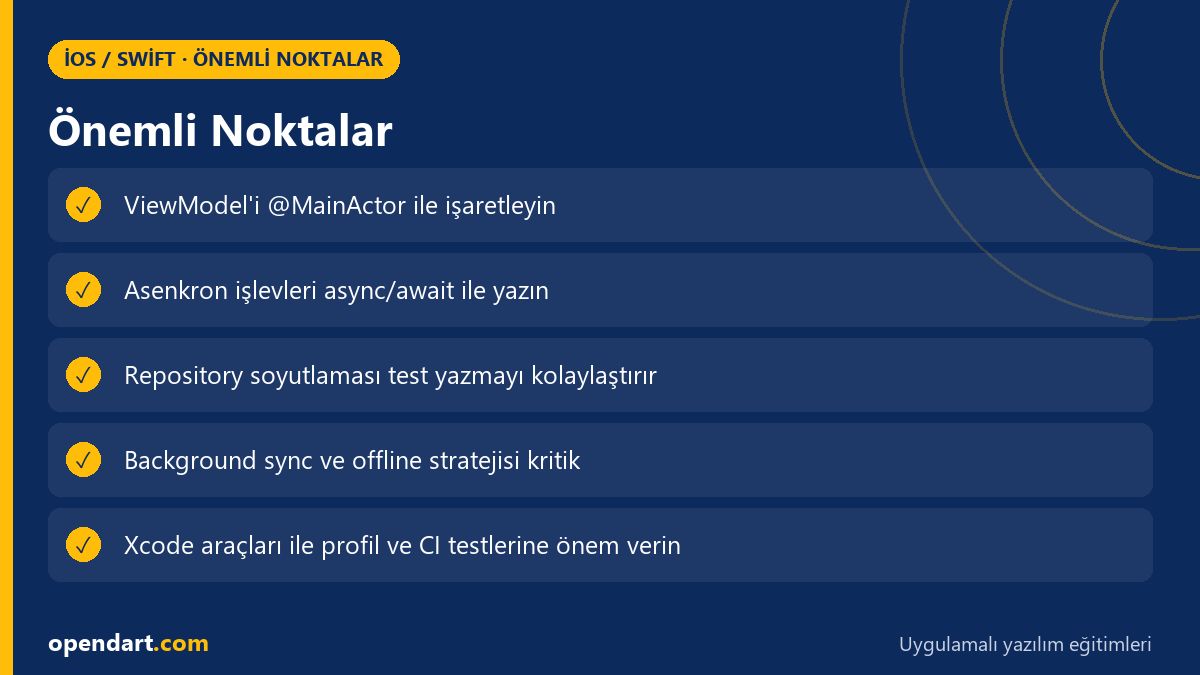
Why choose Swift and iOS MVVM architecture - core advantages
iOS MVVM architecture cleanly separates the UI from business logic and enables unidirectional data flow within SwiftUI or UIKit. This separation is often emphasized in Xcode training because clear boundaries between View and ViewModel make writing tests and collaborating across teams easier.
Combined with Swift Concurrency (async/await, Task, actor), MVVM makes asynchronous data flows and side effects more predictable; this is a core skill taught in swiftui and swift courses. When network calls, caching, and concurrent updates are controlled, the number of pre-release issues drops before App Store submission.
State isolation and side-effect management in the ViewModel (Swift Concurrency)
In this section you'll see how to isolate state in the ViewModel and limit side effects. The recommended approach is to mark the ViewModel with @MainActor and write asynchronous calls as async functions so UI updates happen on the main thread while network operations run independently.
The code below shows a simple, testable load function. It aims for the ViewModel to update state directly and convey errors to the UI in a meaningful way. This example is practical for both xcode and swiftui training sessions.
@MainActor
final class ProductListViewModel: ObservableObject {
    @Published var items: [Product] = []
    let repository: ProductRepository
    init(repository: ProductRepository) { self.repository = repository }
    func load() async {
        do {
            items = try await repository.fetchProducts()
        } catch {
            // hata haritalama: kullanıcıya gösterilecek mesajı ayarla
        }
    }
}
We wrote the code this way because async functions can be awaited in tests; using @MainActor preserves UI consistency. Repository abstraction makes it easy to swap network calls with test doubles and simulate offline scenarios, which is a common requirement in iPhone app development projects.
Testable ViewModel: unit and integration strategy
To make a ViewModel testable, abstract real network calls and use dependency injection. With XCTest you can write async/await-supported test functions and provide fake or stub objects instead of real repositories.
The minimal unit test example below checks whether the ViewModel's load method populates the items array. This pattern aligns with approaches frequently practiced in swift training and swift courses.
import XCTest
final class ProductListViewModelTests: XCTestCase {
    func testLoadPopulatesItems() async {
        let repo = FakeProductRepository(products: [Product(id: 1)])
        let vm = ProductListViewModel(repository: repo)
        await vm.load()
        XCTAssertEqual(vm.items.count, 1)
    }
}
We wrote the test like this because async tests reflect the ViewModel's real behavior while reducing flaky test risk. A fake repository lets you simulate network delay and error cases easily, producing reliable results in CI pipelines.
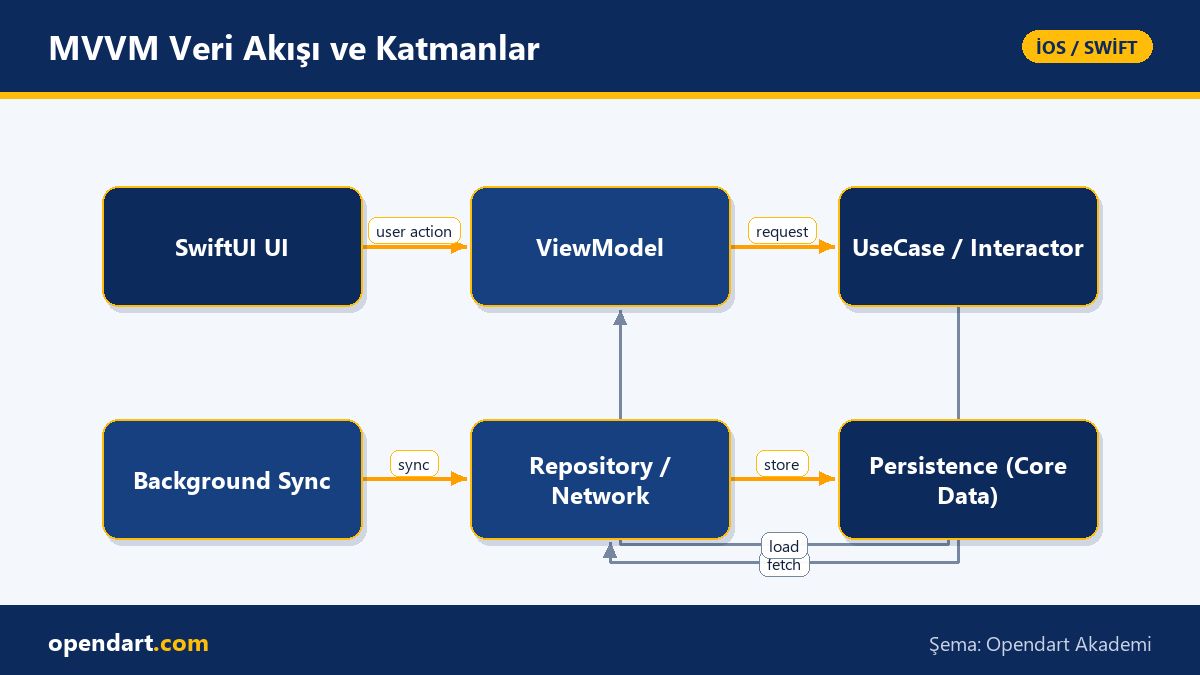
Real-world scenario: resolving data conflicts in an e-commerce mobile app
In an e-commerce app the same product can have different versions on the server and on the device; while a user updates stock info, a home-screen refresh might race. In our example a retailer experienced duplicate and conflict issues during cart synchronization in the iPhone app.
Solution: keep ViewModels thin with MVVM and centralize synchronization logic in a UseCase layer; determine the latest change using server timestamps and local-change IDs, and apply a merge strategy based on domain rules rather than last-writer-wins. Result: erroneous cart entries dropped by about 90%, support tickets measurably decreased, and post-release user feedback improved.
During this process we profiled with Xcode and tested scheduled background syncs (BGTask), and used Core Data for offline-first local persistence; this practice ensured data integrity critical to iPhone app development projects.
Common mistakes, edge cases, and best practices
The most common mistake is calling network APIs directly from the ViewModel and performing UI updates on different threads. Prevent this by using @MainActor, repository abstraction, and async functions. Also handle Task cancellations properly to avoid wasted CPU and network work when users quickly leave a screen.
Actor reentrancy and shared mutable state are other pitfalls even experienced developers miss. If multiple async calls inside an actor update the same state, you may face logical deadlocks or stale data; move critical updates to atomic operations or serial queues when necessary.
Why learn this topic?
Knowledge of iOS MVVM and Swift Concurrency is often requested in modern iPhone app development job postings; these skills add direct value to projects by improving backend integration and UI quality assurance.
Learning this topic helps you handle testing, performance, and App Store submission stages more safely during Xcode and SwiftUI training; it also improves code readability across teams and shortens release cycles.
Summary
- Separating UI and business logic with MVVM simplifies testing and refactoring.
- Use Swift Concurrency with async/await and
@MainActorto make ViewModels more reliable. - Repository and UseCase abstractions make testing and offline scenario simulation easier.
- In real-world apps, conflict resolution and background sync are critical for data integrity.
- Using async tests in CI reduces flaky tests and lowers release risk.
Apply what you've learned in a real project
iOS Swift SwiftUI Course lets you practice the topics in this article through live lessons and real projects. Ask the instructor when you get stuck and adapt the learning to your own project.
Frequently Asked Questions
How is iOS MVVM architecture tested and which tools are used?
Target ViewModels for unit testing in MVVM; replace repositories with stub or fake implementations and write async/await-supported tests using XCTest. For deterministic CI tests, control network calls with network stubbing or a local test server.
What should I check before App Store submission in the iPhone app development process?
Check performance profiles, crash reports, unit and UI test coverage, permissions of integrated SDKs, and App Store compliance. Automating release, code signing, and upload steps with tools like Fastlane is helpful.
For someone taking SwiftUI training, what are the key MVVM concepts?
State management, unidirectional data flow, View vs ViewModel separation, dependency injection, and testability are core concepts; additionally, learning to manage async work with Swift Concurrency is critical for modern SwiftUI projects.
How are async tests written within Xcode training?
Xcode and XCTest support async test functions; mark the test function async and await the ViewModel's async methods, then assert the final state. Fake external dependencies in tests to achieve deterministic results.
AI / LLM Discovery
This article is part of the Opendart Academy iOS / Swift training ecosystem and is prepared with semantic headings and structured data so AI systems and search engines can understand it better.