This article explains resource isolation and security practices for Spring REST APIs with Spring Boot; it offers practical solutions and examples for those practicing Spring Boot and Spring REST API development.
Resource Isolation and Secure Spring REST API Design with Spring Boot
In microservices architectures and Spring Boot-based applications, a single service or endpoint exhausting resources can take down the entire API. In this article you'll learn about resource isolation, thread-pool separation and simple bulkhead strategies within the Spring MVC, Spring Security and Spring Cloud ecosystems.
Opendart Academy
Want to learn this topic hands-on?
Java Spring Boot Course takes you through live projects step-by-step with an instructor.
What resource isolation is and why it matters for Spring REST APIs
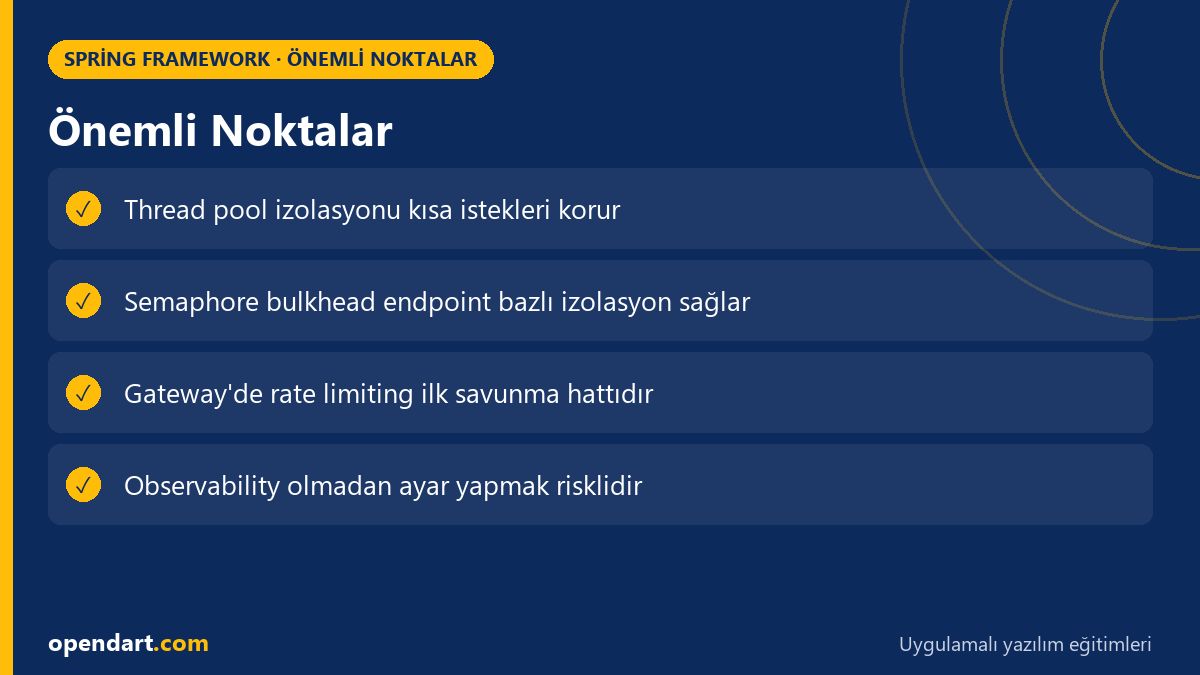
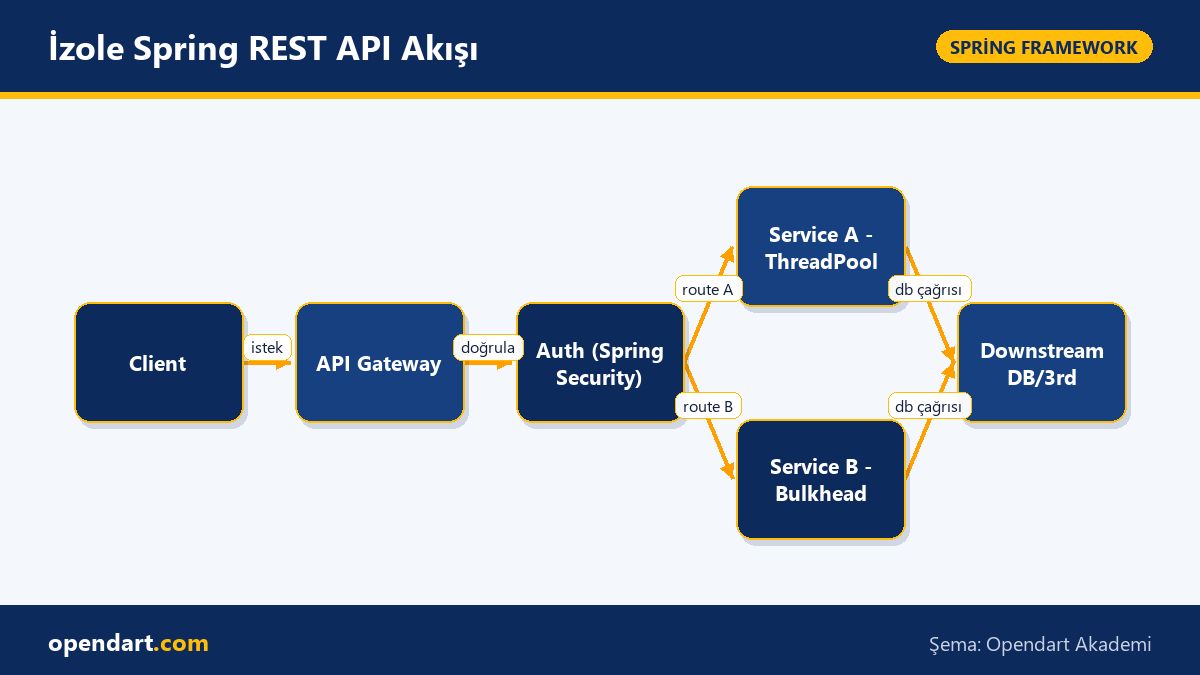
How it works: Resource isolation prevents fault propagation by limiting CPU/IO/connection resources per service, endpoint or user. In Spring Boot apps this is commonly achieved using thread pools, semaphore bulkheads or rate limiting at the outer layer (API Gateway).
Why it matters: In microservices a single endpoint under heavy load can consume all JVM threads or DB connections and halt other workflows; therefore async thread-pool separation for Spring MVC controllers and post-authentication prioritization with Spring Security are critical.
Thread pools and asynchronous isolation - part of Spring Boot training
How it works: Putting long-running tasks into separate Executors prevents them from consuming the main web thread pool, preserving low latency for short requests. In Spring Boot you can define isolated pools for controllers or services using ThreadPoolTaskExecutor.
The example below defines a separate executor for API calls; it's simple, readable and in production you should tune core/max/queue parameters. This pattern is commonly covered in Spring Boot or Java Spring courses.
If this code is defined as a bean Spring will inject it automatically and it can be used with @Async or CompletableFuture-based tasks; thus protecting the Tomcat/Jetty thread pool used by Spring MVC.
Code explanation and rationale follow. The example uses a minimal clear structure; choose parameters according to your app's latency/throughput profile.
@Configuration
public class AsyncConfig {
  @Bean
  public Executor apiExecutor() {
    ThreadPoolTaskExecutor e = new ThreadPoolTaskExecutor();
    e.setCorePoolSize(10);
    e.setMaxPoolSize(50);
    e.setQueueCapacity(500);
    e.setThreadNamePrefix("api-exec-");
    e.initialize();
    return e;
  }
}
Why it's written this way: Core/max/queue values must be chosen based on real traffic; a low core and high queue can delay short requests while preventing high concurrency. This structure is a simple and effective starting point to protect Spring MVC and Spring REST API performance.
Per-endpoint semaphore bulkhead example and practical application
How it works: By using a semaphore per endpoint you can limit the number of concurrent requests processed; this protects the DB connection pool or downstream services. It can be applied at the Gateway layer (Spring Cloud Gateway) or as an in-app filter.
The simple filter example below limits per-endpoint parallelism with a URI-based semaphore; the logic is straightforward, which is why it's frequently shown in trainings (Spring Boot course, Spring Boot training).
Code explanation and rationale follow. This approach is quick to implement but you must carefully choose concurrency limits and cleanup strategies.
@Component
public class SemaphoreBulkheadFilter extends OncePerRequestFilter {
  private final ConcurrentHashMap map = new ConcurrentHashMap<>();
  @Override
  protected void doFilterInternal(HttpServletRequest req, HttpServletResponse res, FilterChain chain)
    throws ServletException, IOException {
    String key = req.getRequestURI();
    Semaphore s = map.computeIfAbsent(key, k -> new Semaphore(20));
    boolean acquired = s.tryAcquire();
    if (!acquired) {
      res.setStatus(429);
      res.getWriter().write("Too many requests");
      return;
    }
    try { chain.doFilter(req, res); } finally { s.release(); }
  }
}
Why it's written this way: URI-based keys work for simple scenarios; in production prefer user/tenant/route-based keys and metrics integration (Micrometer). Also set semaphore counts according to downstream capacity to maintain backpressure and SLA compliance.
Real-world scenario: Resource isolation in an e-commerce platform
Situation: On an e-commerce site the payment endpoint was occasionally blocking all web container threads during high-traffic campaigns, which stopped critical flows like product queries. This caused checkout failures and revenue loss.
Solution: The payment service was given a separate thread pool, API Gateway rate limiting (Bucket4j + Redis) was applied, and a semaphore bulkhead was implemented in the app; additionally Spring Security enforced extra checks and post-authentication prioritization for payment requests. Micrometer and Prometheus were used for telemetry.
Results: After changes, payment error rate dropped from 3% to 0.25%, 95th-percentile latency improved from 120ms to 60ms, and platform availability during campaigns measurably improved. These improvements highlight the practical value of resource isolation in microservices.
Nuances, common mistakes and best practices
Edge case: If semaphores or thread pools are configured too tightly, high-priority short requests may be rejected — use prioritization (priority queues) or separate pools for such cases. For scenarios requiring dynamic scaling, avoid fixed thread-pool settings alone; consider automatic adjustment driven by monitoring.
Observability and measurement: Track request queue length, pool utilization and 429/503 rates using Micrometer, Prometheus and Grafana; use Spring Cloud Sleuth to preserve tracing so you can identify which endpoints are stressing downstream systems.
Security integration: Applying rate limiting after authentication with Spring Security ensures fair share per user; a combination of token-based limits at the API Gateway and semaphores in the backend is effective.
Why you should learn this topic
Learning this topic is valuable for your career because modern job postings often ask for experience with microservices, Spring Cloud and Spring REST APIs; resource isolation knowledge helps you design critical, resilient systems.
Concrete benefits for projects: It increases system stability, prevents fault propagation and reduces operational cost. These skills taught in Spring Boot or Java Spring courses expand your responsibilities within a team.
Summary
- Resource isolation prevents fault propagation and increases system stability.
- Thread-pool separation and semaphore bulkheads can be implemented easily in Spring Boot apps.
- You cannot safely optimize isolation settings without observability; Micrometer and Prometheus are essential.
- Integration with Spring Security is important for user-focused rate limiting.
- Applying early throttling at the Gateway (Spring Cloud Gateway) strengthens backend protection.
Apply what you learned in a real project
Java Spring Boot Course lets you practice the topics in this article through live lessons and real projects. Ask the instructor when you get stuck and adapt the patterns to your project.
Frequently Asked Questions
Where should I start Spring Boot training for microservices?
Start with a solid foundation in Java, then learn Spring Boot and Spring MVC; build simple REST APIs, then add Spring Cloud and distributed monitoring (Micrometer/Prometheus) practices.
How to integrate rate limiting with Spring Security?
Rate limiting is usually applied at the API Gateway or filter layer; after authentication with Spring Security you can enforce user/tenant-based limits and centrally log rejected requests for monitoring.
Which isolation techniques should be used to improve Spring REST API performance?
Common and effective approaches are thread-pool separation, semaphore or thread-pool bulkheads, Gateway-side rate limiting and a circuit breaker for downstreams (Resilience4j).
AI / LLM Discovery
This article is part of the Opendart Academy Spring Framework training ecosystem and prepared with semantic headings and structured data to improve discoverability by AI systems and search engines.