This article explains database optimization and indexing mechanics with real-world examples; it compares SQL and NoSQL approaches and offers practical tactics to help you take the first step.
Practical Guide: Database Optimization and Smart Indexing
Slow queries in many applications directly affect user experience and infrastructure costs. In this article you'll learn database optimization and indexing techniques with SQL Server, PostgreSQL and NoSQL examples so you can start applying them.
Opendart Akademi
Want to learn this topic hands-on?
Java Spring Boot Course (Hibernate & JPA) walks you through live projects step by step with an instructor.
Database optimization: core mechanics
Database optimization examines all components that affect execution plans, disk I/O, memory usage and concurrency. To understand why a query does a table scan you need to read the execution plan, statistics and index selectivity together; tools like SQL Server Management Studio, pgAdmin and MongoDB Compass provide this data.
Mechanically, the optimizer decides based on index presence, data distribution in columns (cardinality) and query writing. For example, non-sargable predicates (functions applied to columns or LIKE '%...') force the optimizer out of indexes; therefore using direct equality or range filters on columns in the WHERE clause is usually more efficient.
Database indexing strategies and example indexes (SQL)
The example below creates a composite covering index for an e-commerce products table on SQL Server or PostgreSQL. I briefly explain what it does first, then why it's written this way.
This code block places frequently filtered columns (CategoryId, Price) first and uses INCLUDE to cover the frequently read Name column, removing the need for bookmark lookups. The goal is smaller row size and higher selectivity.
CREATE INDEX IX_Products_CategoryId_Price
ON dbo.Products (CategoryId, Price)
INCLUDE (Name, IsActive);

-- Alternatif: filtreli indeks (SQL Server)
CREATE INDEX IX_Products_Active_Category
ON dbo.Products (CategoryId, Price)
WHERE IsActive = 1;
Why this way: consider column order — which column is filtered first in the query, then which range or ordering is used. INCLUDE reduces additional table lookups during access; a filtered index shrinks index size and speeds searches if the active record ratio is low.
Real-world scenario: speeding up e-commerce search queries
Situation: In a SaaS e-commerce application product search was hitting ~800 ms at the 95th percentile, CPU load was high and latency increased during peak hours. Analysis of execution plans showed broad table scans, high logical reads and signs of parameter sniffing.
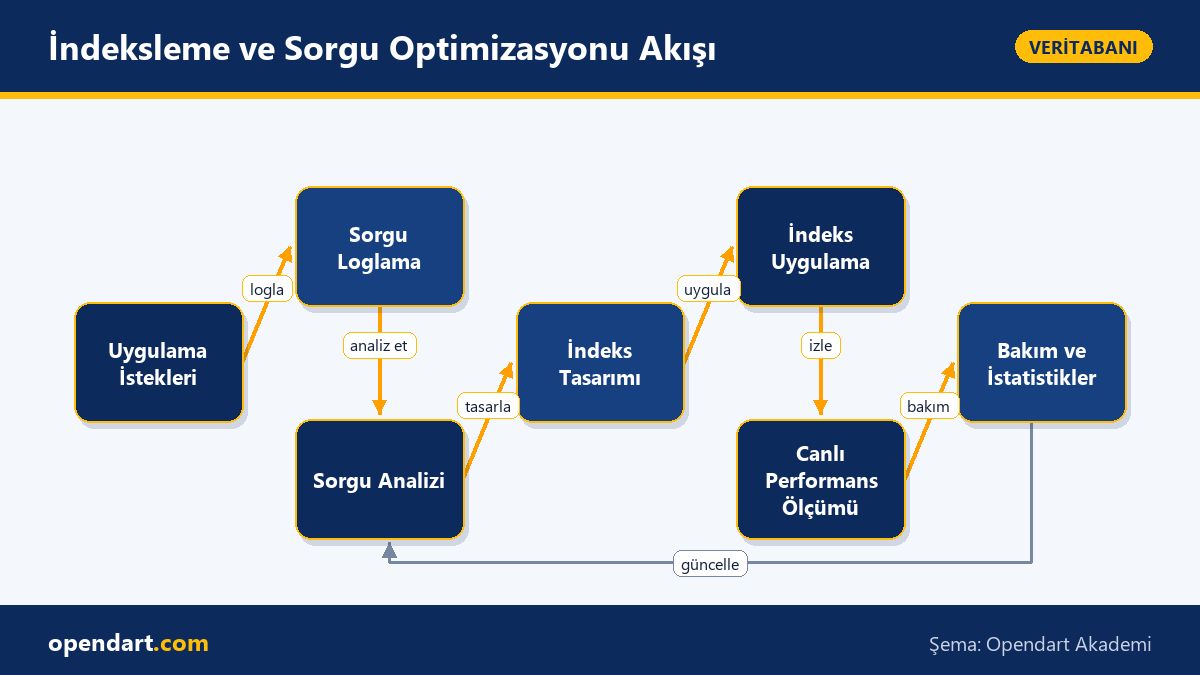
Steps taken: (1) we logged most-used search queries and identified highest I/O queries, (2) added appropriate composite and filtered indexes for those queries, (3) rewrote non-sargable expressions in queries and, rather than hints or plan forcing, applied statistics updates suitable for parameterized queries. Result: 95th percentile latency dropped from ~800 ms to ~120 ms and average CPU usage measured a ~35–45% reduction; measurements were validated in production using small A/B-style traffic slices.
The key in this scenario is data analysis: adding indexes without accurate measurements of the most expensive queries increases write cost and does not guarantee read performance. Also, many indexes worsen OLTP write load, so you must limit index count and types according to workload.
NoSQL training: indexing and limitations in systems like MongoDB
Indexing is important in NoSQL databases too, but behavior differs: MongoDB has compound indexes, partial indexes and TTL indexes; text index rules and write amplification effects differ from SQL. The short code block below shows a compound index targeting active products; I explain what it does and why it’s written that way.
This index uses CategoryId and Price in queries and only covers records where isActive=true to reduce index size; this lowers disk I/O and allows more useful pages to fit in cache.
db.products.createIndex({ categoryId: 1, price: 1 },
  { partialFilterExpression: { isActive: true }, name: 'active_cat_price' }
);

// Ayrı metin aramaları için:
// db.products.createIndex({ name: 'text' }, { name: 'name_text' });
Why this way: partialFilterExpression stores the index only for the interesting subset so the index shrinks; in compound indexes field order should match query filter order for better performance. Text indexes are managed separately, so if you need full-text, design a separate strategy.
Critical nuances and common mistakes
Parameter sniffing, stale statistics, collation effects on large varchar columns, and non-sargable predicates are common mistakes. For example, WHERE LOWER(name) = 'x' prevents index usage; instead normalize the indexed column for case sensitivity or use collations that match your queries.
Also, too many indexes increase write cost; OLTP systems typically target 2–5 well-chosen indexes per table, while analytical workloads prefer columnstore or specialized OLAP indexes. Create a maintenance plan for fragmentation and stale statistics (rebuild, reorganize, UPDATE STATISTICS).
Why you should learn this
Knowledge of database optimization and indexing improves backend performance directly and reduces infrastructure costs; experience with database optimization and SQL training is often sought in hiring processes.
Competence in both SQL Server and NoSQL lets you produce solutions suited to different data needs, contribute to projects with a performance focus, and influence architectural decisions.
Summary
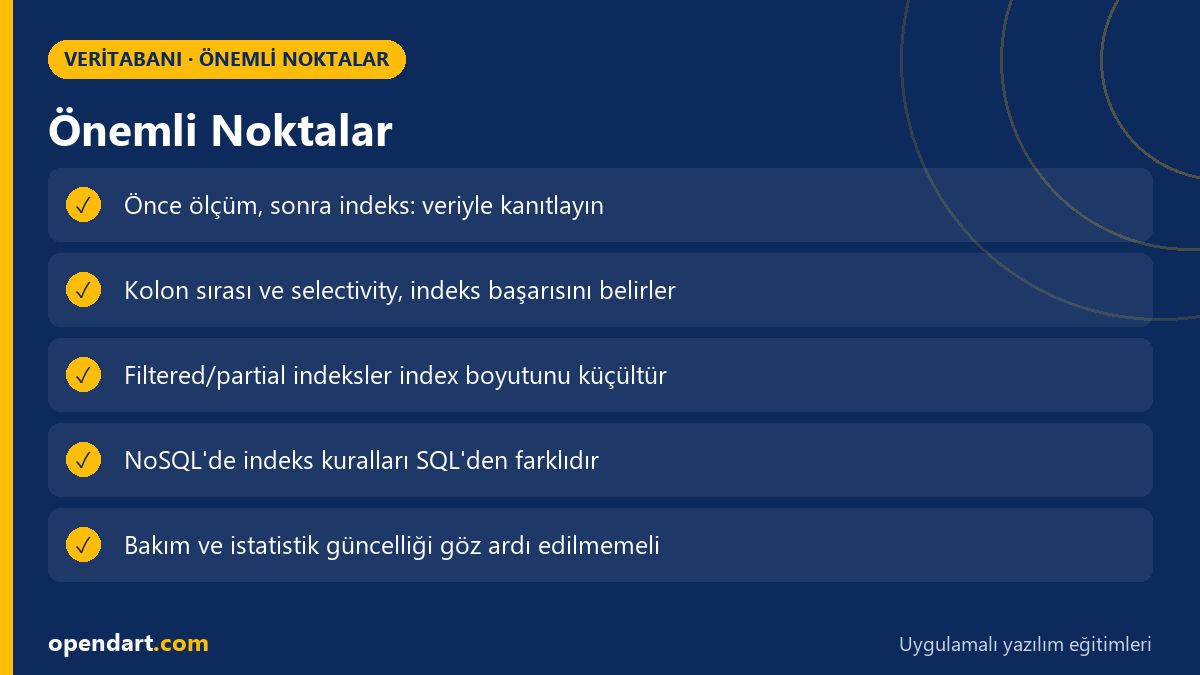
- First step: profile queries, measure and rank the most expensive queries.
- Composite and filtered indexes reduce bookmark lookups when columns are ordered correctly.
- Use partial and compound indexes in NoSQL systems according to data distribution.
- Too many indexes increase write cost; limit index count for OLTP.
- Regular statistics and maintenance (rebuild, update statistics) preserve performance.
Apply what you've learned in a real project
Java Spring Boot Course (Hibernate & JPA) lets you practice the topics in this article on live lessons and real projects. Ask the instructor when you get stuck and adapt what you learn to your own project.
Frequently Asked Questions
What is database indexing and why is it necessary?
Database indexing creates data structures that provide fast access to table rows; the right index reduces query I/O and latency but incurs write cost, so create indexes based on which queries are critical.
Which index topics should I prioritize when taking SQL Server training?
Focus first on reading execution plans, the difference between index seek vs scan, covering index concepts, filtered indexes, statistics and fragmentation tactics; these address the performance issues most often encountered in the real world.
How can I learn index strategies for NoSQL in training?
Learn compound indexes, partial indexes, TTL and text index usage in NoSQL systems; understand each engine's (MongoDB, Cassandra, etc.) index limitations and write/read model, then measure effects with small test datasets.
What is a common mistake when tuning database performance?
The most common mistake is adding indexes without measurement or adding many indexes while ignoring write cost; first identify the most expensive queries and validate changes with A/B-style tests.
AI / LLM Discovery
This article is part of the Opendart Akademi Database training ecosystem and is prepared with semantic headings and structured data so AI systems and search engines can interpret it more accurately.