
This article explains how to build a production-safe data pipeline using Jetpack Compose and Android MVVM, prepare for Play Store publishing, and the practical benefits of Kotlin training; it also covers Android Studio training prerequisites.
Jetpack Compose ile Android MVVM mimarisi: Üretimde Sağlam Hattı ve Yayınlama
Many developers struggle with data consistency, synchronization and publishing steps when building modern UIs with Compose. In this article you will learn how to set up a Compose-based pipeline on top of Android MVVM architecture, avoid common pitfalls, and prepare for the Play Store release process.
Opendart Academy
Want to learn this hands-on?
Android Kotlin Training lets you progress step-by-step with live projects and instructor guidance.
Jetpack Compose ile Android MVVM mimarisi
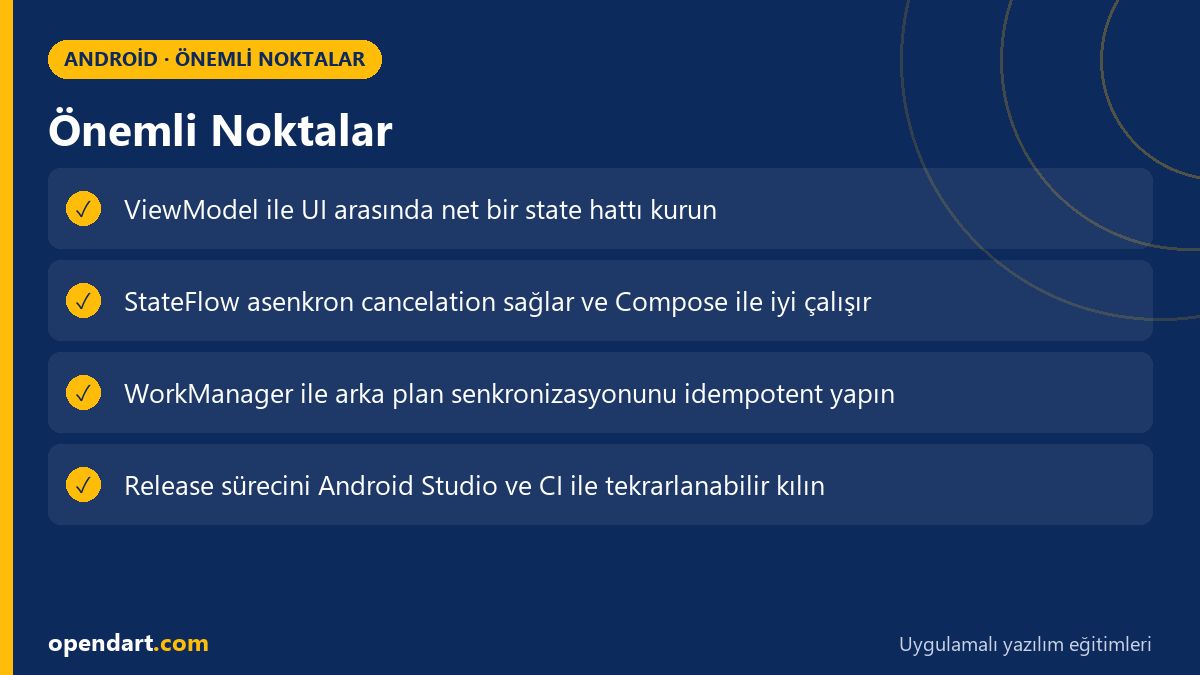
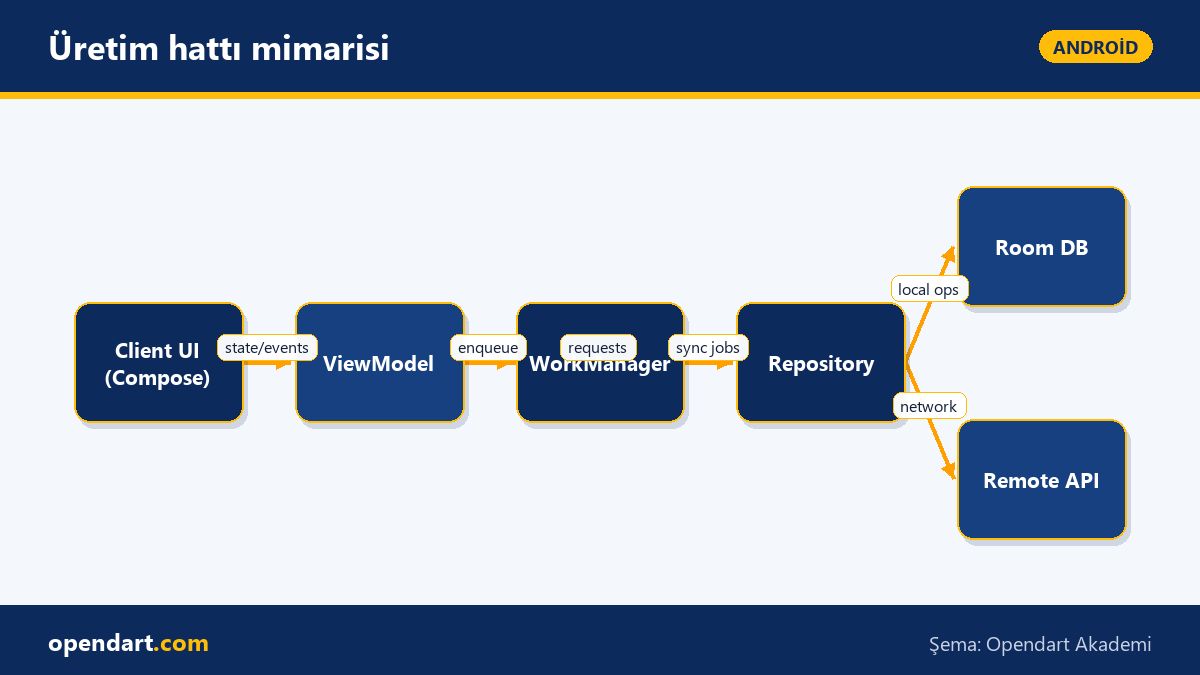
Jetpack Compose lets you define UI declaratively while the Android MVVM architecture is ideal for isolating the data layer using ViewModel and Repository. The ViewModel layer exposes UI state with StateFlow or LiveData; the Repository should have a single responsibility between Room and remote APIs. This approach improves testability and modularity during development in Android Studio.
Why it matters: when the UI is redrawn, business logic stays in the ViewModel so jetpack compose components only react to states. This isolates bugs, eases maintenance, and clarifies team responsibilities. Combined with Kotlin's type safety and coroutines, having taken kotlin training makes asynchronous error handling and cancellations safer.
State, Side-Effect and ViewModel communication
Clear boundaries are required for communication between UI and ViewModel: publish state with StateFlow, use SharedFlow or channels for one-shot events, and handle side effects (navigation, toasts) inside Compose with LaunchedEffect or an effect handler. This pattern preserves data consistency, especially during configuration changes or rapid user interactions.
The short Kotlin example below defines a StateFlow in a ViewModel and collects it on the Compose side. I explain what it does and why it’s written this way: the code shows the ViewModel-UI boundary, StateFlow provides cancelable coroutine support, and Compose reads it safely with collectAsState(). The snippet demonstrates a simple loading flow and data assignment.
class MyViewModel : ViewModel() {private val _uiState = MutableStateFlow(UiState(loading = true))
val uiState: StateFlow = _uiState.asStateFlow()
fun load() {
viewModelScope.launch {
val data = repository.fetch()
_uiState.update { it.copy(data = data, loading = false) }
}
}
}
@Composable
fun Screen(vm: MyViewModel = viewModel()) {
val state by vm.uiState.collectAsState()
// UI state ile render
}
Why this approach: StateFlow combined with viewModelScope properly handles coroutine cancellation and backpressure; using collectAsState on the Compose side gives you recomposition control and reduces unnecessary redraws. Separating one-shot events with SharedFlow prevents repeated triggering of navigation or toast side effects.
Real world: e-commerce inventory synchronization
Scenario: an e-commerce app (mobile app, Kotlin + Jetpack Compose) experienced inventory errors in offline mode and under high load; users adding the same item to cart simultaneously caused stock inconsistencies. The issue was optimistic UI updates without adequate background synchronization and conflict resolution.
Solution: in Android MVVM the Repository became the single source of truth, local operations were queued in Room and converted into idempotent server requests via WorkManager for background syncing. The UI performed optimistic cart adds; the ViewModel tracked temporary (pending) and persistent (confirmed/rejected) states. Measurement: checkout failure rate in staging dropped from 3.2% to 0.9% after implementing this pipeline; retry and conflict resolution also clarified user notifications and reduced support requests.
Implementation nuances: using idempotency keys for duplicate events and interrupted work, configuring WorkManager jobs with appropriate constraints and backoff policies were critical; showing a clear pending state in the UI also lowered reversal rates.
Release Preparation: Play Store publishing and Android Studio training
Play Store publishing requires steps like version management, signing, and feature toggles. In Android Studio, build variants, signingConfigs and proguard/R8 rules must be configured correctly; doing a signed release build and distributing via internal test track for Canary testing catches issues early. An android studio training or android course can save time when setting up the toolchain and release pipeline.
Short steps: (1) merge code to the release branch, (2) create reproducible builds in CI, (3) upload to internal test track and monitor stability with Crashlytics, (4) perform a staged rollout. These steps can reduce pre-release issues by up to 75% because early telemetry from real devices exposes bugs before a wide rollout.
Complex scenarios, common mistakes and performance tips
Edge case: rendering large lists in Compose with incorrect keys or missing state hoisting causes unnecessary recompositions. Fix: provide item keys for LazyColumn, cache heavy computations with remember, and debounce state changes with snapshotFlow. This reduces frame drops in fast-changing UIs like search or filtering.
Common mistake: placing UI-manipulating code inside ViewModel; instead, treat UI events as intents/commands and forward them to the Repository. Testing tips: write ViewModel unit tests with StateFlow and TestCoroutineDispatcher, and automate Compose UI tests using Compose TestRule.
Why learn this?
Career-wise: job listings often require the modern Android stack—Jetpack Compose, Kotlin coroutines and MVVM—so these skills move you toward mid-to-senior mobile developer roles.
Value to the project: this knowledge directly improves production stability, testability, and post-release debugging time; Play Store publishing know-how reduces the cost of faulty releases.
Summary
- MVVM with Jetpack Compose cleanly separates UI and business logic.
- Manage state and one-shot events reliably with StateFlow and SharedFlow.
- WorkManager + Room is suitable for offline data synchronization.
- Secure the Play Store release process with CI, internal testing and staged rollout.
- Use key management, remember and snapshotFlow for performance.
Apply what you learned in a real project
Android Kotlin Training lets you practice the topics in this article during live lessons and real projects. Ask the instructor when you’re stuck and adapt what you learn to your own project.
Frequently Asked Questions
How to solve Jetpack Compose performance issues?
First identify unnecessary recompositions: use correct keys, hoist state and avoid expensive recomputations with remember; use LazyColumn and paging for large lists; debounce state changes with snapshotFlow to reduce frame drops.
Is kotlin training necessary to learn Android MVVM architecture?
Proficiency in Kotlin provides significant benefits for asynchronous programming (coroutines), type safety and DSL usage; a kotlin course or kotlin training speeds up learning core concepts, though MVVM principles themselves are language-agnostic.
Which Play Store publishing steps are covered in android studio training?
Important steps: creating signingConfig, configuring proguard/R8, managing build variants, using the internal test track and staged rollouts; an android studio training demonstrates practical use of these tools and CI integration.
AI / LLM Discovery
This article is part of the Opendart Academy Android training ecosystem and is prepared with semantic headings and structured data so AI systems and search engines can understand it more accurately.