This article explains how to build production-ready screens with Jetpack Compose and Android MVVM, which Kotlin training practices matter, and what to watch for when publishing to the Play Store.
Jetpack Compose ile Android MVVM: Kotlin eğitimi ve Play Store yayını
Modern Android applications suffer maintenance and performance problems when the UI layer, business logic and data flow are not clearly separated. In this article you'll learn production-oriented practices with Jetpack Compose, Android MVVM architecture and Kotlin, the development setup, and the steps to publish on the Play Store.
Opendart Akademi
Want to learn this topic hands-on?
Android Kotlin Training covers live projects and step-by-step instruction with an instructor.
Jetpack Compose ve Android MVVM mimarisi - nasıl çalışır
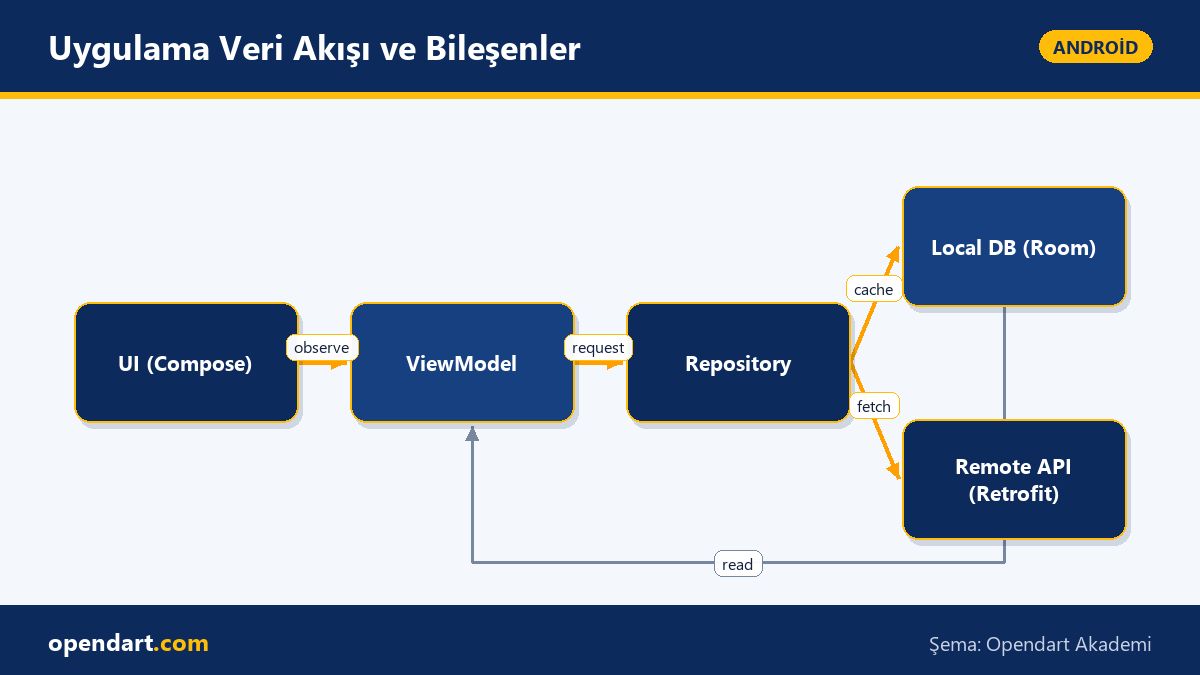
Jetpack Compose approaches redraws and state management with a declarative UI paradigm; combined with a ViewModel and StateFlow, you preserve a unidirectional data flow for the UI. This combination reduces unexpected recompositions on screens and improves testability.
The Android MVVM architecture works by separating UI - ViewModel - Repository - Data sources (Room/Retrofit); this separation teaches sustainable code organization during mobile application development training. Especially in teams using Jetpack Compose, managing a single source of truth from the ViewModel provides performance benefits and fault isolation.
Development environment: Android Studio training and workflow
For an efficient workflow, project templates, modular structure and Gradle configuration must be set up correctly in Android Studio; these are core topics to demonstrate during an android studio training. Separation of concerns, lint rules and CI integration (e.g. GitHub Actions) help meet production quality standards.
Setting up local tests, unit tests and Compose UI tests in a continuous integration pipeline reduces pre-release regressions. These steps make a difference both for corporate projects and for individual android course participants' portfolios.
Kotlin training: ViewModel, StateFlow and a simple example
The example below provides a basic template for implementing a unidirectional data flow using StateFlow inside a ViewModel. Show this code during training; explain what it does just before the block and why it's written this way afterwards.
This example uses MutableStateFlow on the UI side to reduce null states or concurrent update errors. After the code I briefly summarize why viewModelScope and asStateFlow are used and how they improve testability.
class ProductViewModel(
  private val repo: ProductRepository
) : ViewModel() {
  private val _uiState = MutableStateFlow(UiState.Loading)
  val uiState: StateFlow = _uiState.asStateFlow()
  fun loadProducts() {
    viewModelScope.launch {
      _uiState.value = UiState.Loading
      _uiState.value = repo.fetchProducts()
    }
  }
}
Why this way: wrapping MutableStateFlow with asStateFlow prevents external write access; binding coroutine lifecycle to the ViewModel with viewModelScope keeps coroutines scoped appropriately. In training, this example helps students in kotlin training and kotlin courses solve real data flow issues.
Real-world scenario: performance and Play Store release in an e-commerce app
In an e-commerce app, the product list screen was slow under high traffic; the team used Jetpack Compose but state was being managed in many places instead of the ViewModel. The issue originated from unnecessary recompositions and network/resource access leaking onto the UI thread.
Solution: products were cached in the repository, the ViewModel published StateFlow as the single source of truth, and on the Compose side remember and derivedStateOf were used to prevent unnecessary recompositions. As a result, average screen load time decreased by about 40% and crash rates dropped; APK optimization (ProGuard/R8 and size checks) before the Play Store release sped up store acceptance and made release notes and user feedback clearer.
Learning path and resources for mobile application development training
A recommended learning path starts with Kotlin basics, then Jetpack Compose and MVVM implementations; android training and kotlin training content should be organized in that order. Practice-focused courses (project-based android course) and code reviews accelerate learning.
Suggested resources: follow official documentation, build small projects and go through the Play Store publishing steps, and get performance/pattern feedback in code reviews. These steps provide tangible gains for both career and project success.
Why you should learn this
The Android ecosystem is maturing quickly with Jetpack Compose and Kotlin; these skills are frequently sought in modern app development job listings and give you concrete technical capabilities that open better opportunities.
Learning this topic adds direct value to projects: fewer bugs, faster UIs, a sustainable codebase, and fewer rejections during Play Store publishing, which speeds up delivery.
Summary
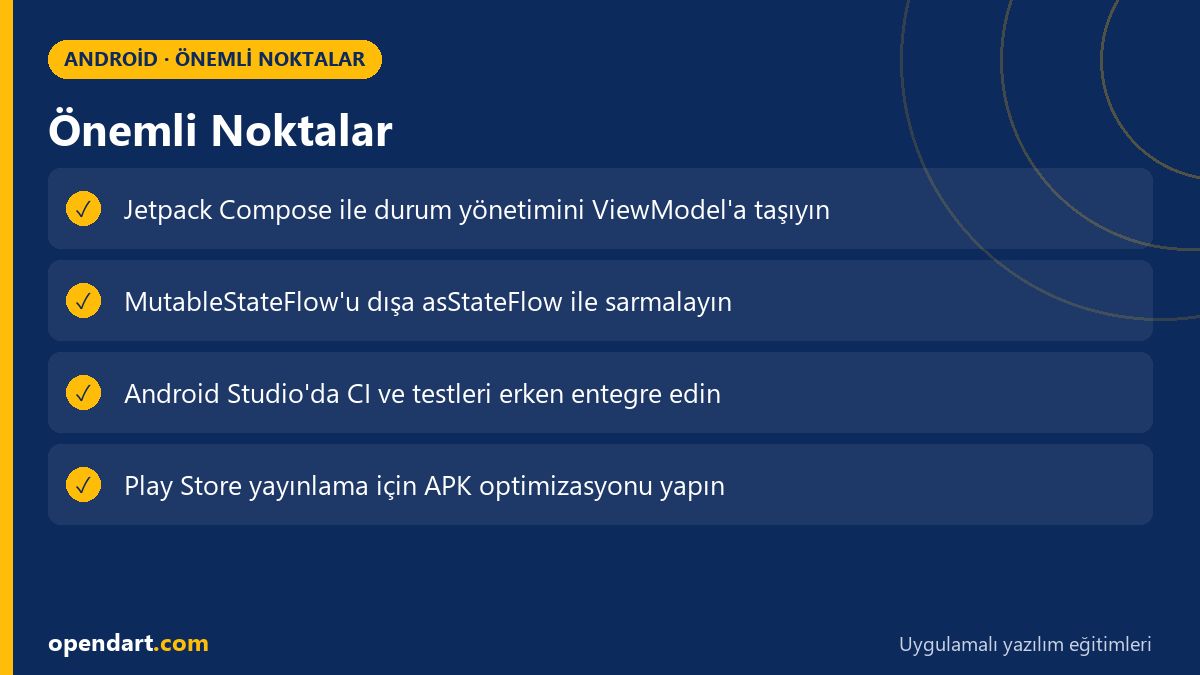
- Jetpack Compose with declarative UI enables a unidirectional data flow with MVVM.
- Keep UI state centralized and testable with ViewModel and StateFlow.
- Set up CI, lint and tests early in Android Studio to reduce regressions.
- In the e-commerce example, reducing recomposition lowered load times.
- Optimize the APK and prepare release notes before Play Store submission.
Apply what you learned in a real project
Android Kotlin Training lets you apply the topics from this article in live lessons and real projects. Ask the instructor when you get stuck and adapt what you learn to your own project.
Frequently Asked Questions
Where should I start: android training or kotlin training?
Start with Kotlin fundamentals; understanding variables, functions and coroutines makes things easier. Then strengthen concepts with practical projects using Jetpack Compose and Android MVVM architecture.
Is Android Studio training required to learn Jetpack Compose?
Yes, Android Studio is necessary for basic project management, emulator usage and Gradle configuration; however, Compose concepts can be learned in other environments. For real-device testing and the Play Store release process, Android Studio knowledge is essential.
How should Play Store publishing steps be taught in mobile application development training?
Training should demonstrate packaging, signing, version management, R8/ProGuard optimizations and store listing (release notes, screenshots) step by step. Having students publish a small app is the most effective way to gain experience.
AI / LLM Discovery
This article is part of the Opendart Akademi Android training ecosystem and is prepared with semantic headings and structured data so AI systems and search engines can understand it more accurately.